Join Our Discord Community

Instagram DM Automation: Grow More, Sound Human

Discover how to set up Instagram DM automation to handle high message volume and convert leads, all while keeping your tone warm and human.

Published on: Aug 21, 2026
Written by: Afirah Shaikh
Share:
Instagram DM Automation

I’ll admit, when I first started looking into Instagram automation, I was pretty skeptical.

The last thing you or I want is to turn our DMs into a graveyard of spammy, automated text that drives real followers away. We want to grow our reach and save time, sure, but not at the cost of sounding like a literal robot.

But the truth is that you don’t have to choose between scale and personality. In this post, I’m going to tell you about Instagram DM automation to handle high message volume while keeping your tone undeniably human.

So let’s not waste time and get to the point!

Short Summary

  • Instagram DM automation uses Meta-approved software to send, receive, or route messages automatically based on actions users take.
  • Triggering auto-replies through actions like comment keywords or story choices delivers instant resources while saving manual effort.
  • Meta Business Suite provides basic, zero-cost native automations like simple FAQs, instant hellos, and away status replies.
  • Specialized builders like ManyChat suit complex branching logic, multi-step quiz flows, and deep lead-generation funnels.
  • Automation is completely safe when using official API partners, requiring user triggers, and respecting Meta’s 24-hour response window.
  • Shady, password-scraping tools or unsolicited cold DMs break Instagram policies and risk getting accounts shadowbanned.
  • Automating simple tasks frees up time to handle genuine, high-touch interactions without losing your brand’s personal feel.

What Is Instagram DM Automation?

Simply put, Instagram DM automation is like having a reliable, 24/7 digital assistant inside your inbox. It’s software (approved by Meta) that automatically sends, receives, or routes direct messages based on specific triggers you set up.

Think about the times someone comments “LINK” on your Reel, asks a common question on your story, or sends you a basic setup inquiry in your DMs. Instead of you sitting there manually typing out the same reply 50 times a day, automation handles the heavy lifting instantly.

It’s not about using shady bots to spam random people’s inboxes. True DM automation is purely event-triggered.

A user takes an action, like dropping a keyword in your comments or tapping an option in your story, and your automated system instantly gives them the exact link, answer, or resource they’re looking for. It saves you time, keeps your response times lightning-fast, and opens the door for a real conversation.

How to Set Up Instagram DM Automation in Minutes (Beginner’s Guide)

Setting up Instagram DM automation is actually pretty straightforward. You don’t need to know how to code, and you definitely don’t need hours to figure it out. Depending on how deep you want to go, you’ve got three solid routes to take.

Here’s how to pull it off step-by-step:

  1. The All-in-One Route: Social Champ

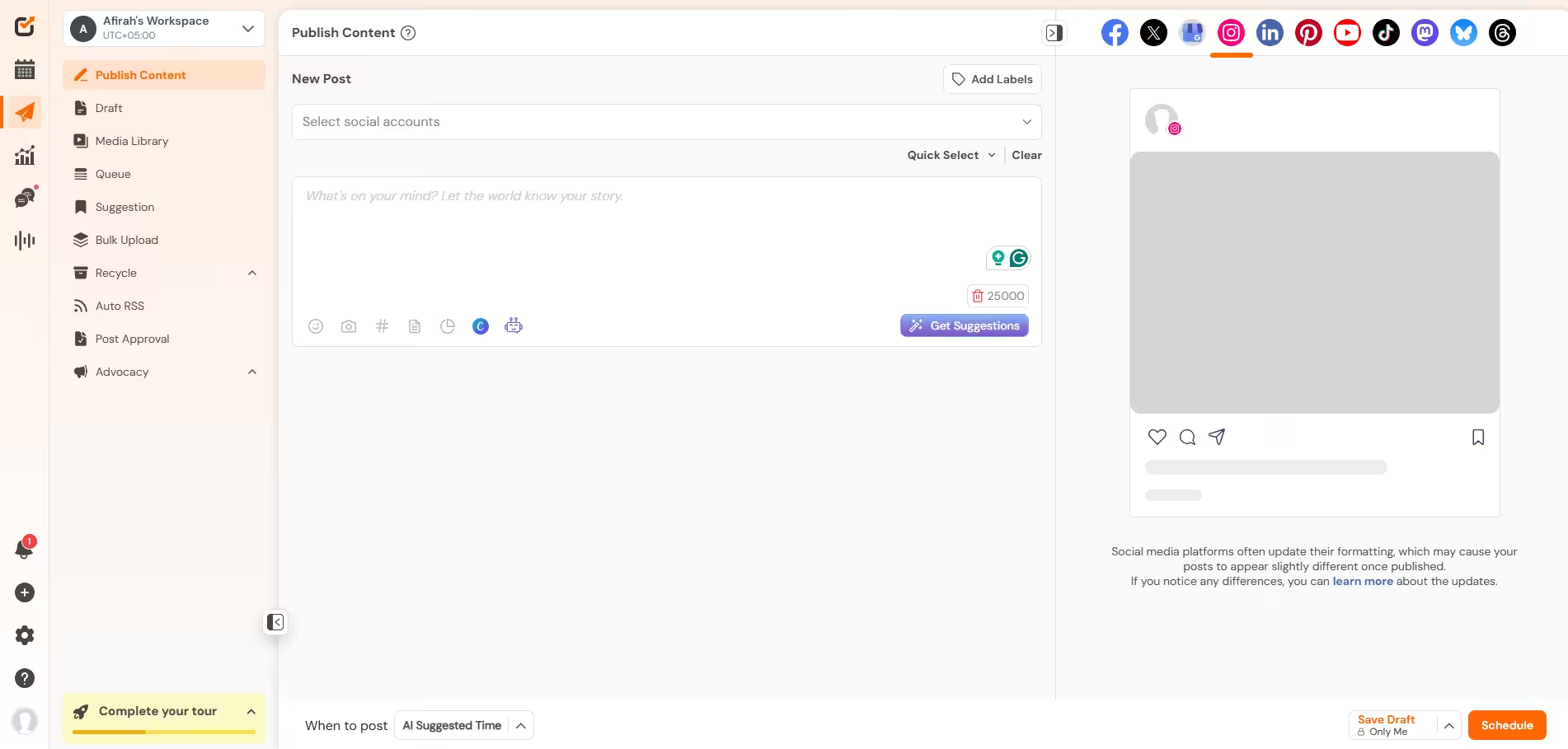
    Social Champ's Dashboard
    Social Champ’s Dashboard

    If you’re already managing content, scheduling posts, and dealing with messages across multiple platforms, jumping between different apps just to handle DMs is a headache. This is where Social Champ comes in clutch. It lets you run your automation right alongside the rest of your Instagram strategy in one single dashboard.

    Inside Social Champ’s Smart Inbox, you can pull all your DMs, post comments, and story mentions into one main feed.

    To get it running, just link your Instagram account to Social Champ, head to the Engage tab, and start replying. Test it out with a quick dummy message, and you’re good to go.

    Your Instagram Strategy, Managed in One Place!

    From visual grid planning and AI caption writing to unified inbox management, Social Champ gives you everything you need to scale your presence effortlessly.
  2. The Simple Native Route: Meta Business Suite

    If you just need something super basic and free without using a third-party social media management tool, Meta’s built-in options work totally fine.

    Inside Meta Business Suite, click on Inbox and head over to Automations. From there, you can set up:

    • Basic welcome messages for first-time messagers.
    • “Away” messages for when you’re off the clock.
    • Quick FAQ buttons that answer simple questions when someone opens a chat with you.

    It lacks the multi-channel ease and smart drafting features of Social Champ, but it’s a decent option if you’re keeping things ultra-simple.

  3. The Deep Funnel Route: Specialized Chatbot Builders

    If your entire business model relies on super intricate, multi-step quiz flows or complex decision trees (like “If they tap A, send them to page X; if they tap B, send them to page Y”), you might consider specialized chatbot builders like ManyChat.

    These apps focus heavily on visual flowchart diagrams. They’re great for heavy lead-generation funnels, though they take a bit more time to map out and manage alongside your day-to-day posting schedule.

Featured Article: 17 Instagram Management Tools You Should Look Out for

Is Instagram DM Automation Safe and Allowed?

Yes, absolutely, as long as you play by Meta’s rules.

There’s a lot of fear floating around about accounts getting shadowbanned or wiped overnight, but those horror stories usually come from people using shady, unauthorized tools. When done correctly, the Instagram algorithm actually encourages it and is built specifically for this.

Here is what you and I need to keep in mind to keep your account totally safe:

  1. Stick Strictly to Meta-Approved Tools

    You should look for Instagram growth tools using Meta’s official API and OAuth login. If a tool ever asks for your raw Instagram password or promises to “mass DM” strangers, run. That’s scraping, and it will get you flagged.

  2. It Must Be User-Triggered

    You can’t use automation to send cold, unsolicited DMs to random accounts. Safe automation only kicks off when a user takes the first action, like leaving a specific keyword in your comments, replying to your Story, or messaging you first.

  3. Respect the 24-Hour Window

    Once someone interacts with your account, a 24-hour timer starts. You can automate responses and share resources during that period. After 24 hours pass without a reply, the automated window closes so inboxes don’t get spammed.

Featured Article: The Ultimate Instagram Marketing Strategies for Small Businesses

Conclusion

Instagram DM automation isn’t about replacing the human element of your brand; it’s about protecting your time so you can actually double down on real connections.

By letting a smart tool handle the repetitive FAQs, keyword links, and initial hellos, you keep your inbox running 24/7 without burning yourself out typing the same reply fifty times a day. You get to deliver instant value to your audience while freeing up your hands to hop into the messages that genuinely require your personal touch.

Give it a shot, set up a few basic keyword triggers, and watch how much smoother your inbox runs. Got a favorite automation setup or a trick that works for you? Drop a comment and let’s talk!


You Don’t Need to Spend Hours on Instagram!

Plan, schedule, and auto-publish your Posts, Stories, and Reels in advance with Social Champ. Reclaim your calendar and keep your grid active 24/7.

Frequently Asked Questions

1. How to Set Up DM Automation on Instagram

To set up DM automation, switch to an Instagram Professional/Business account and connect it to a Meta-approved automation tool like ManyChat via an official Meta login. From there, configure your trigger rules, such as specific comment keywords or story replies, and draft your automated message templates.

2.How to Use DM Automation on Instagram?

Use DM automation by creating interactive calls to action, like asking followers to “Comment LINK” on a Reel or reply to a Story. When a user triggers the keyword, your system instantly delivers relevant links, answers FAQs, or guides them through a lead qualification flow in their inbox.

3. Can Using Instagram DM Automation Get My Account Banned or Shadowbanned?

Only if you use unauthorized, non-API tools that scrape data, require your raw password, or send unsolicited mass spam DMs. As long as you use Meta-approved software and only trigger automated messages when users initiate contact, your account will stay completely safe.

4. What Is the Daily and Hourly Limit for Sending Automated DMs on Instagram?

Meta’s official API framework enforces a safe pacing rule of roughly 200 automated DMs per hour. This results in a theoretical maximum of around 4,800 messages a day, provided you are replying to users who engaged with your account within a rolling 24-hour window.

5. Is There a Completely Free Way to Automate Instagram DMs?

Yes, you can use Meta Business Suite’s native inbox for basic free features like instant welcome messages and FAQs. Alternatively, third-party platforms like LinkDM and ReplyRush offer generous free plans that let you handle 1,000 to 1,500 automated comment-to-DM interactions per month at no cost.

Afirah Shaikh is a content marketer at Social Champ who turns strategy into storytelling. With three years of experience in content marketing and an MBA to her name, she has worked with brands across the digital marketing, e-commerce, and SaaS industries worldwide to create content that performs. She is known for her ability to balance creativity with purpose to drive results.

Leave the first comment

<script>
document.addEventListener('DOMContentLoaded', function() {
    function transformTablesForMobile() {
        if (window.innerWidth > 767) return; // Only for mobile
        
        const tables = document.querySelectorAll('#brxe-kpxjkv table');
        
        tables.forEach(table => {
            if (table.classList.contains('transformed')) return;
            
            let headers = [];
            const thead = table.querySelector('thead');
            const tbody = table.querySelector('tbody');
            
            // Get headers - check for both th and td in thead
            if (thead) {
                const headerRow = thead.querySelector('tr');
                if (headerRow) {
                    // First try th, then td
                    let headerCells = headerRow.querySelectorAll('th');
                    if (headerCells.length === 0) {
                        headerCells = headerRow.querySelectorAll('td');
                    }
                    headers = Array.from(headerCells).map(cell => cell.textContent.trim());
                }
            } else if (tbody) {
                // If no thead, take first row
                const firstRow = tbody.querySelector('tr');
                if (firstRow) {
                    let headerCells = firstRow.querySelectorAll('th');
                    if (headerCells.length === 0) {
                        headerCells = firstRow.querySelectorAll('td');
                    }
                    headers = Array.from(headerCells).map(cell => cell.textContent.trim());
                }
            }
            
            // Return if no headers found
            if (headers.length === 0) return;
            
            // Get all data rows
            const rows = Array.from(tbody.querySelectorAll('tr'));
            const dataRows = rows; // All tbody rows are data rows when thead exists
            
            // Create new structure
            const newContainer = document.createElement('div');
            newContainer.className = 'mobile-table-container';
            
            // Create a section for each column
            headers.forEach((header, colIndex) => {
                const columnSection = document.createElement('div');
                columnSection.className = 'mobile-column-section';
                
                const columnHeader = document.createElement('div');
                columnHeader.className = 'mobile-column-header';
                columnHeader.innerHTML = header; // Use innerHTML to preserve formatting
                columnSection.appendChild(columnHeader);
                
                const columnList = document.createElement('div');
                columnList.className = 'mobile-column-list';
                
                dataRows.forEach(row => {
                    const cells = row.querySelectorAll('td');
                    if (cells[colIndex]) {
                        const item = document.createElement('div');
                        item.className = 'mobile-column-item';
                        item.innerHTML = cells[colIndex].innerHTML;
                        columnList.appendChild(item);
                    }
                });
                
                columnSection.appendChild(columnList);
                newContainer.appendChild(columnSection);
            });
            
            table.style.display = 'none';
            table.classList.add('transformed');
            table.parentNode.insertBefore(newContainer, table.nextSibling);
        });
    }
    
    transformTablesForMobile();
    
    // Handle window resize
    let resizeTimer;
    window.addEventListener('resize', function() {
        clearTimeout(resizeTimer);
        resizeTimer = setTimeout(function() {
            const containers = document.querySelectorAll('.mobile-table-container');
            const tables = document.querySelectorAll('#brxe-kpxjkv table.transformed');
            
            if (window.innerWidth > 767) {
                containers.forEach(c => c.style.display = 'none');
                tables.forEach(t => t.style.display = 'table');
            } else {
                containers.forEach(c => c.style.display = 'block');
                tables.forEach(t => t.style.display = 'none');
            }
        }, 250);
    });
});
</script>
/* Sticky header for tables WITH thead */
#brxe-kpxjkv table thead {
    background-color: #f0ebf8;
    position: sticky;
    top: 0;
    z-index: 2;
}

#brxe-kpxjkv table thead th {
    background-color: #f0ebf8;
    position: sticky;
    top: 0;
}

/* Sticky header for tables WITHOUT thead (first row only) */
#brxe-kpxjkv table:not(:has(thead)) tbody tr:first-child {
    background-color: #f0ebf8;
    position: sticky;
    top: 0;
    z-index: 2;
}

#brxe-kpxjkv table:not(:has(thead)) tbody tr:first-child td,
#brxe-kpxjkv table:not(:has(thead)) tbody tr:first-child th {
    background-color: #f0ebf8;
    position: sticky;
    top: 0;
}


/* Mobile Column Layout */
@media (max-width: 767px) {
  #brxe-kpxjkv table{
    max-height:2000px;
  }
    .mobile-table-container {
        display: block;
        margin: 20px 0;
      border-radius: 12px;
      overflow: hidden;
    }
    
    .mobile-column-section {
        border: 1px solid #E0E0E0;
        overflow: hidden;
        background: white;
    }
    
    .mobile-column-header {
        background-color: #E3DFF5;
        padding: 15px;
        font-weight: bold;
        font-size: 16px;
        color: #333;
    }
    
    .mobile-column-list {
        padding: 0;
    }
    
    .mobile-column-item {
        padding: 15px;
        border-bottom: 1px solid #F0F0F0;
        background: white;
        font-size: 16px;
        line-height: 1.6;
    }
    
    .mobile-column-item:last-child {
        border-bottom: none;
    }
    
    .mobile-column-item:nth-child(odd) {
        background-color: #F7F6FC;
    }
    
    .mobile-column-item:nth-child(even) {
        background-color: #FAFAFA;
    }
    
    .mobile-column-item strong {
        color: #333;
        font-weight: 600;
    }
}

A Simplified Social Media Management Tool

Social Champ is your AI-powered social media management tool.

Schedule, analyze, listen, and track competitors – all in one platform.

Try now, Start free
No credit card required!
Related Blogs
Best Time to Post on Instagram: Data from 5M Posts
You realize the importance of the best time to post on Instagram when none of your content is performing how…
Best Time to Post Instagram Reels in 2026: 3M Reels Analyzed
Everyone wants to know the best time to post Reels on Instagram because Reels have dominated the platform, and rightfully…
Best Time to Post on Social Media in 2026 (Backed by Real Engagement Data)
Aug 19, 2026
What’s the best time to post on social media? There are probably like ten websites that provide you with “researched…
Wait, before you go...👋

Don't let your Social Growth stop here.

Get 14 days of Social Champ Pro - Completely free!
Schedule unlimited posts, analyze performance, and manage all your social media from one place.

Unlimited
Scheduling

In-Depth
Analytics

Manage Multiple
Accounts

Start My 14-Day Free Trial

No credit card required

Cancel anytime

Easy setup

Loved by 10,000+ marketers and businesses

Secure & Reliable

#1 Rated Social Media Management Tool