Disclaimer:
The information presented in this blog post is based on publicly available data from official sources at the time of writing. Our intention is solely to provide accurate and helpful information. If you notice any inaccuracies, please feel free to contact us for corrections.
Nothing kills the excitement of finding a productivity tool faster than having to hand over your email address just to see how much it costs.
Historically, Loomly frustrated users by requiring a sign-up just to view costs, leaving agencies and small businesses in budget limbo.
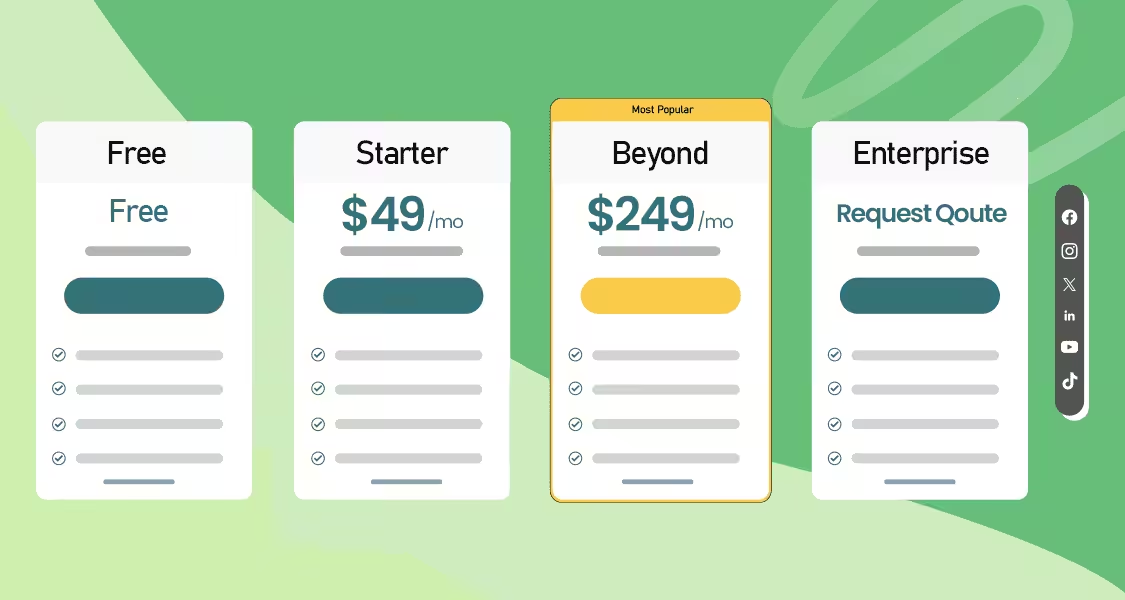
The good news? In 2026, Loomly finally pulled back the curtain. They ditched the sign-up requirement entirely, introducing a fully transparent pricing page.
Short Summary
- Loomly abandoned its hidden pricing model, making its costs fully transparent, with paid plans starting at $49/month when billed annually.
- Despite this transparency, Loomly pricing features rigid brackets that force users into a massive $200/month jump to upgrade from the Starter to the Beyond plan.
- Loomly hides its free-forever tier inside the app’s billing settings, making it difficult for users to find without creating an account first.
- Scalable alternatives like Social Champ offer a much lower barrier to entry, featuring a generous free-forever plan and affordable paid tiers starting at just $4 /month.
- Instead of expensive tier upgrades, Social Champ provides transparent bundle offers for extra accounts, making accurate budgeting easier for growing agencies.
But now that the numbers are public, is the platform actually worth the cost?
In this guide, I’ll break down Loomly’s new open pricing structure, highlight features that trigger price jumps, and compare it to transparent alternatives like Social Champ.
Let’s dive in!
Supercharge Your Social Media Game Today!
Loomly Goes Transparent
If you visited Loomly’s website in the past, you likely experienced a frustrating trend: trying to find pricing led you down a rabbit hole of mandatory trial sign-ups.
Their old gatekept model hid the actual cost of the platform behind a registration wall.
Thankfully, Loomly finally ditched the sign-up requirement and introduced a fully public pricing page for 2026.
Why the Change Was Necessary
While hidden pricing might benefit sales teams, it creates major hurdles for the average user:
- Time Wasted: Users had to sign up just to discover a tool was twice their budget.
- Comparison Friction: It made quick, side-by-side comparisons with other tools nearly impossible.
The Value of Transparent Pricing
Previously, Loomly’s hidden costs stood in stark contrast to openly priced alternatives like Social Champ. Now that Loomly has joined the transparent model, users get to enjoy the benefits that open-pricing platforms have always offered:
- Clarity: Prices, including their 25% discount for yearly billing, are now clearly listed right on the homepage.
- Speed: You can evaluate costs and ensure it fits your budget in seconds.
- Trust: There’s no more nagging feeling that you could have negotiated a better deal; you know exactly what you and everyone else are paying.
The Evolution of Loomly Pricing Plans
Loomly hasn’t always been as premium as it is today. In earlier versions (circa 2020–2022), it was widely known as a budget-friendly alternative to Hootsuite, with a base plan starting around $25–$30/month for solo freelancers.
By 2026, we’ve seen those entry points climb to a $49/month minimum (when billed annually), reflecting the platform’s heavy shift toward agency-focused clients.
Loomly’s Updated 2026 Pricing
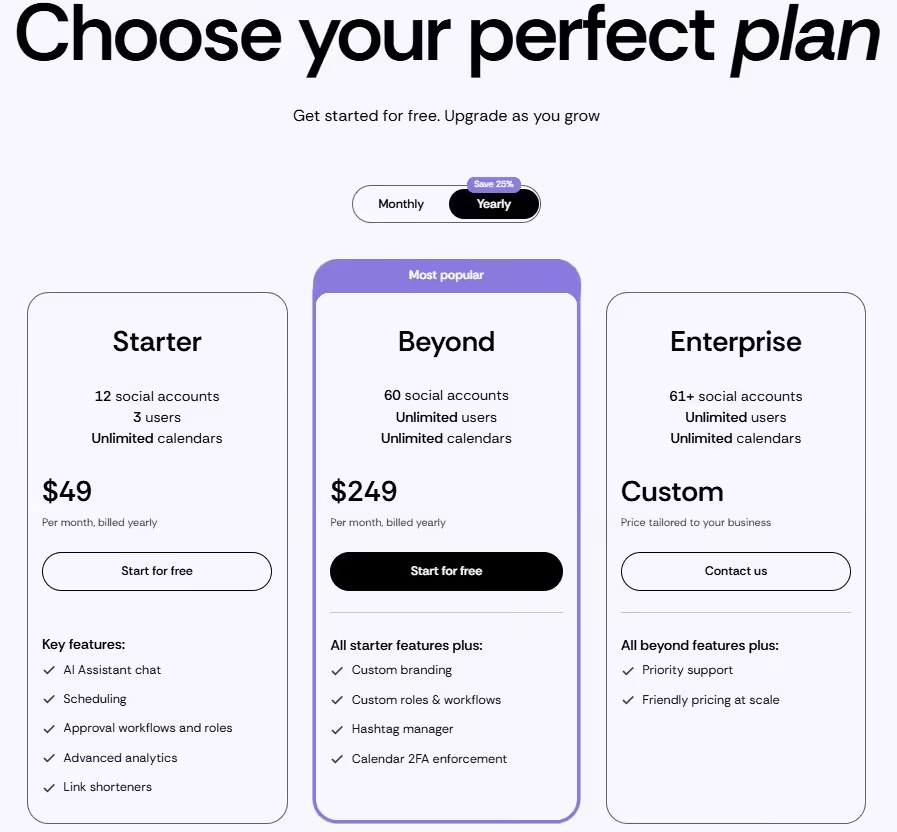
Here is a breakdown of the new, transparent plans based on their annual billing discount (25% off):
THE HIDDEN FREE PLAN:
If you look at Loomly’s current public pricing page, there is absolutely no mention of a free tier. However, Loomly does offer a Free Plan! It is intentionally hidden inside the tool itself. To access it, you must first sign up for an account, navigate to your Account Settings, click on the Billing tab, and select the Free plan from there.
- Starter Plan: At $49/month (billed yearly), this tier fits small businesses. It includes 12 social accounts, 3 users, and unlimited calendars. Key features cover the basics: an AI Assistant chat, scheduling, approval workflows, advanced analytics, and link shorteners.
- Beyond Plan (Most Popular): Jumping to $249/month (billed yearly), this is built for growing agencies. It supports 60 social accounts and unlimited users. It includes all Starter features, plus custom branding, custom roles and workflows, a hashtag manager, and calendar 2FA enforcement.
- Enterprise Plan: Designed for large organizations needing 61+ social accounts, this tier requires you to contact sales for a custom quote. It includes everything in the Beyond plan, plus priority support and “friendly pricing at scale.”
What Factors Likely Affect Loomly Pricing?
Understanding Loomly’s cost isn’t just about the base price; it’s about knowing the strict limits that force you into a massive tier jump, specifically the $200/month leap from the Starter ($49/mo) to the Beyond plan ($249/mo).
Based on their current transparent pricing, here are the primary factors that drive up your total cost:
- The 4th User Penalty (Team Seats): This is often the biggest catalyst for a price jump. The Starter plan strictly limits you to 3 users. If your team grows and you need to add just one more collaborator, you are forced to upgrade to the Beyond plan to unlock unlimited users.
- The 13th Account Trap (Social Profiles): Loomly groups accounts into rigid brackets. The Starter plan caps at exactly 12 social accounts. If you are a growing agency that just landed a new client and needs to connect a 13th profile, you must upgrade your entire plan, even if you don’t need the extra user seats.
- Custom Branding and Advanced Workflows: Loomly now generously includes Advanced Analytics in its base Starter plan. However, if you are an agency that requires White-labeled Custom Branding, Custom Roles & Workflows for client approvals, or a dedicated Hashtag Manager, those features are firmly locked behind the premium Beyond tier.
How Does Loomly’s Pricing Compare to Social Champ?
In the SaaS world, pricing transparency is a critical trust builder.
In fact, studies show that 74% of consumers are more likely to recommend a brand that is forthright in its pricing. Clear, transparent pricing not only enhances customer trust and brand loyalty but also allows teams to budget accurately and prevents sticker shock from hidden fees.
While Loomly previously used a frustrating, gatekept model that required a trial sign-up, they have finally made their pricing public.
However, transparency alone doesn’t equal affordability. Social Champ has always championed keeping its highly affordable, scalable pricing completely public and easy to find from day one.
Here is how the two platforms stack up now that both have their numbers out in the open:
| Platform | Free Plan | Starting Price (Annual) | Transparency | Core Features | Ideal For |
|---|---|---|---|---|---|
| Social Champ | YES (15 posts/mo, 3 accounts, 1 user) | $4 /mo | YES (Always public) | Unlimited Scheduling, Content Calendar, Social Listening, Analytics, Social Inbox, Separate Workspaces, & Team Roles | Solopreneurs, Growing Agencies, & Budget-Conscious Teams |
| Loomly | YES (But hidden inside account billing settings) | $49 /mo | YES (Recently updated) | Visual Scheduling, Approval Workflows, Media Libraries, & Canva Integration | Mid-to-Large Teams focused on Campaign Approvals |
Why Scalable Pricing Wins
Now that both tools offer transparent pricing pages, the real deciding factor is scalability. Choosing a flexible tool like Social Champ offers several distinct advantages for modern agencies:
- Instant Affordability: You can see Social Champ’s $4 /month starting point immediately, which is drastically more accessible than Loomly’s $49/month minimum requirement.
- An Easy-to-Find Free Tier: Social Champ proudly displays its generous “free-forever” tier right on the homepage. While Loomly does offer a free plan, it’s hidden deep inside the app’s billing settings, requiring you to sign up and dig through menus just to find it.
- Scalability Clarity: With Social Champ, you know exactly how the price scales as you add profiles (thanks to bundle offers starting at just $4 per additional account). With Loomly, users face a massive $200/month pricing gap. Moving from their Starter tier to the Beyond plan forces you to jump from $49/month to $249/month just to add a 4th user or a 13th client account.
Social Champ stands out in 2026 as the clear, budget-friendly champion.
By offering a completely free plan for starters and a scalable $4 /month entry point for professionals, it ensures you spend your time growing your social presence, not stressing over massive leaps in your software bill.
Is Loomly Worth It Despite the Steep Price Tag?
Now that Loomly has finally made its pricing public, a new question arises: Is the software actually worth the premium cost?
While the $49/month minimum entry point and steep upgrade costs are a major hurdle for budget-conscious decision-makers, the platform remains a powerhouse for teams that can comfortably afford it.
Feature Strengths: Where Loomly Shines
Loomly isn’t just a scheduler; it’s a workflow engine. Here is what you’re actually paying for:
- Seamless Post Approvals: Their multi-step approval tiers are arguably the best in the business. You can set up draft, pending approval, and approved statuses that keep everyone on the same page.
- Visual Content Calendar: Unlike tools that feel like a cluttered list, Loomly provides a highly aesthetic, drag-and-drop calendar that makes it easy to spot gaps in your strategy at a glance.
- Strong Collaboration UX: The interface is built for teams. You can leave internal comments that clients can’t see, tag teammates, and track version history without leaving the app.
Here is a quick breakdown of where Loomly excels and where its new pricing model falls short:
| Pros | Cons |
|---|---|
| Best-in-class approval workflows and team roles for seamless client collaboration. | High entry barrier ($49/month minimum for publicly listed plans) and a free plan that is intentionally hidden from the main website. |
| Highly intuitive visual calendar and manual post-preview interface. | Massive pricing gaps; upgrading from Starter to Beyond costs an extra $200/month just to add a 4th user. |
| Built-in post ideas and an AI Assistant to help you fight writer’s block. | Rigid social account brackets (e.g., a strict 12-account limit on Starter) that force expensive tier upgrades. |
The Drawbacks of Rigid Pricing Tiers (Even When Public)
For marketers and agency owners, transparency is only half the battle. Just because a tool like Loomly now displays its dollar signs upfront doesn’t mean it’s budget-friendly.
When a platform relies on highly rigid pricing brackets, it creates a whole new set of practical frustrations for growing teams.
The Threat of Budget Creep
Marketers often operate on fixed monthly or quarterly budgets. While you now know Loomly starts at $49/month, the strict limits (like capping out at exactly 3 users or 12 social accounts on the Starter plan) create a massive “scaling tax.”
If your agency lands a new client and needs to add a 13th social account, or if you simply need to add a 4th team member, your bill doesn’t just go up by a few dollars. It violently spikes to $249/month.
This makes reliable, long-term forecasting incredibly dangerous.
The Scalability Trap
Truly flexible platforms give you granularity. As seen in Social Champ’s pricing model, they offer explicitly listed “Bundle offers” where adding an extra social account costs just a few dollars (e.g., $3 to $4 each).
Rigid tools like Loomly force you to buy an entirely new, massive bucket of features just to accommodate a minor team expansion.
Pro-Tip: What to Ask Before You Commit in 2026
If you are evaluating a social media management tool today, don’t just look at the base sticker price. Ask the questions that reveal your true long-term scaling cost:
- What is the exact cost of adding one more user or one more social profile? (Know your scaling tax: Does it cost $4, or does it force a $200/month tier upgrade?)
- Can I buy granular add-ons, or am I forced into rigid brackets? (Look for transparent bundle offers.)
- What exact features are strictly locked behind the next paywall? (For example, don’t get caught needing custom branding or a hashtag manager only to realize it requires a massive plan jump.)
What Are the Best Affordable Alternatives to Loomly?
Now that Loomly’s pricing is public, the sticker shock of its $49/month starting point and $249/month upgrade path has many users looking for better options.
When it comes to finding alternatives to Loomly that offer great value without forcing you into rigid, expensive brackets, here are the top three:
-
Social Champ (Best Overall for Scalability and Affordability)
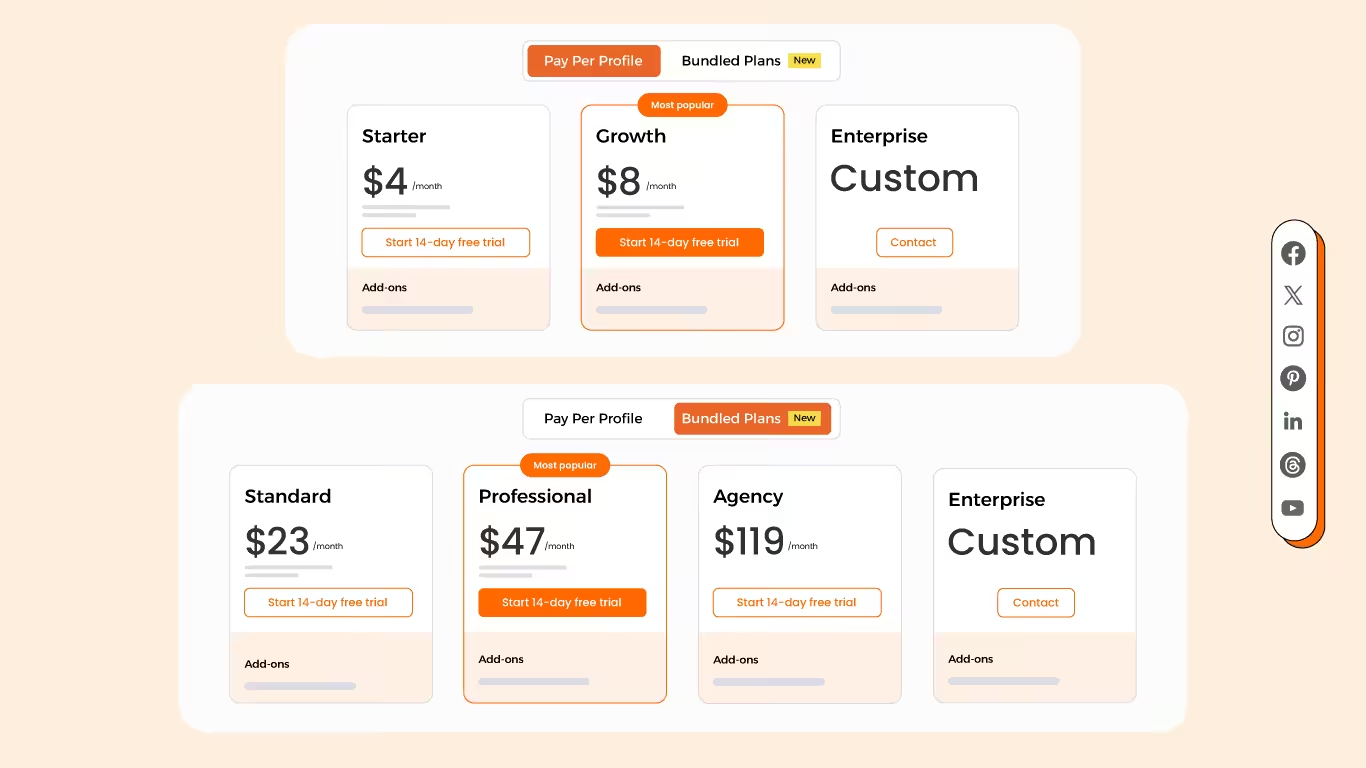
Social Champ’s Pricing Social Champ tops the list as the most cost-effective and flexible alternative to Loomly. It comes with two pricing tiers, including a Pay-Per-Profile and a Flat-Rate model.
Here’s what you get in the Pay-Per-Profile:
- Starter, which costs $4 and has 1 user. In this plan, you can manage 1 social accounts.
- Growth, which costs $8 and has unlimited users. In this plan, you can manage 1 social accounts.
These plans also offer discounts as you scale. Here’s how much you can save in the Starter:
- For 1-10 social accounts: $4
- For 11-20 social accounts: $3
- For 21-40 social accounts: $2
- For 41+ social accounts: $0.50
Here’s how much you can save in the Growth:
- For 1-10 social accounts:$8
- For 11-20 social accounts:$3.50
- For 21-40 social accounts:$2.50
- For 41+ social accounts:$1
With Social Champ, you also get Flat-Rate bundles, which are:
- Free, which costs $0 and has 1 user. In this plan, you can manage 3 social accounts.
- Standard, which costs $23 and has 2 users. In this plan, you can manage 6 social accounts. This plan also comes with add-ons for accounts. You can add another account for $5/account
- Professional, which costs $47 and has 5 users. In this plan, you can manage 12 social accounts. This plan also comes with add-ons for accounts. You can add another account for $4/account and pay $8/user for another user.
- Agency, which costs $119 and has unlimited users. In this plan, you can manage 30 social accounts. This plan also comes with add-ons for accounts. You can add another account for $3/account
- Enterprise, which is Custom and has unlimited users. In this plan, you can manage unlimited social accounts.
Social Champ also supports: Instagram, Facebook, TikTok, LinkedIn, YouTube, Threads, Pinterest, X, Google Business Profile, Bluesky, Mastodon, and WhatsApp Business
With unique features like social listening, competitor analysis, bulk upload, and tailored posts, Social Champ is an excellent choice for teams that want powerful tools without the hefty price tag.
Get Affordable Social Media Management Now!
Try Social Champ today and get access to advanced features like bulk uploads, content curation, and unlimited scheduling, all at an affordable price. -
Buffer (Best for Minimalists)
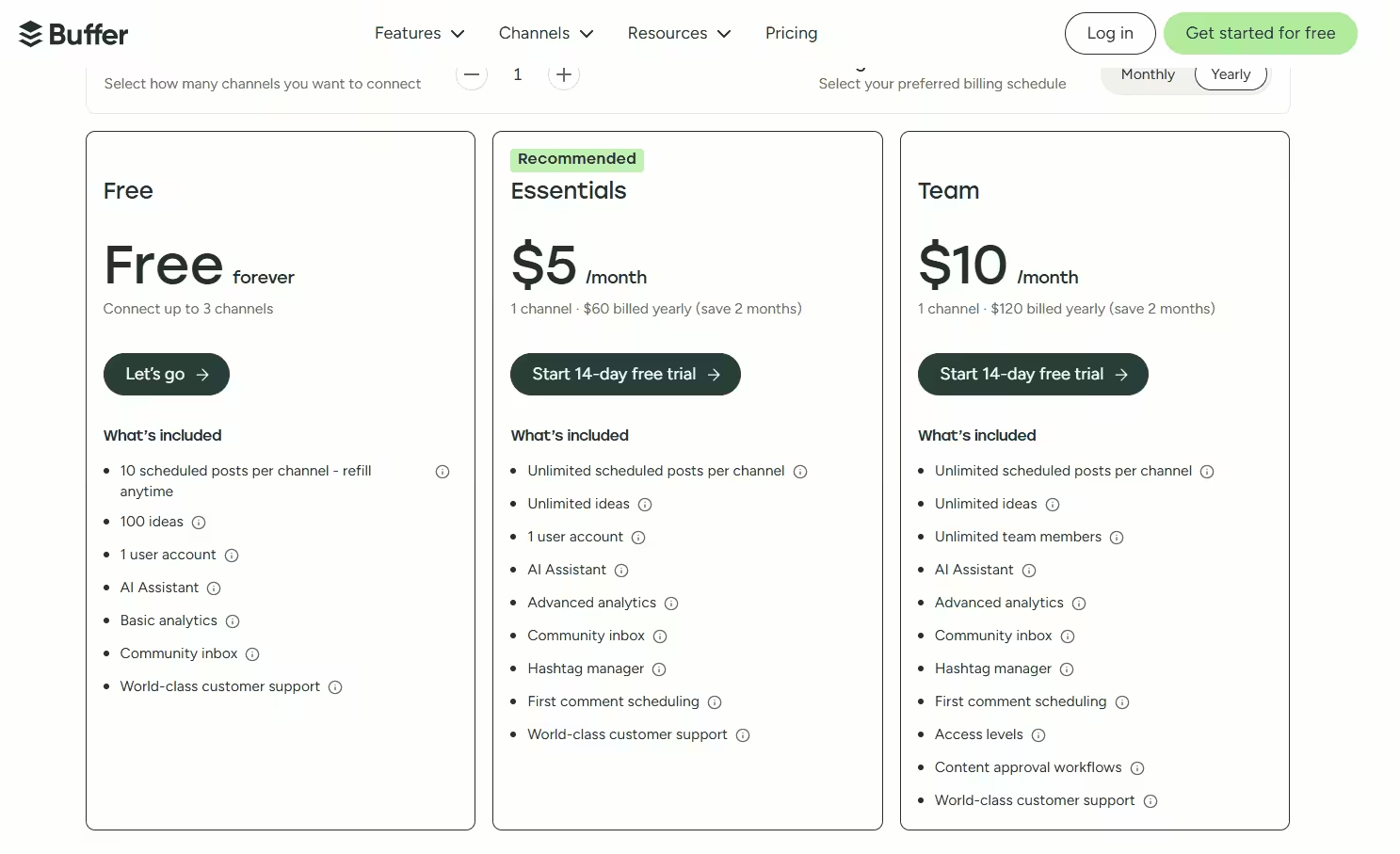
Buffer’s Pricing Plans Buffer is another strong contender in the affordable social media management space. It is widely praised as an intuitive tool for small businesses that prioritize straightforward scheduling.
With its transparent “pay-per-channel” model (starting at $5 to $6 per month per social channel), Buffer lets you easily calculate your exact costs as you add new client profiles. Just like Social Champ, it also offers a basic free plan to help you get started without requiring a credit card.
-
Later (Best for Visual Creators)
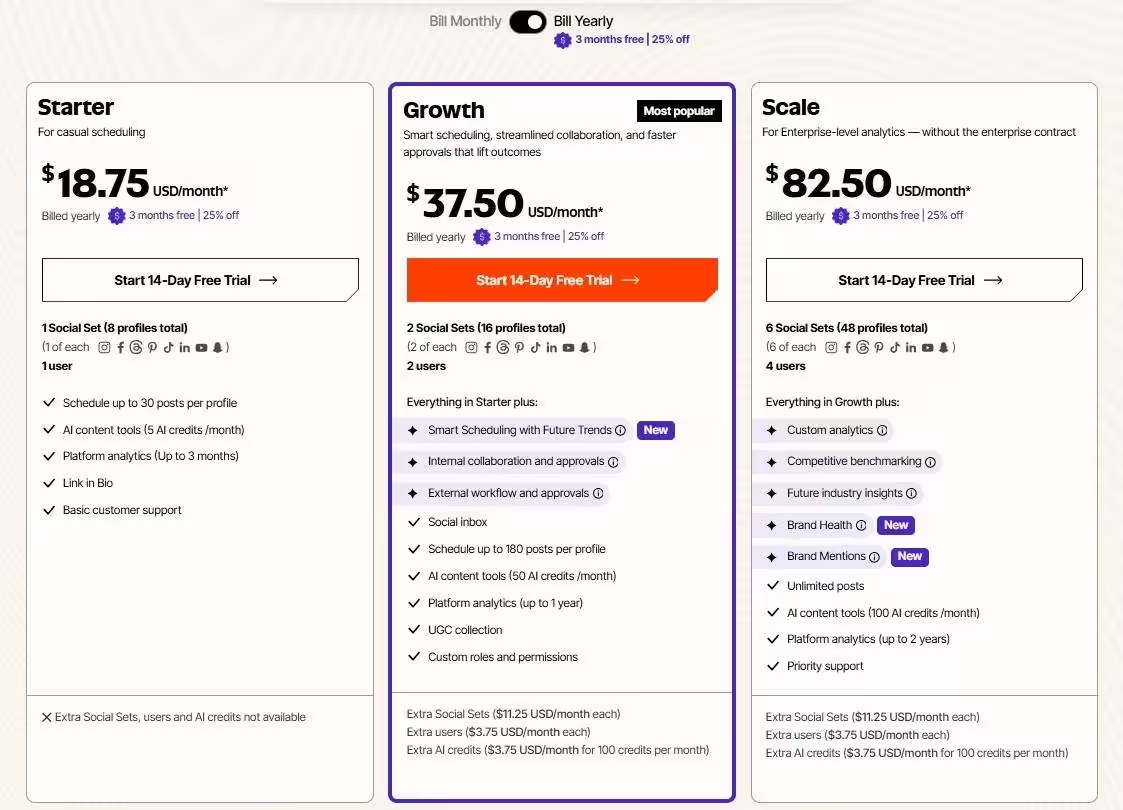
Later’s Pricing Plans Later is heavily geared toward visual platforms like Instagram and TikTok. Their pricing typically starts with a Starter plan around $18.75 per month, which is perfect for individuals or small teams just getting started.
While Later’s focus on simplicity and a visual grid planner makes it an aesthetically pleasing option, it does come at a higher starting price point compared to Social Champ and Buffer, and it can become pricey as you add more users.
Why Social Champ Stands Out
When scaling your software, the golden rule is simple: don’t overpay for coverage you don’t use. Among these alternatives, Social Champ really shines due to its unmatched balance of affordability, premium features, and flexible scaling.
It offers a wide range of tools, like content curation, built-in AI, and team collaboration, while completely eliminating the “scaling tax” associated with rigid tools like Loomly.
If you want to know more about tools, refer to the following resources!
Featured Article: Post to All Social Media at Once
Boost Your Social Media Management!
Conclusion
In the great showdown of social media management tools in 2026, it’s clear that both platforms bring serious value to the table.
Loomly shines with comprehensive workflow features, making it a solid fit for larger teams that can comfortably absorb its $49/month starting cost and steep $249/month upgrade leaps.
But let’s be honest: transparency doesn’t automatically equal affordability. While the newly updated Loomly pricing structure finally removes the old guesswork, its rigid account brackets still cause major sticker shock for growing businesses.
Sometimes, you simply don’t need an overpriced five-course meal when a premium sandwich does the exact same trick.
If the strict limitations of Loomly pricing have you searching for a flexible alternative, Social Champ gets the job done without the financial fuss.
By offering scalable bundle options and unlocking unlimited users for just $8/month, Social Champ proves you never have to sacrifice quality to stretch your budget.