Free Canva alternative for social media
The free Canva alternative built into your social media scheduler.
Social Champ Designs is a free design editor inside Social Champ, the social media scheduler. Make the post, get 7 post sizes from one design, and schedule it from the same place, with no export and no re-upload.
Sign up on your phone, design on a laptop or desktop.
Is there a free Canva alternative for social media?
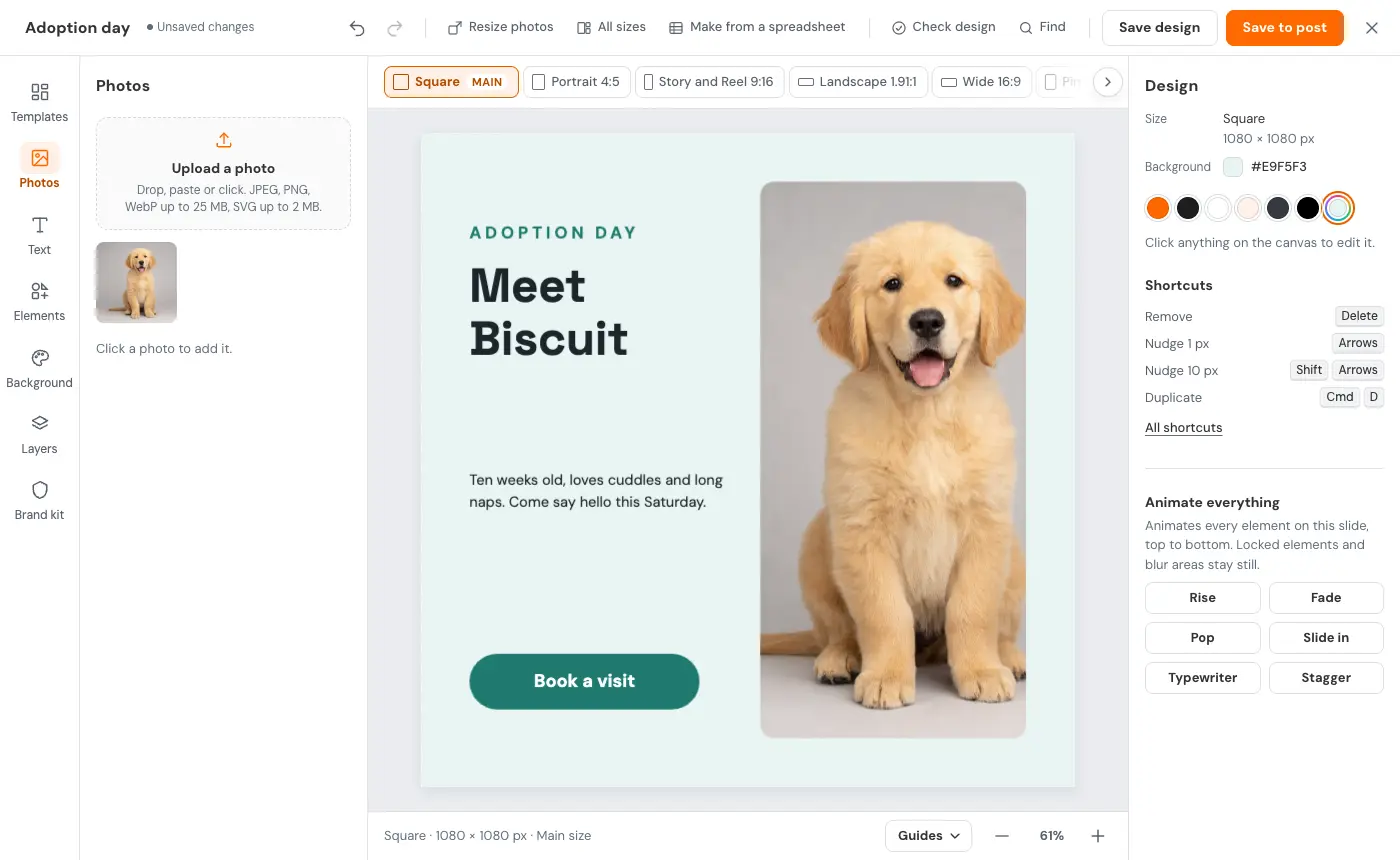
Short answer: yes. Social Champ Designs is a free design editor built into Social Champ, the social media scheduler, and it is included on every plan, including Free. It has 180 templates, 7 post sizes from one design, background removal, Retouch, carousels up to 10 slides and a brand kit per workspace. Save to post puts the design straight into the post you schedule.
Why social teams want a design tool next to their schedule.
Most social posts need a design, a few sizes and a time slot. When those live in different apps, the busywork adds up.
Two apps for one post
Designing in one app and posting from another means exporting the file and attaching it again for every post. Here, Save to post puts the image, carousel slides or video straight into the post you're writing.
7 post sizes from one design
The All sizes button lays one design out in 7 post sizes at once, from Square to Story and Reel. Check design flags small text and words under the app's buttons, and Make it fit meets each network's size limit.
Posts from your own numbers
The Data tab turns your Social Champ analytics into charts or big numbers, and Make from a spreadsheet builds one post per row, up to 200 rows.
Cut-outs and portraits
Remove background lifts people, pets and products off their background, and Retouch polishes portraits. Both are free on every plan. Background removal and Retouch run on your device; your photo isn't uploaded to do them. Saved designs are stored in your workspace.
What you get free
Everything here is included on every Social Champ plan, including Free.
- 180 templates in 9 categories and 12 carousel packs
- 7 post sizes from one design
- Remove background and Retouch
- Carousels up to 10 slides, PDF and video
- 149 fonts, plus your own
- A brand kit for every workspace
- Animation, QR codes, tables and charts
- Scheduling in the same place
Is Social Champ Designs the right Canva alternative for you?
Choose Social Champ Designs if:
- You schedule what you designMost of what you make is social posts you schedule in Social Champ.
- You post in many sizesYou want 7 post sizes from one design, checked before they go out.
- You edit photos for postsYou need background removal and Retouch that run on your device.
- You manage brandsEach client or brand needs its own brand kit in its own workspace.
- You post your resultsYou want charts from your Social Champ analytics, or one post per spreadsheet row.
- You want it freeIt is included on every Social Champ plan, including Free.
Where it stops, and why you can use both.
Social Champ Designs is not built for
- Print, documents, whiteboards, websites or mockups
- Real-time co-editing, comments or version history
- A licensed music library or GIF stickers
- AI image editing or upscaling inside the editor
- Editing on phones and tablets
- A template and stock library as large as a dedicated design tool's
Use both if you like
The Canva integration in the composer stays, so you can keep using it. Make the posts you schedule every day right where you schedule them, and use whichever tool suits everything else.
Included free on every plan, including Free.
Write with AI works on plans with AI Content Wizard credits; AI images use AI Imaginator credits.
Up to 200 saved designs and 500 MB of design media per workspace.
Works on screens at least 1,024 pixels wide.
Competitor numbers in the Data tab need a plan with competitor analysis.
Team members need Publish access to design.
Free Canva alternative: questions and answers
Is there a free alternative to Canva for social media?
Yes. Social Champ Designs is free on every Social Champ plan, including Free. It covers social posts: templates, 7 post sizes from one design, background removal, Retouch, a brand kit, carousels and short videos, with scheduling in the same place.
What is the best Canva alternative for social media?
It depends on what you make. If most of your designs are social posts you schedule, Social Champ Designs is a free option built into the Social Champ scheduler: 180 templates, 7 post sizes from one design, background removal and Retouch, and Save to post instead of export and re-upload. For print, documents, whiteboards or websites, a dedicated design tool goes further.
Is there an AI alternative to Canva?
Social Champ Designs has AI built in. Ask it for headline ideas, have it rewrite or translate a whole design, or start a design from the caption you already wrote. Write with AI uses your plan's AI Content Wizard credits, and AI images use AI Imaginator credits.
What can't Social Champ Designs do?
Social Champ Designs is built for social posts, so it does not do print, documents, whiteboards, websites or mockups. It has no real-time co-editing, comments or version history, no licensed music library or GIF stickers, and no AI image editing or upscaling inside the editor. Its template and stock library is smaller than a dedicated design tool's.
Can I use Social Champ Designs on my phone?
You can sign up on your phone, but you design on a laptop or desktop. Social Champ Designs works on screens at least 1,024 pixels wide, and editing on phones and tablets is not supported.
Is there a free background remover for social media posts?
Yes. Remove background in Social Champ Designs is free on every Social Champ plan, including Free. It lifts people with their hair, pets or products off their background in one click, and the cut-out goes straight into your post. Background removal and Retouch run on your device; your photo isn't uploaded to do them. Saved designs are stored in your workspace.
Does Social Champ work with Canva?
Yes. The Canva integration in the composer stays, so you can use whichever fits the job.
Make the post where you schedule it.
Social Champ Designs is included free on every plan.
People and pets shown are illustrative. Canva is a trademark of Canva Pty Ltd. Social Champ is not affiliated with Canva.