
You didn’t become a social media manager to spend four hours a day copy-pasting captions.
It’s 2026, and jumping between ten browser tabs, re-uploading the same video three times, and manually changing hashtags for LinkedIn, then Instagram, then X is just not it anymore.
If you really want to grow your brand, you need a way to hit ‘Publish’ once and be done. In this guide, I’m breaking down the exact workflow to post to all social media platforms at once, so you can stop being a ‘copy-paste’ machine and start being a strategist again.
Short Summary
- Cross-platform posting helps you post to all your social media channels at once.
- You can post to 12+ platforms with tools like Social Champ.
- Look for a multi-function cross-platform publishing tool that lets you customize content, including hashtags or caption changes for each channel.
- The platforms you use, the needs of your team, features like social listening or analytics, and your budget all play a role in selecting the best tool.
- Social Champ makes it affordable for individuals and teams to post on multiple platforms simultaneously by offering both free and paid plans.
What Is Cross-Posting on Social Media?
Cross-posting on social media basically means that you can publish content to all your social channels, like Instagram, LinkedIn, X, and others, in just one go.
With this approach, you can save time spent on customizing and uploading content on each channel, which you can then spend on bettering your content strategy.
Here’s what cross-posting with a free social media management tool can look like:
How Can You Automate Your Cross-Platform Posting With Social Champ
If you’re looking for a good (and affordable) tool to post to all social media at once, Social Champ is the way to go.
Here’s how it works:
You can start by creating a free account on Social Champ. (I’d recommend signing up for a free trial to explore all the premium features!)
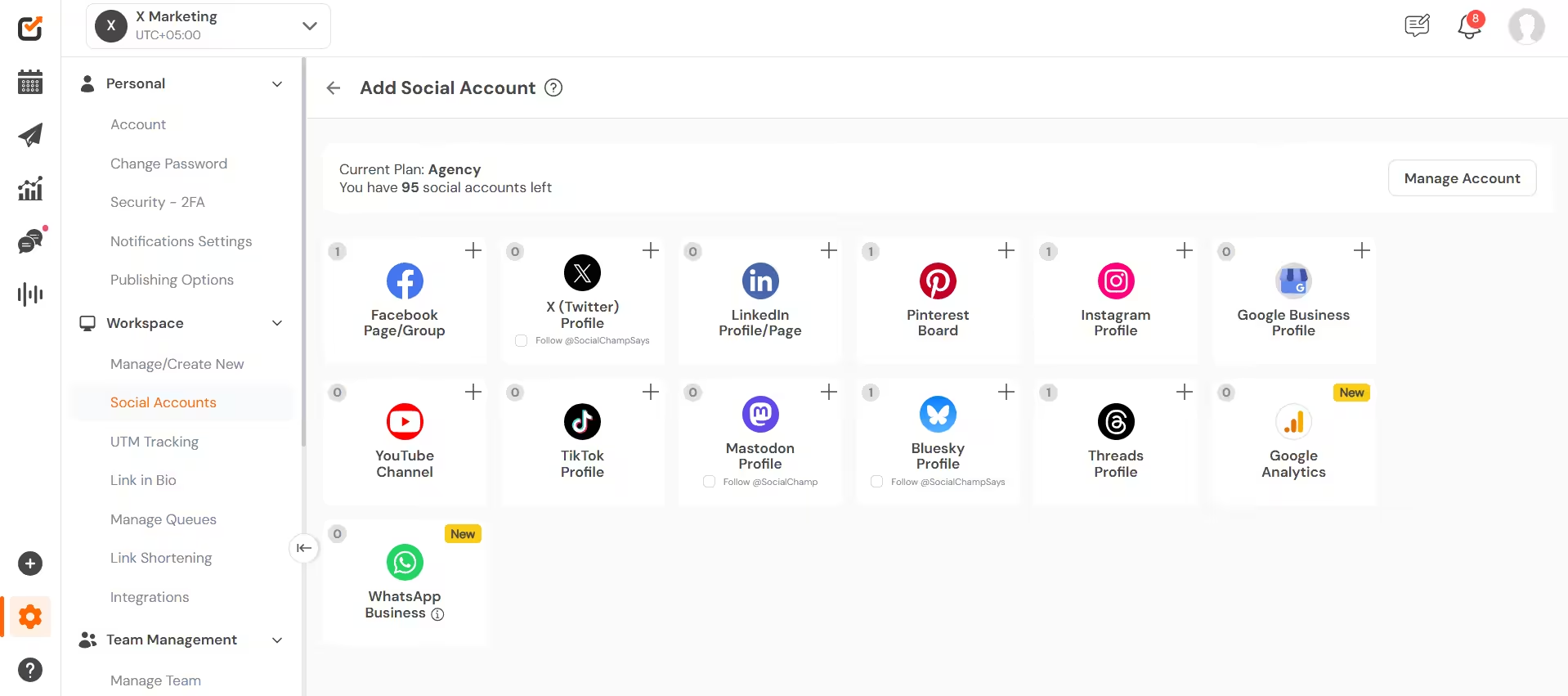
Next, connect all your socials. Social Champ supports up to 12+ social media networks, including Instagram, Facebook, LinkedIn, X, TikTok, Pinterest, Threads, Google Business Profile, Mastodon, Bluesky, and YouTube.
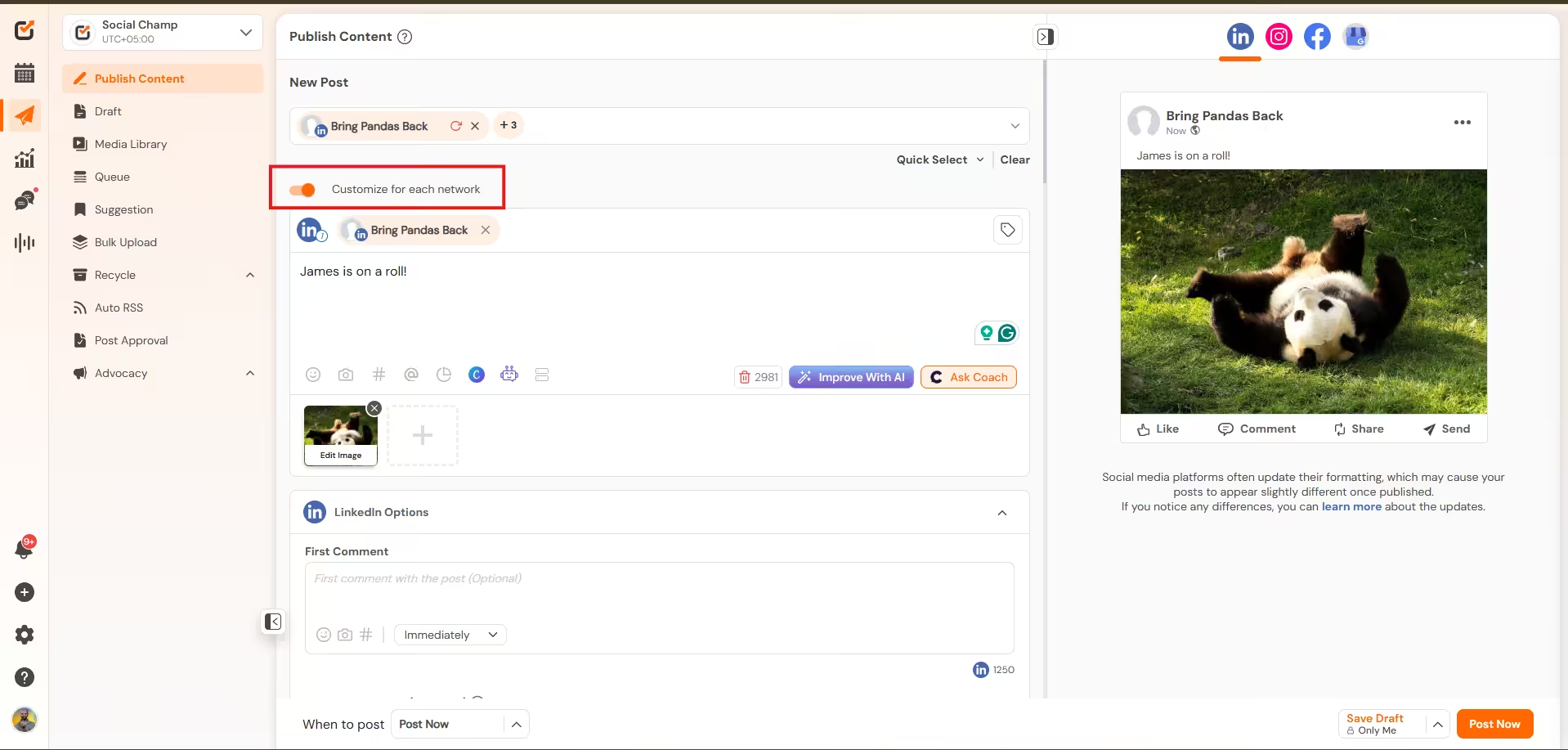
Now comes the fun part. Open the composer, select the social accounts you want to publish on, and toggle on “customize for each network”.
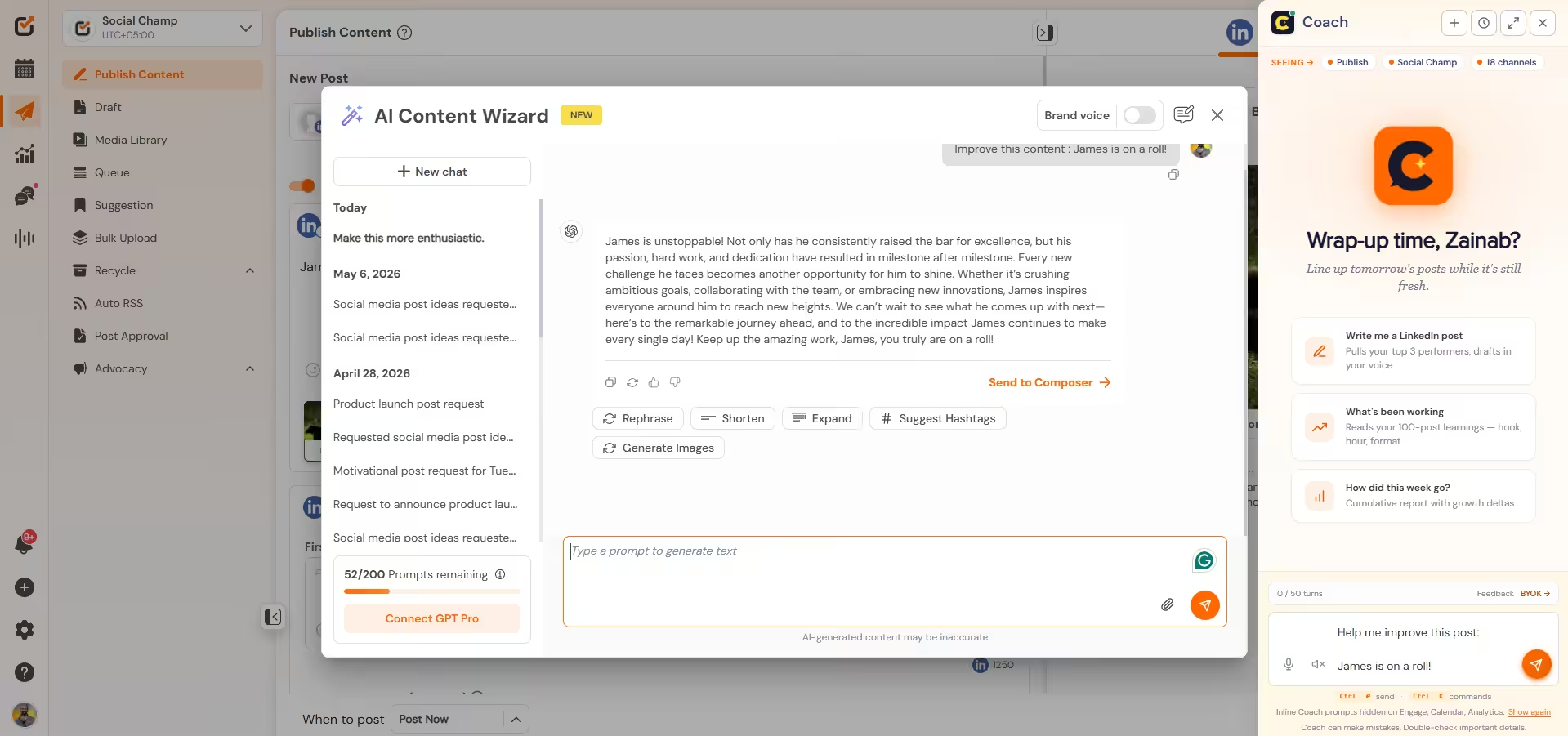
If you need help with writing caption, use the AI Content Wizard or it’s latest AI assistance (called Coach) to create content and visuals in your brand voice!
Next, you can scroll down to customize for each network and see the preview on the right-side bar. For instance, you can:
- Select between Post, Reel, or Story
- Add first comment
- Tweak captions
- Upload document (on LinkedIn)
- Add link in bio (for Instagram)
- Boost post
- Add CTA buttons
- Target audiences on Facebook
- Add collaborators
- And so much more!
Now that your post is ready, you can simply publish it or schedule it for later. (I’d recommend using the AI Suggested Time tool to find the best time to post on each platform!)
Try This One-Click Publisher For Free!
Featured Article: Best Time to Post on Social Media
How to Manually Post to All Social Media Channels at Once
You can manually post to multiple platforms by following these steps:
- Create your content. You’ll need to draft text, visuals, and any media assets.
- Adapt for each platform, such as trimming videos for TikTok, cutting text for X’s 280-character limit, and adjusting image sizes, among other things.
- Log in to each account separately, and open every platform in individual tabs.
- Draft posts, one by one, on each platform. Add links, hashtags, and other customizations.
- Publish simultaneously by hitting post on each account at the same time. Start with slower-uploading platforms (like YouTube) first to make sure all content goes live at the same time.
- Monitor and engage with your content. Respond to comments across all profiles individually.
- Follow this workflow every time.
The Hard Truth
If you want to cross-post identical content to TikTok, X, or YouTube, you’ll need a cross-posting tool. And if you’re an agency managing multiple clients, manual posting is a security risk, and you’ll get burnt out pretty fast.
Even for one client, posting on multiple socials is tedious. For ten, it’s unsustainable. The manual approach fails at scale for three reasons:
• Switching between platform interfaces can reduce efficiency by up to 40% , which is billable hours lost to browser tabs.
• Sharing login credentials across team members increases breach exposure.
• Without a centralized dashboard, you can’t track performance, schedule in bulk, or maintain brand consistency across accounts.
P.S. If you want more strategies on eliminating manual bottlenecks and maximizing client reach, these guides might help you out!
Benefits of Posting to Multiple Social Media Channels
Being a single-channel brand no longer serves you. According to Datareportal, an average user is active on 6.8 platforms monthly. So, if you’re not posting everywhere, you’re missing out on potential customers.
If you’re still not convinced, let me give you a few benefits of cross-posting on social media.
-
Algorithmic Arbitrage and Traffic Stability
Social algorithms are more volatile than they’ve ever been. If you’re relying on one platform, you’re relying on a single point of failure.
Posting to all platforms creates “Algorithmic Insurance.” For instance, if Instagram’s reach dips by 20%, your growth on surging platforms like Threads or LinkedIn (where engagement is at an all-time high) can act as a stabilizer.
-
Social SEO
The search landscape has fundamentally shifted. For the first time, search intent is moving away from browsers and into social feeds.
When you post everywhere, you aren’t just “sharing content”; you are indexing your brand across the web’s new search engines.
-
Hyper-Efficiency
The “Efficiency Gap” is the biggest hurdle for marketers. Manually posting takes an average of 18 hours and 36 minutes per week for multi-channel brands.
Posting to all social media at once via a central dashboard collapses those 18 hours into roughly 90 minutes of total work.
Don’t believe me? Here are brands showing actual receipts on how cross-platform publishing saved them hours on end:
- Rapid Skill Up saved 6 hours with a cross-posting tool
- Alfie Studio and BetterBoutiques saved 5-7 hours, and the latter also saw 20% increase in reach and engagement
- CommQuest Studio saved 6-8 hours every week with Social Champ.
-
Maximized “Short-Form” ROI
Video is no longer “a” format; it is the format. But the ROI of a single video depends entirely on its distribution.
A single Reel is now a TikTok, a YouTube Short, and a Facebook Video. Strategic cross-posting can turn a one-time production cost into a multi-revenue stream!
Featured Article: Best Time to Post on TikTok
5 Best Practices for Effective Cross-Platform Posting
Cross-posting the same content on every channel can only save you time if you do it smartly.
Here are a few things that you need to keep in mind to get the most out of your cross-platform strategy:
-
Speak to Each Platform’s Crowd
Every social network attracts a different crowd of people. So, it’s safe to say that the content that works on LinkedIn might not work on TikTok (or vice-versa).
That’s why, when you’re cross-posting content, make sure to customize it for each network’s audience. You can make small changes, such as:
- Change the tone of voice
- Open with platform-relevant hooks
- Swap out examples and references
- Customize your value proposition
- Adapt your call-to-action
-
Resize and Reformat Your Visuals
When it comes to social media platforms, one size definitely does not fit all. For instance, a 9:16 video looks amazing on TikTok and Reels, but it feels awkward on Facebook or YouTube where landscape or square formats works better.
The same goes for images. So make sure your visuals actually fit the screen your audience is scrolling on.
-
Post When Your Audience Is Actually Online
Your Facebook and TikTok followers probably aren’t scrolling at the same time. That’s why you need to publish every piece of content at the time your audience is most active.
You can check each platform’s analytics and use tools like Social Champ’s AI Suggested Time to see when your specific audience is online.
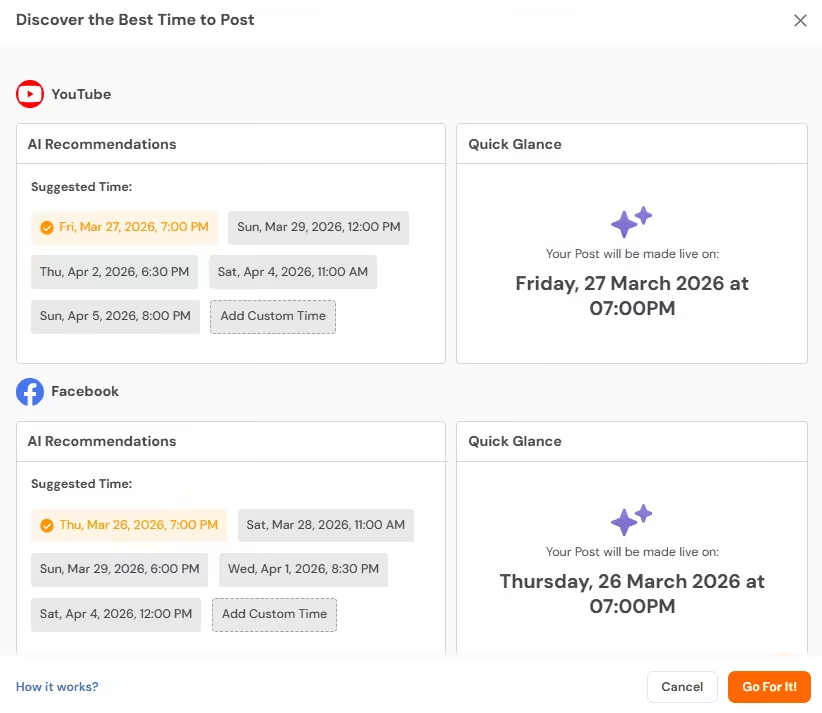
Social Champ’s Best Time to Post Feature -
Tweak Your Captions and CTAs
Not all platforms play by the same rules. Links work beautifully on LinkedIn and X, but on Instagram, you’ll need a workaround with a “link in bio“.
Similarly, hashtags work great on Instagram, but can feel spammy on TikTok or Facebook. When cross-posting, you can swap out these tiny little details in the copy to see a huge difference in engagement.
-
Use a Scheduling Tool to Keep It Simple
Manually posting to five different apps is a recipe for typos and missed opportunities. You need to find a social media management tool that lets you build one core post, then customize the copy, images, and timing for each platform, all in one place. You’ll save tons of time and make sure every post feels native to where it lands.
Why Waste Another Hour?
Conclusion
If you’re a marketer, you need to be proactive and smart. Cross-posting moves you a step closer to that. You don’t have to create a separate post for each platform, and you don’t have to post manually either.
With the help of Social Champ, you can post to all social media at once, without even paying that much, and if you don’t want to pay at all, there’s a free plan you can try as well. But hey, don’t let a few dollars stop you from saving thousands of hours that you will otherwise be spending on posting manually to each platform one by one.
All social media platforms have a different set of audiences, and as a business owner, you should explore as many opportunities as you can. Let Social Champ be a part of this journey with you and schedule away!











keto acv gummies
Social media can be a really powerful tool to generate quality leads for the business if used in the right way to target the audience. Great read.
Murali Krishna
Thanks a lot, I am randomly searching in google and opening your site. seems good, luckily found a great article. and it is useful for my blog.
Bright
You got a nice write up here and I really want to thank you for sharing this post as it contains a lot of information, keep up this good work.
Jeandavis
I appreciate the useful information you provide in your writings regarding social media marketing I’ll save your blog and come back to it frequently. I’m confident I’ll learn a lot of new things right here! Best of success in the future!
Robert
Thanks for some great Facebook post ideas, I’ll be trying these! I’m working in research so looking to business and marketing to help us share about research.
Fedric
I appreciate you sharing this blog. Really thank you! Really Cool.
Emily
Thank you for another great article. Where else could anyone get that kind of information in such a perfect way of writing? I have a presentation next week, and I am on the look for such information.
Apple
Here is some strong info with respect to.
Anonymous
some genuinely interesting information, well written and broadly user-friendly.
Anonymous
You completed some good points there. I did a search on the theme and found most persons will have the same opinion with your blog.
Vivienne
Fairly insightful post. Never thought that it was this simple after all. I had spent a good deal of my time looking for someone to explain this topic clearly and you’re the only one that ever did that. Kudos to you! Keep it up
Anonymous
Valuable information. Lucky me I found your site by accident, and I am shocked why this accident didn’t happen earlier! I bookmarked it
bcbg uk
Let me justify that in perfect detail.
bcbg sale
This is very fascinating, You’re a very professional blogger. I’ve joined your RSS feed and look ahead to in quest of more of your excellent post. Additionally, I’ve shared your website in my social networks!
russell and bromley
Enjoyable read, thanks
russell and bromley
Anonymous
What a brilliant read buddy. Thank you But I am experiencing an issue with your RSS feed. Unable to subscribe. So anybody experiencing same RSS problem? Anybody who can assist kindly replies. Thanks!
Anonymous
I like the helpful information you provide in your articles. I will bookmark your weblog and check again here regularly. I am quite certain I will learn lots of new stuff right here! Best of luck for the next!
Anonymous
I think you’ve made some actually interesting points. Not as well many people would truly think about this the way you just did. I’m actually impressed that there’s so a lot about this subject that’s been uncovered and you did it so properly, with so a lot of class. Excellent 1 you, man! Seriously good stuff right here.
Anonymous
Dear admin, thanks for providing this blog post. I found it great. Take care,
Anonymous
Without difficulty, the post is really the best on this deserving topic. I agree with your results and will thirstily look onward to your approaching updates. Saying many thanks will not just be enough, for the tremendous ability in your writing. I will instantly pick up your RSS feed to stay privy of any updates. Very good work and a lot of success in your future!
Anonymous
Awesome post! I’ve been trying to come up with a good internet business idea for a while. Instead, I have come up with a great non-internet business idea, which kind of sucks in a way because this idea requires a lot of money, as opposed to a full internet-based business that might not require that much to get it started. I’m not giving up though. I recently started a blog where I plan to document my steps for starting my company. I figured it would keep me motivated and force me to keep at it. I also hope it will motivate the readers to keep trying to accomplish their goals. By the way, I love your site. I’ll be adding it to my list of interesting blogs.
Anonymous
Very well written post. It will be valuable to anybody who implements it, as well as yours truly :). Keep up the good work – can’t wait to read more posts.
Anonymous
My sister saved this internet site for me and I have been going through it for the past several hrs. This is really going to assist me and my classmates for our class project. By the way, I like the way you write.
Anonymous
I’m having a weird problem I cannot subscribe your RSS feed, I’m using google reader fyi.