Join Our Discord Community

AI Social Media Assistant vs. AI Content Generator: What’s the Difference?

Confused between an AI content generator and an AI social media assistant? Learn the key differences and see how Social Champ's Switch combines both.

Published on: Oct 9, 2026
Written by: Afirah Shaikh
| Reviewed by: Masfa Ejaz 
Share:
AI Social Media Assistant

Okay, let’s clear up something that’s been bugging me for a while. Every time I scroll through marketing Twitter (or X, whatever), I see tools calling themselves “AI social media assistants” when really, they just spit out captions.

And on the flip side, some genuinely powerful AI agents get lumped in with basic caption generators because nobody’s bothered to explain the difference. So let’s actually break this down.

You could be talking about a tool that writes you five caption options, or a tool that plans your entire month, schedules it, replies to your DMs, and tells you why last week’s Reel flopped. Those are wildly different things, but they get marketed almost identically.

I think the confusion happens because both tools use AI, both touch your social content, and both promise to save you time. But what they actually do is night and day. So let’s untangle it, one piece at a time.

Short Summary

  • AI content generators create text, images, or video on request but stop there- no memory, scheduling, or platform awareness
  • AI social media assistants manage the full workflow: creating content, scheduling, analytics, approvals, and inbox replies
  • The key difference is scope: generators only handle content; assistants handle content plus everything around it
  • Assistants offer autonomy levels (draft, approve, auto), while generators have none and always wait for a prompt
  • Generators are usually standalone tools; assistants integrate directly into your social media management workflow
  • Solo creators needing occasional help can get by with a generator; growing teams managing calendars, approvals, and multiple accounts need a full assistant
  • Most brands eventually need both, but tend to outgrow generators alone
  • Social Champ’s Switch is built as a full AI assistant, drafting content, managing calendars, reading analytics, handling approvals, and supporting ad campaigns
  • Switch lets you choose your control level (Draft, Approve, Auto) with a kill switch and platform rules always in place

What Is an AI Content Generator?

An AI content generator does exactly one job really well: it creates. You give it a prompt; it gives you output. Caption, blog paragraph, product image, short video clip, whatever format you need. It’s a creative tap you can turn on whenever you’re stuck staring at a blank screen.

Common Use Cases

Most people use content generators for:

  • Writing captions or hooks for a post
  • Drafting blog intros or outlines
  • Generating quick graphics or product images
  • Coming up with ad copy variations
  • Brainstorming content ideas when you’re out of them

Limitations

Here’s where it falls short, honestly. A content generator doesn’t know your posting schedule. It doesn’t know that your last three Reels underperformed, or that Thursday afternoons crush it for your audience. It just generates. Once the words are out, its job is done; what happens next (does it fit your brand voice? does it get scheduled? does it actually perform?) is entirely on you.

Stop Juggling Tools, Start Using One Assistant!

From drafting captions to scheduling posts and reading your analytics, Social Champ's Switch handles it all in one place, so you can focus on strategy, not busywork.

What Is an AI Social Media Assistant?

An AI social media assistant is a different beast altogether. Instead of just creating, it’s involved in the whole lifecycle: ideation, drafting, scheduling, publishing, monitoring performance, even replying to comments or DMs. Think of it less like a content vending machine and more like an actual teammate who happens to be really fast.

Common Use Cases

  • Drafting and scheduling posts based on your calendar gaps
  • Pulling analytics and explaining what’s working (and what isn’t)
  • Managing approval workflows for teams
  • Reading brand mentions and sentiment
  • Handling routine inbox replies

How It Differs from a Pure Content Generator

The biggest difference? Context and continuity. A social media assistant remembers your brand voice, understands your calendar, knows your past performance, and can act across several tools instead of just handing you a block of text and walking away.

Key Differences at a Glance

Tasks AI Content Generator  AI Social Media Assistant 
What it does Creates content on request Manages content + workflow end-to-end
Memory of your brand/history None Learns and applies brand voice, past posts
Autonomy None! Always waits for a prompt Can draft, queue for approval, or act within limits
Scheduling & publishing Not included Built in
Analytics & reporting Not included Built in

Do You Need One, the Other, or Both?

It is important to understand your needs before you get an AI agent because in most cases, people end up getting the wrong one. So here’s how you can decide whether you need an AI content generator or an AI social media assistant!

  1. When a Content Generator Is Enough

    Honestly, if you’re a solo creator who just needs a hand writing captions or brainstorming ideas once in a while, a content generator might be all you need. No shame in that; sometimes you just need help getting unstuck.

  2. When You Need a Full Assistant

    But if you’re managing multiple accounts, juggling a content calendar, working with a team that needs approvals, or trying to actually understand why your content performs the way it does, a generator alone won’t cut it. You need something that sees the bigger picture.

  3. Why Most Growing Brands End Up Needing Both

    In my experience, most teams start with a generator because it’s the easy entry point, and then quickly realize they need something that also handles the “after the content is written” part: scheduling, review cycles, performance tracking. That’s really the natural evolution from generator to assistant.

Featured Article: 10+ Social Media Automation Tools and Their Benefits

Meet Switch: Social Champ’s AI That Goes Beyond Content Generation

Okay, this is the part where I get to talk about something I’m genuinely excited about. Social Champ’s AI, Switch, is built to be exactly the kind of assistant we just described, not just a content generator with a fancy name slapped on it.

Switch can draft captions, hooks, images, and carousels like any generator would, but it doesn’t stop there.

It can also check calendar gaps, read your analytics and explain performance in plain language, apply labels to drafts, manage approval workflows, and even read brand mentions and sentiment. It’s built to understand your brand voice over time, not just generate generic text.

Choose Your Level of Control

What I personally like most about Switch is that it doesn’t force an all-or-nothing choice on autonomy. You get to pick how much you trust it, task by task:

  • Draft: Switch prepares the work; you take it from there
  • Approve: Switch queues the work and waits for your green light
  • Auto: For lower-risk tasks, Switch can complete them within strict limits you’ve set

And there’s always a kill switch, plan limits, and platform rules working in the background, so you’re never handing over more control than you’re comfortable with. That balance- genuinely useful automation without losing your grip on the wheel- is what separates an assistant like Switch from a plain content generator.

How to Use Switch?

If you’re new to Social Champ, here’s a step-by-step guide to using Switch so you can also incorporate AI into your social media.

  • Login to your Social Champ account and click on “Ask Switch”
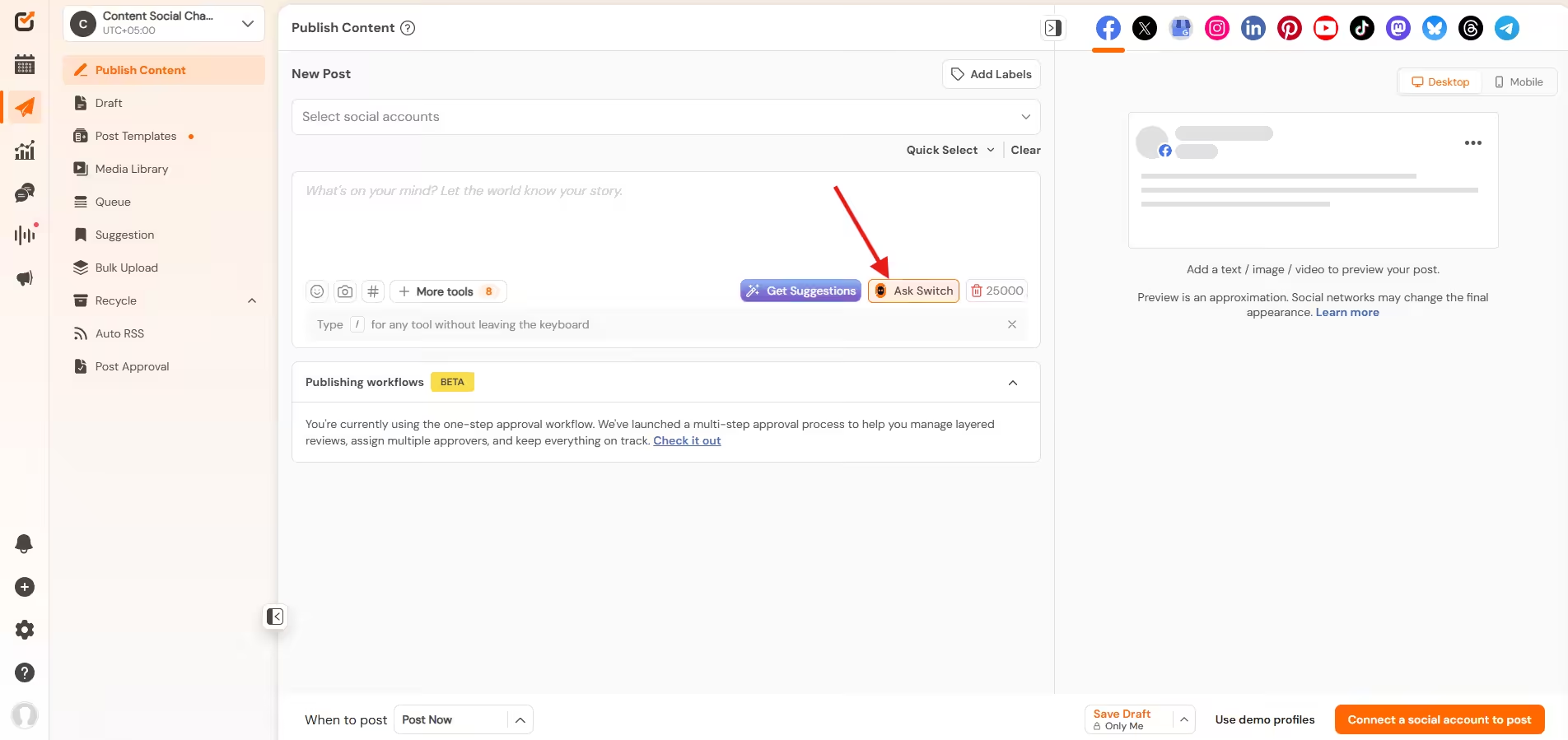
    Click on Ask Switch
    Click on Ask Switch


  • Scroll down to see options, click what you want Switch to do; here clicked on content creation.
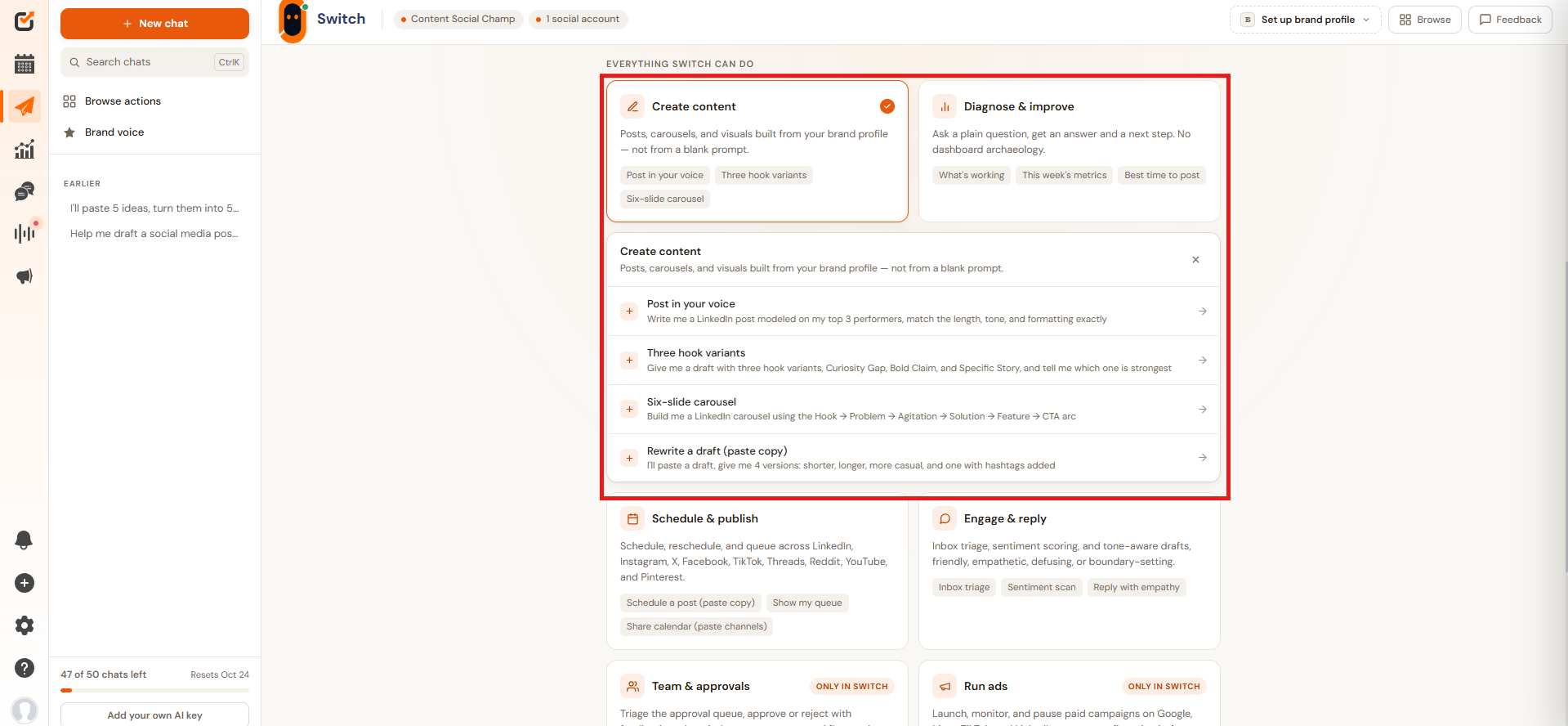
    Click on Content Creation
    Click on Content Creation


  • Send the prompt and continue talking to Switch to get the right results.
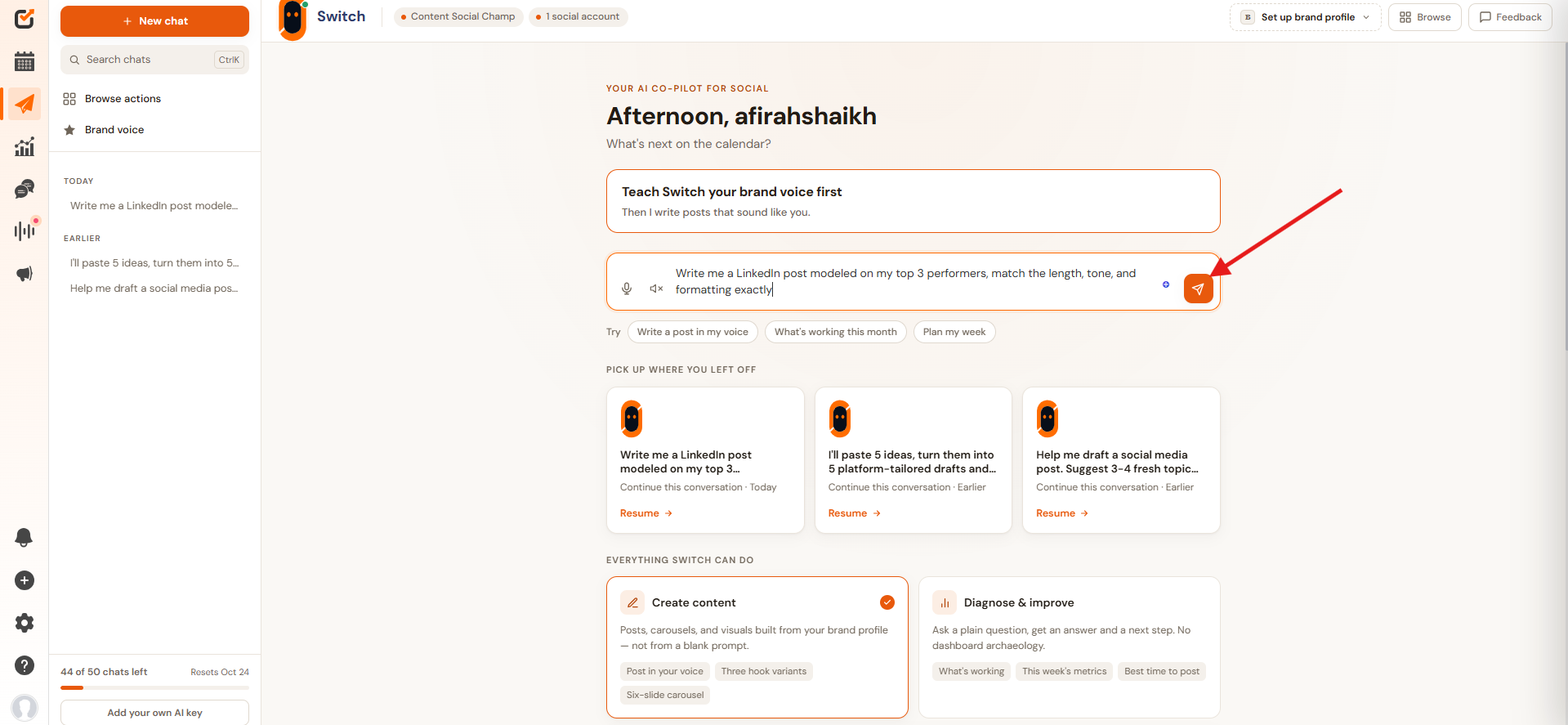
    Send the Prompt
    Send the Prompt

Let Switch Do the Heavy Lifting!

Social Champ's Switch goes beyond content generation: plan, publish, and track performance, all guided by AI that actually understands your brand. 

Conclusion

At the end of the day, it’s not about which tool is better; it’s about matching the tool to the job. Need quick content help now and then? A generator will do fine. Managing an entire social presence, team, and calendar? You want an assistant that can see the whole board, not just write one line at a time.

If you’re leaning toward the latter, Switch is worth a look; it’s built to handle the whole workflow, not just the writing part.

Featured Article: Best Social Media Management Tools for Marketers

Frequently Asked Questions

1. Can an AI Content Generator Schedule Posts for Me?

No, most content generators stop at creation. You’ll need to manually copy the output into a scheduling tool or your own social media management platform.

2. Is an AI Social Media Assistant More Expensive Than a Content Generator?

Not necessarily; it depends on the platform and plan. Many assistants are bundled into social media management tools you’re likely already paying for. 

3. Do I Need to Give an AI Assistant Full Control Over My Accounts?

Not at all. Good assistants, like Switch, let you choose your level of control, from just drafting suggestions to full approval-based automation.

4. Which One Is Better for a Solo Creator?

If you just need occasional help writing captions or ideas, a content generator is probably enough. As you scale up, an assistant becomes more valuable.

5. Can an AI Assistant Replace My Social Media Manager?

Not really; think of it as a teammate that handles the repetitive, time-consuming parts, while you stay in charge of strategy and final decisions.

Afirah Shaikh is a content marketer at Social Champ who turns strategy into storytelling. With three years of experience in content marketing and an MBA to her name, she has worked with brands across the digital marketing, e-commerce, and SaaS industries worldwide to create content that performs. She is known for her ability to balance creativity with purpose to drive results.

Leave the first comment

<script>
document.addEventListener('DOMContentLoaded', function() {
    function transformTablesForMobile() {
        if (window.innerWidth > 767) return; // Only for mobile
        
        const tables = document.querySelectorAll('#brxe-kpxjkv table');
        
        tables.forEach(table => {
            if (table.classList.contains('transformed')) return;
            
            let headers = [];
            const thead = table.querySelector('thead');
            const tbody = table.querySelector('tbody');
            
            // Get headers - check for both th and td in thead
            if (thead) {
                const headerRow = thead.querySelector('tr');
                if (headerRow) {
                    // First try th, then td
                    let headerCells = headerRow.querySelectorAll('th');
                    if (headerCells.length === 0) {
                        headerCells = headerRow.querySelectorAll('td');
                    }
                    headers = Array.from(headerCells).map(cell => cell.textContent.trim());
                }
            } else if (tbody) {
                // If no thead, take first row
                const firstRow = tbody.querySelector('tr');
                if (firstRow) {
                    let headerCells = firstRow.querySelectorAll('th');
                    if (headerCells.length === 0) {
                        headerCells = firstRow.querySelectorAll('td');
                    }
                    headers = Array.from(headerCells).map(cell => cell.textContent.trim());
                }
            }
            
            // Return if no headers found
            if (headers.length === 0) return;
            
            // Get all data rows
            const rows = Array.from(tbody.querySelectorAll('tr'));
            const dataRows = rows; // All tbody rows are data rows when thead exists
            
            // Create new structure
            const newContainer = document.createElement('div');
            newContainer.className = 'mobile-table-container';
            
            // Create a section for each column
            headers.forEach((header, colIndex) => {
                const columnSection = document.createElement('div');
                columnSection.className = 'mobile-column-section';
                
                const columnHeader = document.createElement('div');
                columnHeader.className = 'mobile-column-header';
                columnHeader.innerHTML = header; // Use innerHTML to preserve formatting
                columnSection.appendChild(columnHeader);
                
                const columnList = document.createElement('div');
                columnList.className = 'mobile-column-list';
                
                dataRows.forEach(row => {
                    const cells = row.querySelectorAll('td');
                    if (cells[colIndex]) {
                        const item = document.createElement('div');
                        item.className = 'mobile-column-item';
                        item.innerHTML = cells[colIndex].innerHTML;
                        columnList.appendChild(item);
                    }
                });
                
                columnSection.appendChild(columnList);
                newContainer.appendChild(columnSection);
            });
            
            table.style.display = 'none';
            table.classList.add('transformed');
            table.parentNode.insertBefore(newContainer, table.nextSibling);
        });
    }
    
    transformTablesForMobile();
    
    // Handle window resize
    let resizeTimer;
    window.addEventListener('resize', function() {
        clearTimeout(resizeTimer);
        resizeTimer = setTimeout(function() {
            const containers = document.querySelectorAll('.mobile-table-container');
            const tables = document.querySelectorAll('#brxe-kpxjkv table.transformed');
            
            if (window.innerWidth > 767) {
                containers.forEach(c => c.style.display = 'none');
                tables.forEach(t => t.style.display = 'table');
            } else {
                containers.forEach(c => c.style.display = 'block');
                tables.forEach(t => t.style.display = 'none');
            }
        }, 250);
    });
});
</script>
/* Sticky header for tables WITH thead */
#brxe-kpxjkv table thead {
    background-color: #f0ebf8;
    position: sticky;
    top: 0;
    z-index: 2;
}

#brxe-kpxjkv table thead th {
    background-color: #f0ebf8;
    position: sticky;
    top: 0;
}

/* Sticky header for tables WITHOUT thead (first row only) */
#brxe-kpxjkv table:not(:has(thead)) tbody tr:first-child {
    background-color: #f0ebf8;
    position: sticky;
    top: 0;
    z-index: 2;
}

#brxe-kpxjkv table:not(:has(thead)) tbody tr:first-child td,
#brxe-kpxjkv table:not(:has(thead)) tbody tr:first-child th {
    background-color: #f0ebf8;
    position: sticky;
    top: 0;
}


/* Mobile Column Layout */
@media (max-width: 767px) {
  #brxe-kpxjkv table{
    max-height:2000px;
  }
    .mobile-table-container {
        display: block;
        margin: 20px 0;
      border-radius: 12px;
      overflow: hidden;
    }
    
    .mobile-column-section {
        border: 1px solid #E0E0E0;
        overflow: hidden;
        background: white;
    }
    
    .mobile-column-header {
        background-color: #E3DFF5;
        padding: 15px;
        font-weight: bold;
        font-size: 16px;
        color: #333;
    }
    
    .mobile-column-list {
        padding: 0;
    }
    
    .mobile-column-item {
        padding: 15px;
        border-bottom: 1px solid #F0F0F0;
        background: white;
        font-size: 16px;
        line-height: 1.6;
    }
    
    .mobile-column-item:last-child {
        border-bottom: none;
    }
    
    .mobile-column-item:nth-child(odd) {
        background-color: #F7F6FC;
    }
    
    .mobile-column-item:nth-child(even) {
        background-color: #FAFAFA;
    }
    
    .mobile-column-item strong {
        color: #333;
        font-weight: 600;
    }
}

A Simplified Social Media Management Tool

Social Champ is your AI-powered social media management tool.

Schedule, analyze, listen, and track competitors – all in one platform.

Try now, Start free
No credit card required!
Related Blogs
How AI Agents Can Help Manage Social Media Campaigns
Oct 9, 2026
I want to start with a confession, because I think it sets up everything else in this post. For about…
How to Use an AI Social Media Assistant for Daily Social Media Tasks
Oct 9, 2026
If you're managing social media for even one brand, you already know the real job isn't "be creative"; it's juggling…
AI-Powered Community Management: Automating Replies Without Losing the Human Touch
Oct 8, 2026
Let me grab a coffee first, because this is a topic I’ve strong opinions about. I test apps for a…
Wait, before you go...👋

Don't let your Social Growth stop here.

Get 14 days of Social Champ Pro - Completely free!
Schedule unlimited posts, analyze performance, and manage all your social media from one place.

Unlimited
Scheduling

In-Depth
Analytics

Manage Multiple
Accounts

Start My 14-Day Free Trial

No credit card required

Cancel anytime

Easy setup

Loved by 10,000+ marketers and businesses

Secure & Reliable

#1 Rated Social Media Management Tool