If you run or work at a social media agency, you already know the feeling. You land a new client, you’re thrilled, and then reality hits: you now have one more Instagram calendar to plan, one more set of reports to pull, one more inbox to babysit. Multiply that by however many clients you’re juggling, and it’s no wonder agency life can feel like you’re always one step behind.
I’ve been down this road myself, and honestly, AI for social media agencies has been the first thing that’s actually made a dent in that workload, not by replacing the team, but by taking the repetitive stuff off our plates. In this post, I want to walk you through exactly what you can (and honestly, can’t yet) automate as an agency, based on what I’ve seen work in practice.
Short Summary
- AI can now handle most of the repetitive, time-consuming work agencies deal with daily: content drafts, scheduling, reporting, listening, and basic approvals.
- Content creation (captions, hooks, images, carousels, brand-voice-matched drafts) is one of the easiest and highest-impact places to start automating.
- Scheduling and publishing automation saves time through bulk scheduling and platform-specific checks, though some tasks (queue controls, file uploads) still need manual clicks.
- Analytics automation turns hours of report-building into a quick review; charts, top posts, and best-time insights are generated automatically, but results still need human sanity-checking.
- Social listening and competitor tracking run quietly in the background, catching mentions and trends agencies would otherwise miss.
- Approval workflows can be automated to keep sign-offs and reminders moving without anyone manually chasing people down.
- Community management automation drafts replies to common questions, but sensitive or risky messages should always be escalated to a human.
- Paid social automation helps with campaign setup and performance tracking, but spend decisions should always require human sign-off.
- Social Champ’s Switch brings all of the above into a single AI assistant, using a Draft/Approve/Auto control model with a kill switch and action history for accountability.
Why Automation Matters for Social Media Agencies
Using AI for social media agencies is much better than managing things manually! You might not see it now, but here’s why it is important for you to let the AI handle your workload.
-
The Scalability Problem
Here’s the thing nobody tells you when you’re growing an agency: revenue can scale a lot faster than your team can. You sign three new clients this month, and suddenly your five-person team is doing the work of ten.
Hiring isn’t instant, and honestly, it’s not always the answer either; sometimes you just need the boring, repetitive 80% of the work handled so your people can focus on the 20% that actually needs a human brain.
-
Client Expectations for Speed and Consistency
Clients don’t really care that you’re stretched thin. They want their posts up on time, their reports on their desk every month, and someone replying to comments before a bad review spirals into a PR headache.
Consistency is the whole game in this industry, and consistency is exactly what humans are bad at when we’re overworked and running on our fourth coffee.
Stop Switching Tabs, Start Using Switch! Let AI Draft It, You Approve It!
Scheduling and Publishing Automation
Once the content’s ready, getting it out the door shouldn’t eat up half your day. This is the unglamorous, purely practical side of automation, but it’s the one that saves the most hours week over week.
-
Bulk Scheduling and Calendar Previews
Manually scheduling posts one by one is the kind of task that makes people quit their jobs. Being able to line up a batch of posts, preview how they’ll look, and schedule them all in one go is a genuine time-saver- not flashy, just practical.
-
Platform-Specific Formatting Checks
Every platform has its own quirks, aspect ratios, character limits, and how a link behaves. Having something automatically flag “hey, this won’t look right on LinkedIn” before you hit publish saves you from those small, embarrassing mistakes that are so easy to miss when you’re moving fast.
Analytics and Reporting Automation
If content creation is the fun part of the job, reporting is usually the part everyone dreads. This is where AI for social media agencies has genuinely earned its keep for me, turning hours of number-crunching into a few minutes of review.
-
Auto-Generated Performance Charts and Monthly Reports
I used to dread the last week of every month because that meant reporting season. Pulling numbers, formatting slides, writing up what happened, hours gone.
Now a lot of that can be generated automatically: charts, top posts, monthly summaries. You still need to add the “so what does this mean for the client” layer yourself, but the grunt work of assembling the report? Gladly automated.
-
Best-Time-To-Post and Top-Post Analysis
Instead of guessing when your audience is online, AI can look at the actual data and tell you. Same with figuring out which posts are quietly outperforming the rest- patterns a busy human might just miss while scrolling through a dashboard at 6 pm.
-
Turning Insights Into Next Content Decisions
The real value isn’t just seeing the numbers; it’s what you do with them. Good AI tools can take “this type of post is working” and turn it into an actual suggestion for what to create next. That’s the difference between reporting and actually improving.
Featured Article: 10 Best Brand Management Software
Social Listening and Competitor Monitoring Automation
Keeping an ear on what’s being said about a brand, and what competitors are up to, used to mean someone manually scrolling and searching for hours. Automation turns that into a background process instead of a to-do list item.
-
Automated Mention and Sentiment Tracking
Trying to manually track every mention of a brand across platforms is a losing battle. Automated listening catches it all in the background and tells you the sentiment, so you find out about a problem (or a win) way before it would’ve crossed your desk otherwise.
-
Keyword-Based Alerts
Setting up alerts for specific keywords, a product name, a competitor, or a trending phrase means you get pinged the moment something relevant pops up, instead of finding out three days late.
-
Competitor Content Tracking
Keeping tabs on what competitors are posting used to mean someone on your team manually checking their profiles every so often. Now that can run quietly in the background, giving you a steady stream of competitive intel without anyone having to remember to do it.
Community Management and Inbox Automation
Inboxes and comment sections are where a lot of agency time quietly disappears. This is a spot where I think AI can genuinely help, as long as it knows when to step back and hand things to a person.
-
Drafting Replies to Common Questions
A big chunk of inbox messages are the same handful of questions over and over: pricing, hours, “where’s my order?” Having drafts ready for those means your community team spends their time on the messages that actually need a real, thoughtful human response.
-
Escalation Rules for Sensitive or Risky Messages
This is the part I actually care about most. A good system should recognize when a message is a complaint, a legal risk, or just clearly upset, and route it to a person instead of trying to handle it automatically. Nobody wants an angry customer to get an automated reply that makes things worse.
Approval Workflows and Team Collaboration
Agency work lives and dies by approvals, and honestly, chasing people down for sign-off is one of the most avoidable time-wasters out there. Automating this part keeps everyone moving without anyone playing project manager all day.
-
Automating Single-Stage Approval Flows
Agency work runs on approvals, client sign-off, internal review, more sign-off. Being able to set up a simple approval flow where content goes out for review automatically, instead of someone chasing people down over Slack, is a small change that makes a surprisingly big difference to how smoothly a team runs.
-
Reminders and Approval Tracking
Nothing kills a deadline faster than an approval sitting untouched in someone’s inbox. Automatic reminders and a clear view of what’s pending, approved, or rejected keeps things moving without anyone having to play project manager all day.
-
Keeping a Clear Decision Trail for Client Accountability
When a client asks “who approved this post?” six months from now, you want an actual answer, not a shrug. Having a recorded history of who approved what and when protects your agency just as much as it helps you stay organized.
Featured Article: Best MCP Servers: 9-Tool Stack for Social Media Creators
How Social Champ’s Switch Brings These Automations Together
Alright, this is the part where I’ll be upfront that I have a favorite. I’ve spent a lot of time with Switch, Social Champ’s AI assistant, and it’s honestly the closest thing I’ve found to “one place that handles the stuff I described above” instead of juggling five different tools.
-
One AI Assistant for Everything
What I like about Switch is that it’s not just a caption generator with a fancy name. You can ask it to draft content, pull performance charts, check what’s happening in your mentions, or list out your pending approvals, all from the same conversation.
For an agency managing multiple clients, not having to hop between five tabs to get a straight answer is a bigger deal than it sounds.
-
A Control Model Built for Agencies
This is the bit that actually won me over. Switch works on three levels: Draft, where it prepares something for you to look at; Approve, where it lines work up for a person to sign off on; and Auto, which it only uses for a narrow set of low-risk, eligible tasks.
As someone who’s genuinely a little wary of handing full control to any AI, I appreciate that the system is built around staying in the loop rather than around replacing you.
How Can You Automate Posting Using Switch?
Automating your social media posts is extremely easy with Switch. Here’s a step-by-step guide on how to do it!
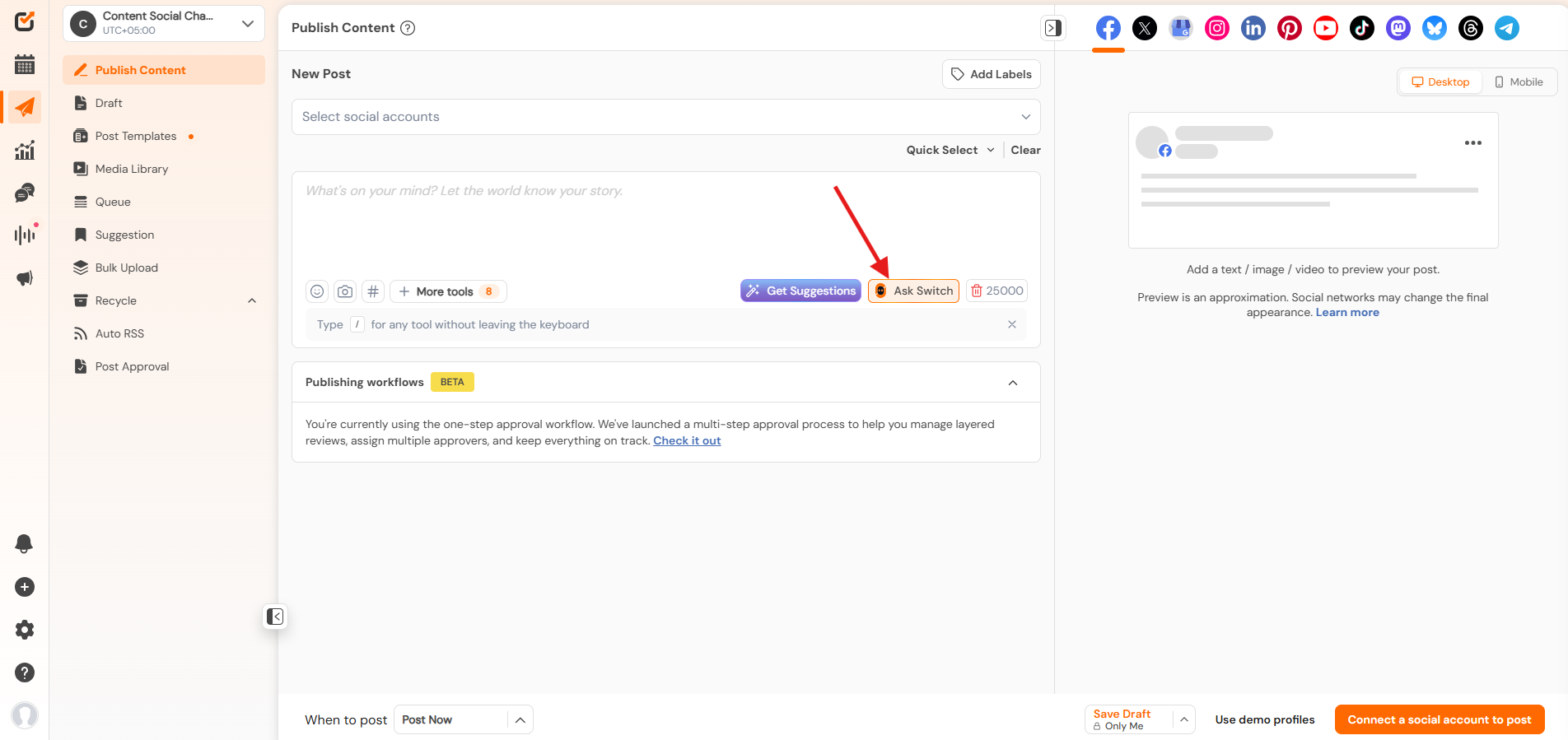
- Login to your Social Champ account and click on “Ask Switch”.
Click on Ask Switch - Scroll down to see the option and click on “Schedule and Publish”.
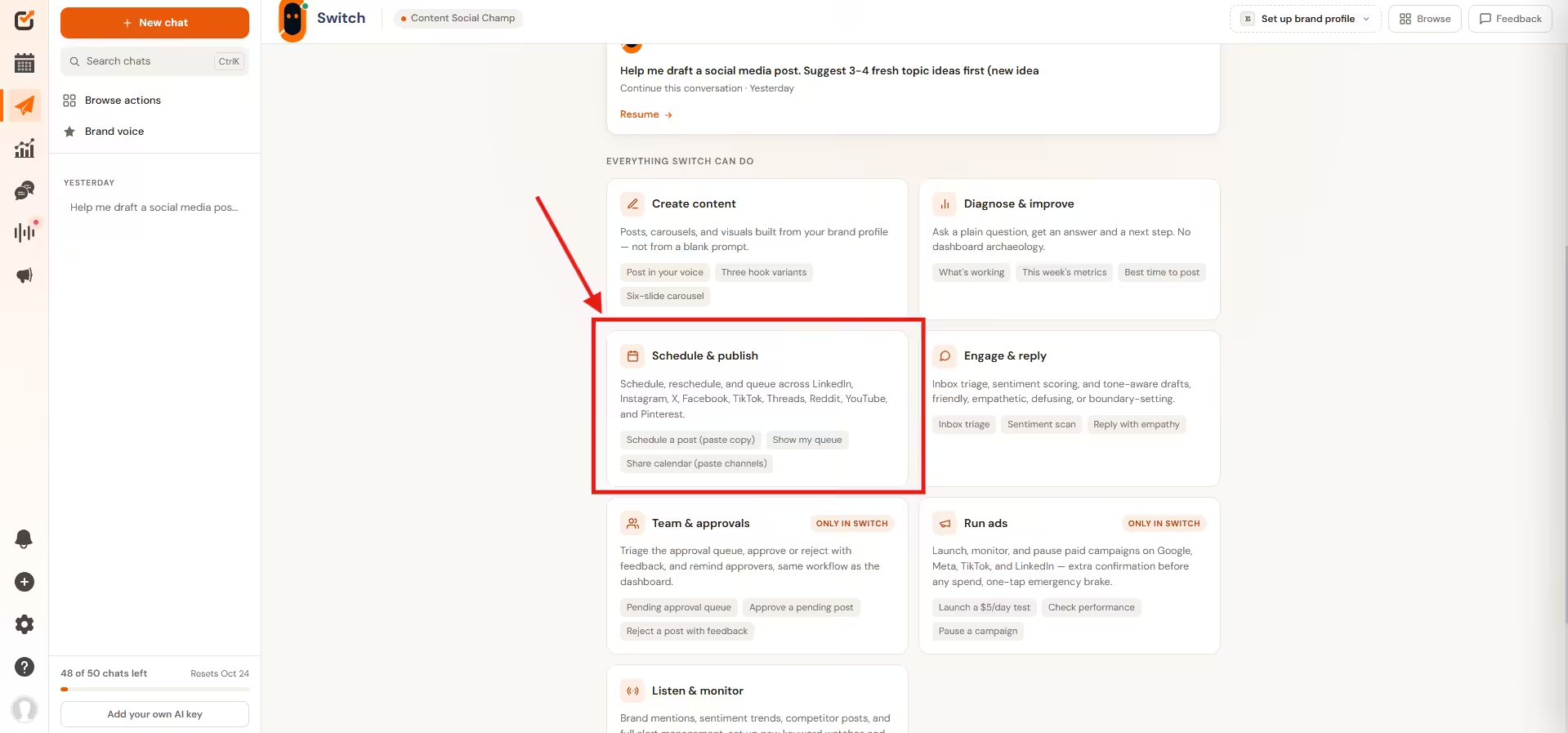
Click on Schedule and Publish - You will see a few options for automation; select your option.
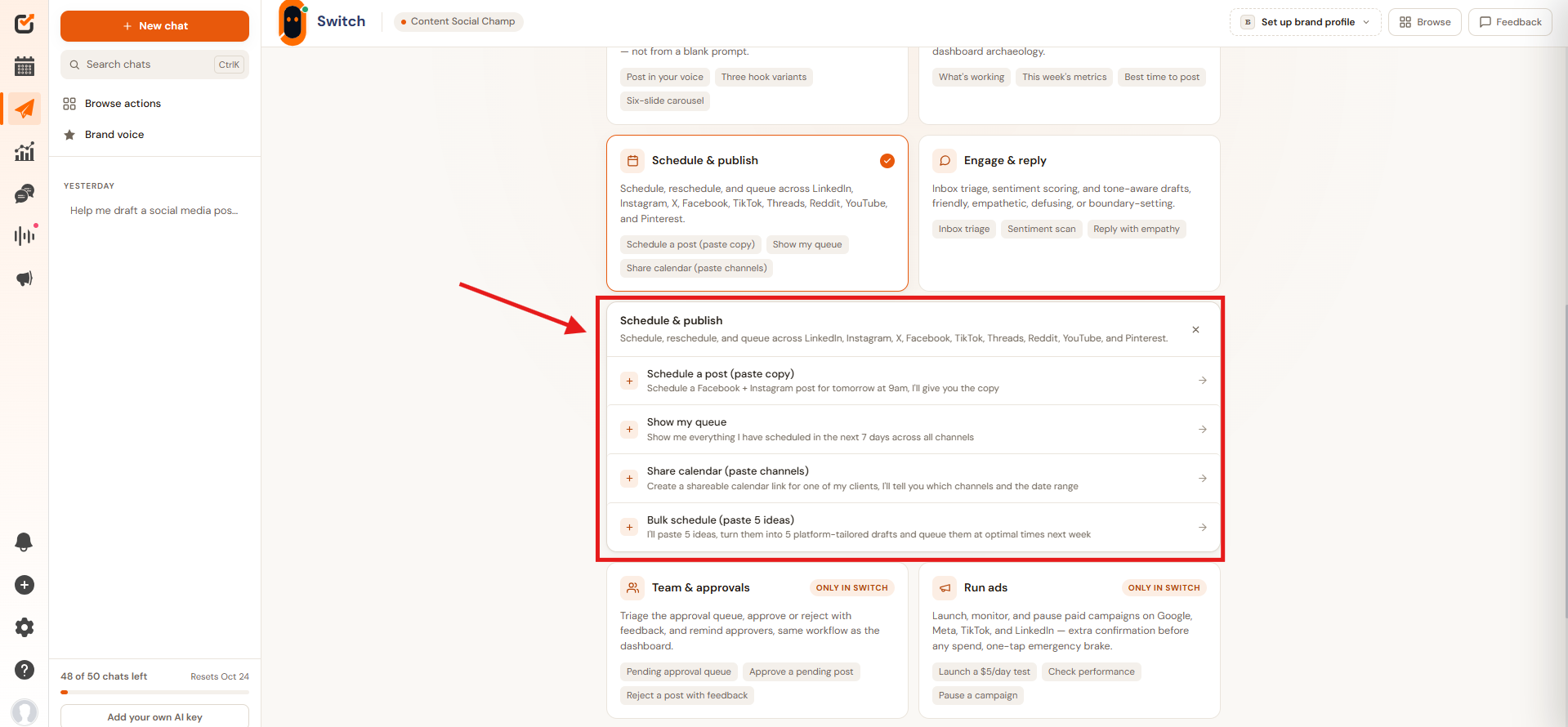
Select Your Prompt - Paste your post ideas.
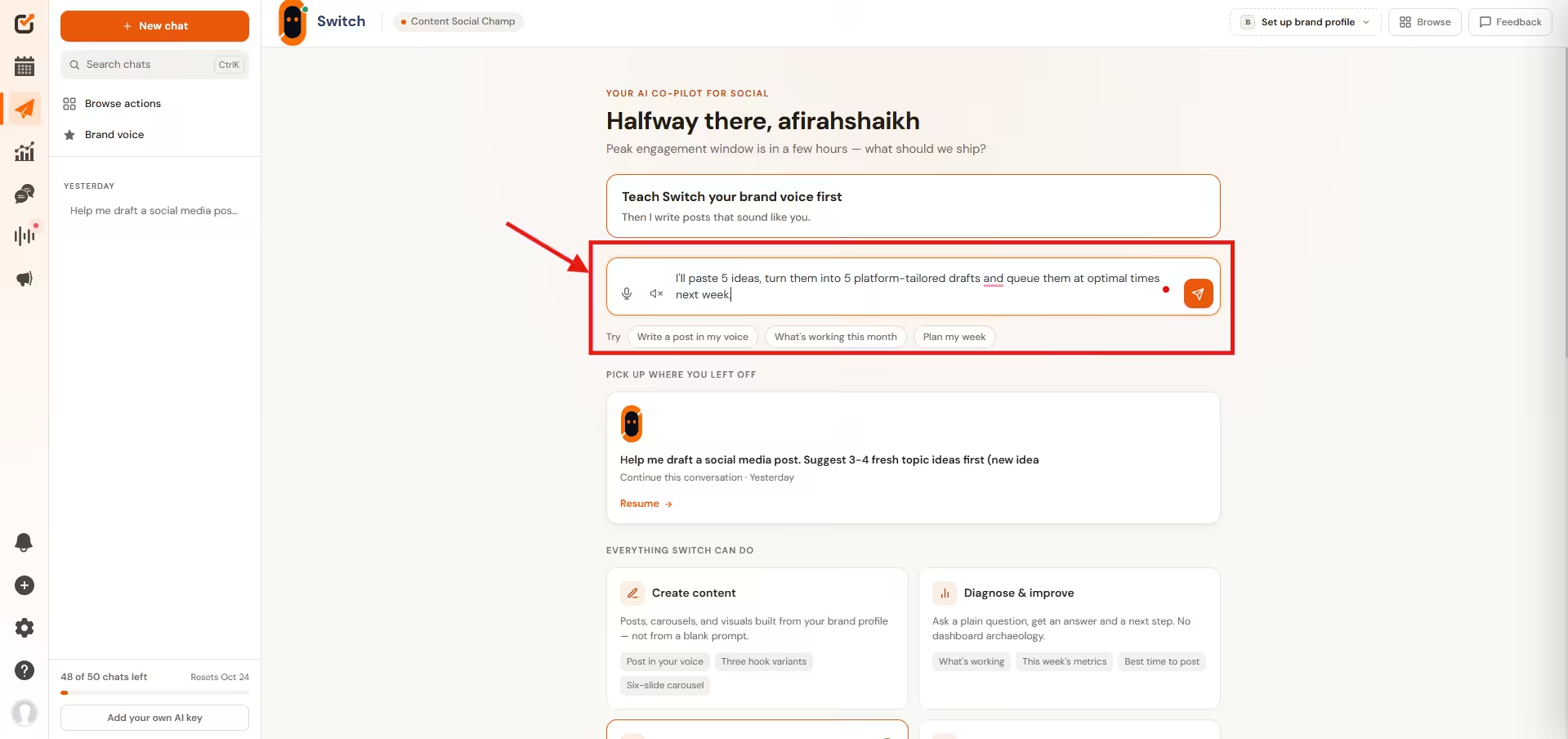
Paste Your Ideas - Switch will create posts with your prompt; go through the content and select “Send to Composer”.
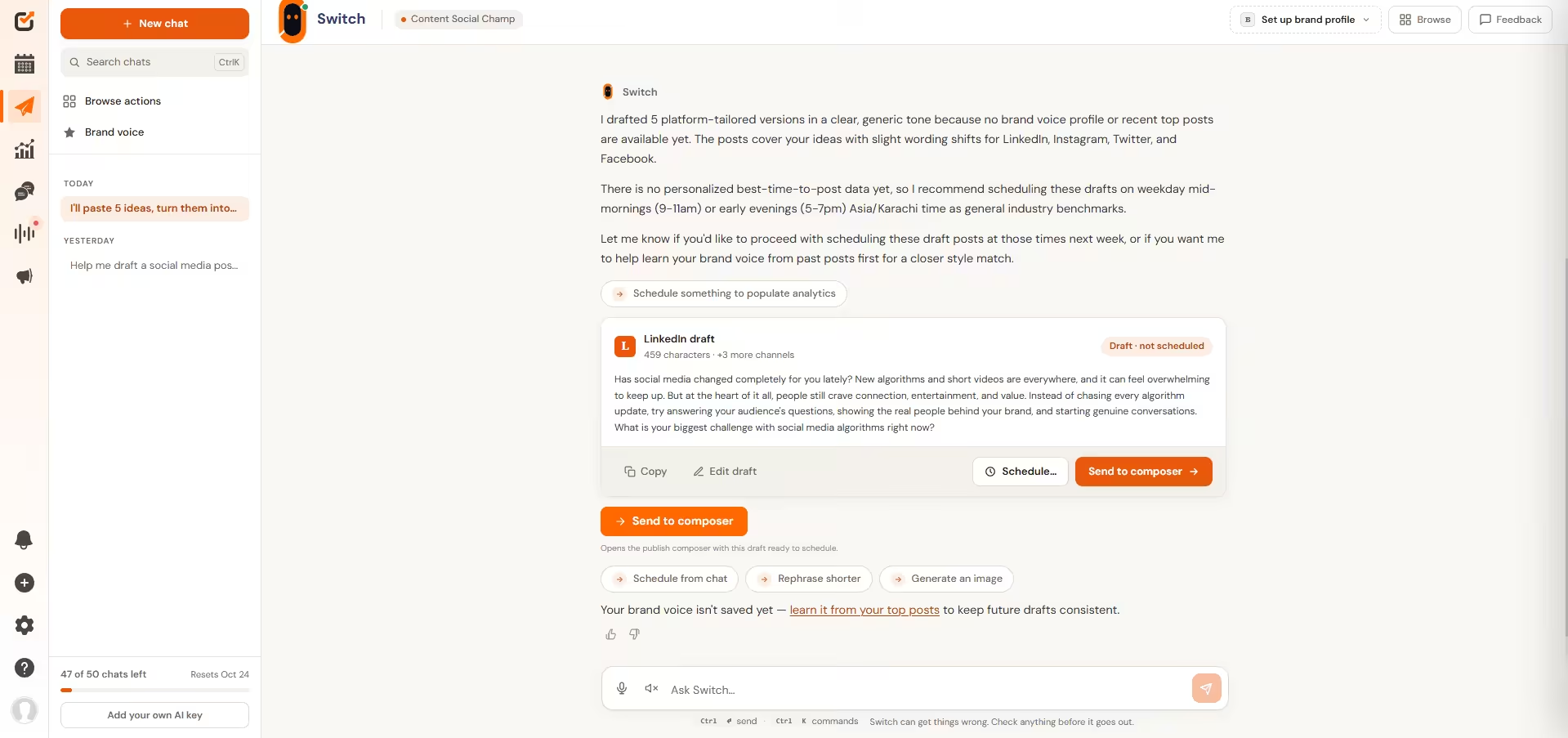
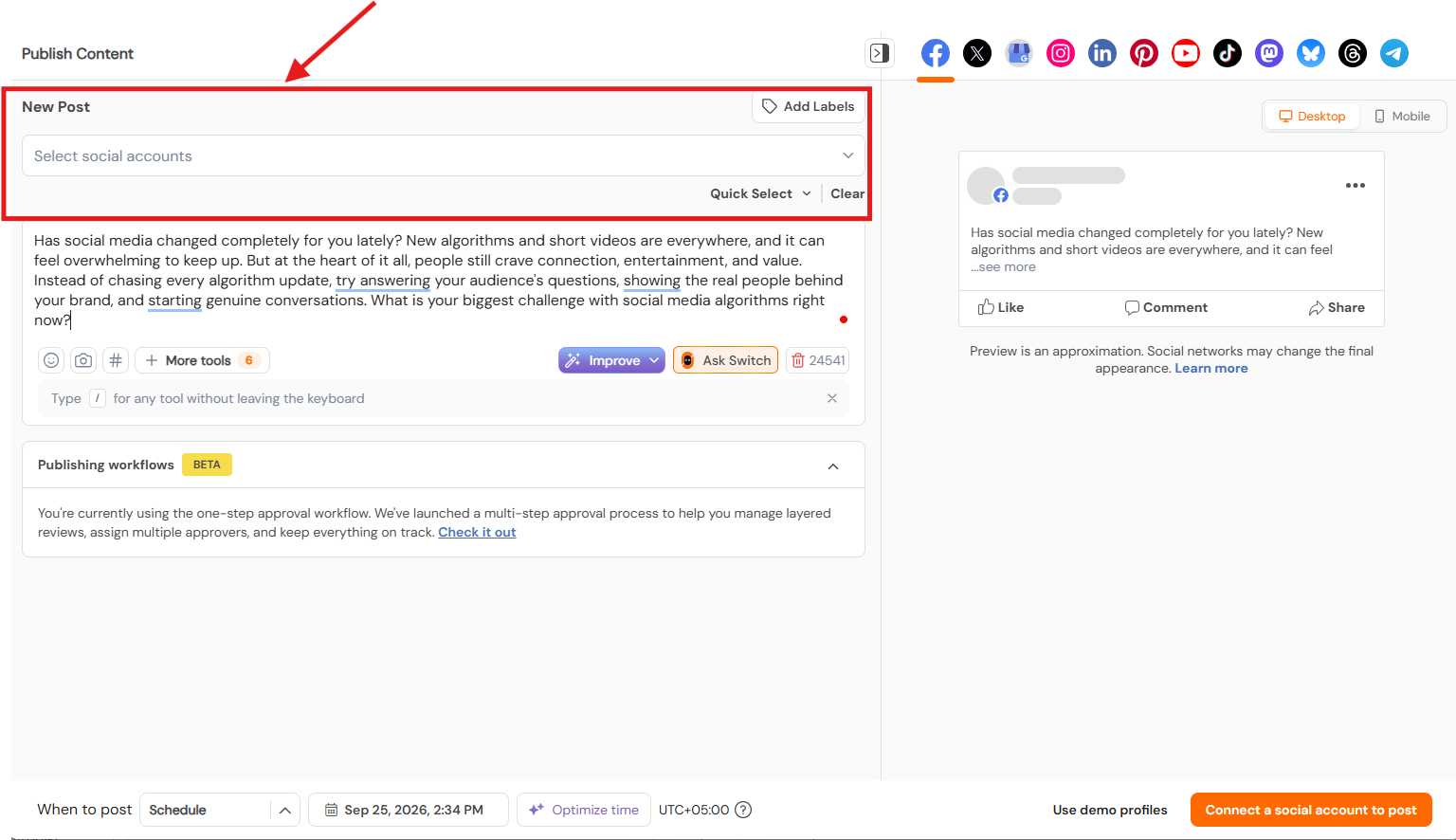
Click Send to Composer - Add your social account where you want to schedule the post; once selected, click on “Schedule.”
Stop Switching Tabs, Start Using Switch!
Conclusion
If there’s one thing I’d want you to take away from this, it’s that the goal was never “automate everything.”
It’s automating the stuff that’s draining your team’s time without adding real value, so the humans on your team can spend their energy on the parts of the job that actually need a human, strategy, relationships, and judgment calls.
Tools like Switch make that a lot more achievable than it was even a year or two ago, but the smartest agencies I know are the ones using AI as a teammate, not a replacement.