I can usually tell when a brand has lost its voice before I even see its logo.
One post sounds polished and serious. The next is packed with slang. Then there’s another one that reads like it was copied from a corporate handbook. None of them are necessarily bad posts, but together, they make the brand feel inconsistent.
That gets even harder when a team publishes across several social platforms. Different writers, different formats, tight deadlines, and a growing pile of content can slowly pull the brand voice in different directions.
This is where I think AI can be genuinely useful. Not because it can magically make every post sound perfect, but because it can help teams follow the same writing standards across their content.
The trick is giving it enough context to understand how your brand actually communicates.
Short Summary
- Brand voice keeps your social content recognizable across different platforms.
- Different writers, platforms, and generic outputs can make that voice inconsistent.
- Clear guidelines and real examples help keep your content closer to your brand.
- AI can create and review content, but human editing keeps the final message authentic.
- Switch brings brand context, existing content, and platform details into the creation process.
- Consistency comes from clear guidelines, strong examples, regular reviews, and human judgment.
What Brand Voice Means on Social Media
Before using AI for brand voice, I think it helps to clear up one common confusion. Brand voice and brand tone aren’t exactly the same thing.
Your brand voice is the personality that stays recognizable across your content. Your tone can change depending on what you’re saying, who you’re talking to, and where you’re saying it.
For example, a brand might be friendly, direct, and slightly playful as part of its overall voice. However, a product announcement on LinkedIn may sound more informative than an Instagram post celebrating a customer milestone.
The personality stays familiar. The delivery changes.
What Makes a Brand Voice Recognizable
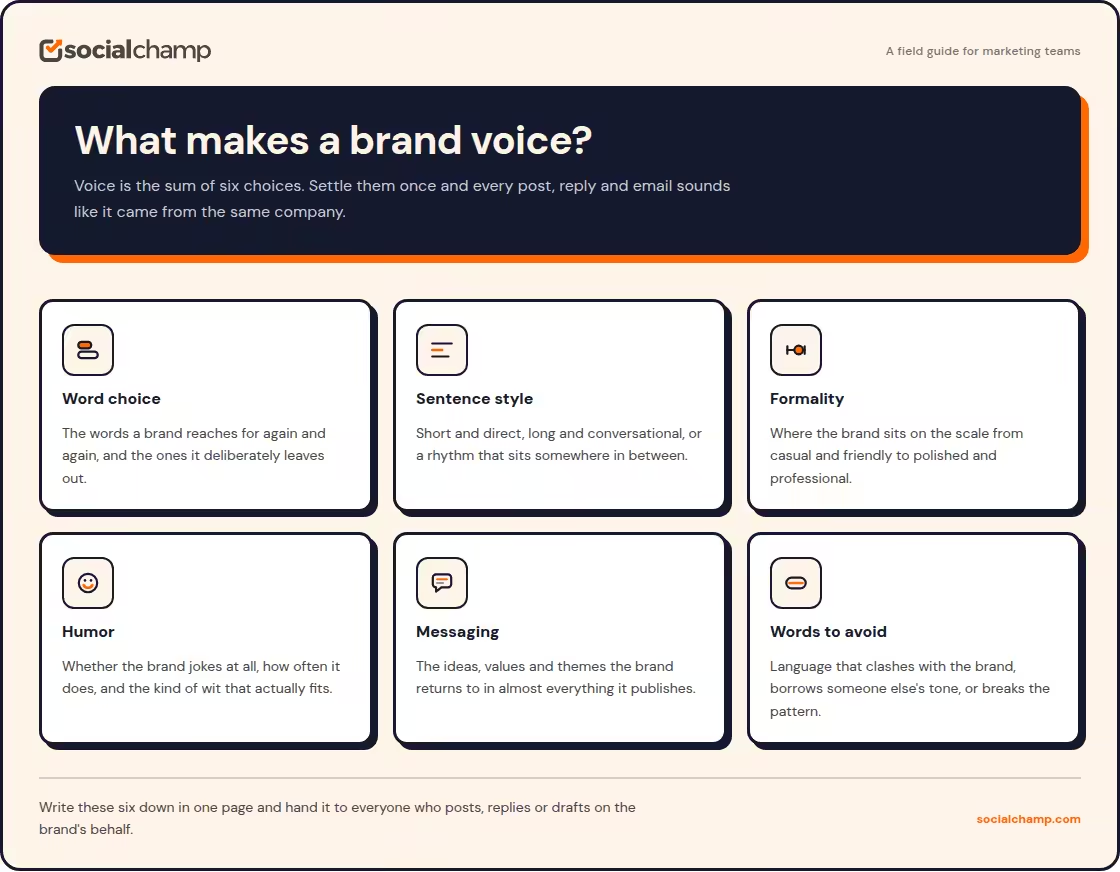
When I look at whether a piece of content sounds like a particular brand, I pay attention to things like:
- The words the brand regularly uses
- Sentence length and writing style
- How formal or casual the language feels
- How much humor the brand uses
- How directly it speaks to the audience
- Topics and ideas it regularly talks about
- Words and phrases it avoids
These details might seem small on their own. Put them together, though, and they create a recognizable personality.
Consistency Does Not Mean Identical Posts
I wouldn’t want every social post from a brand to sound exactly the same. That’d get boring pretty quickly.
A LinkedIn post, Instagram caption, and Facebook update can follow different formats while still sounding like they came from the same company.
The goal is to keep the underlying voice recognizable while adapting the content to each channel.
Does Your Brand Sound Different?
Why Keeping the Same Voice Across Platforms Is Difficult
In theory, maintaining brand voice sounds simple. In practice, it gets messy fast.
I’ve seen this happen when several people contribute to the same social calendar. Everyone understands the brand differently. One writer keeps things short and casual. Another prefers longer explanations. Someone else adds a little too much marketing language.
Over time, the brand starts sounding different depending on who has the keyboard.
Different People Write Differently
Even with brand guidelines, two writers can interpret the same instruction in completely different ways.
“Keep it friendly” can mean conversational to one person and overly casual to another.
That’s why a useful voice guide needs more than a few personality words. Writers need practical examples that show how the brand should sound.
Every Platform Has Its Own Style
Social platforms also create another problem.
The format that works for LinkedIn may not work for Instagram. A short caption might be enough for one post, while another needs more context. When teams adapt content for each platform, they can accidentally change more than the format.
They can change the personality too.
AI Can Make the Problem Worse
This is where I think many teams run into trouble.
AI can produce a perfectly readable social post in seconds. But readable doesn’t automatically mean recognizable.
If I give an AI tool a vague instruction such as “write a professional LinkedIn post,” I shouldn’t be surprised when the result sounds like thousands of other professional LinkedIn posts.
Here the main problem is the lack of brand context.
Featured Article: 10 Best Brand Management Software Platforms
How to Use AI to Keep Your Brand Voice Consistent
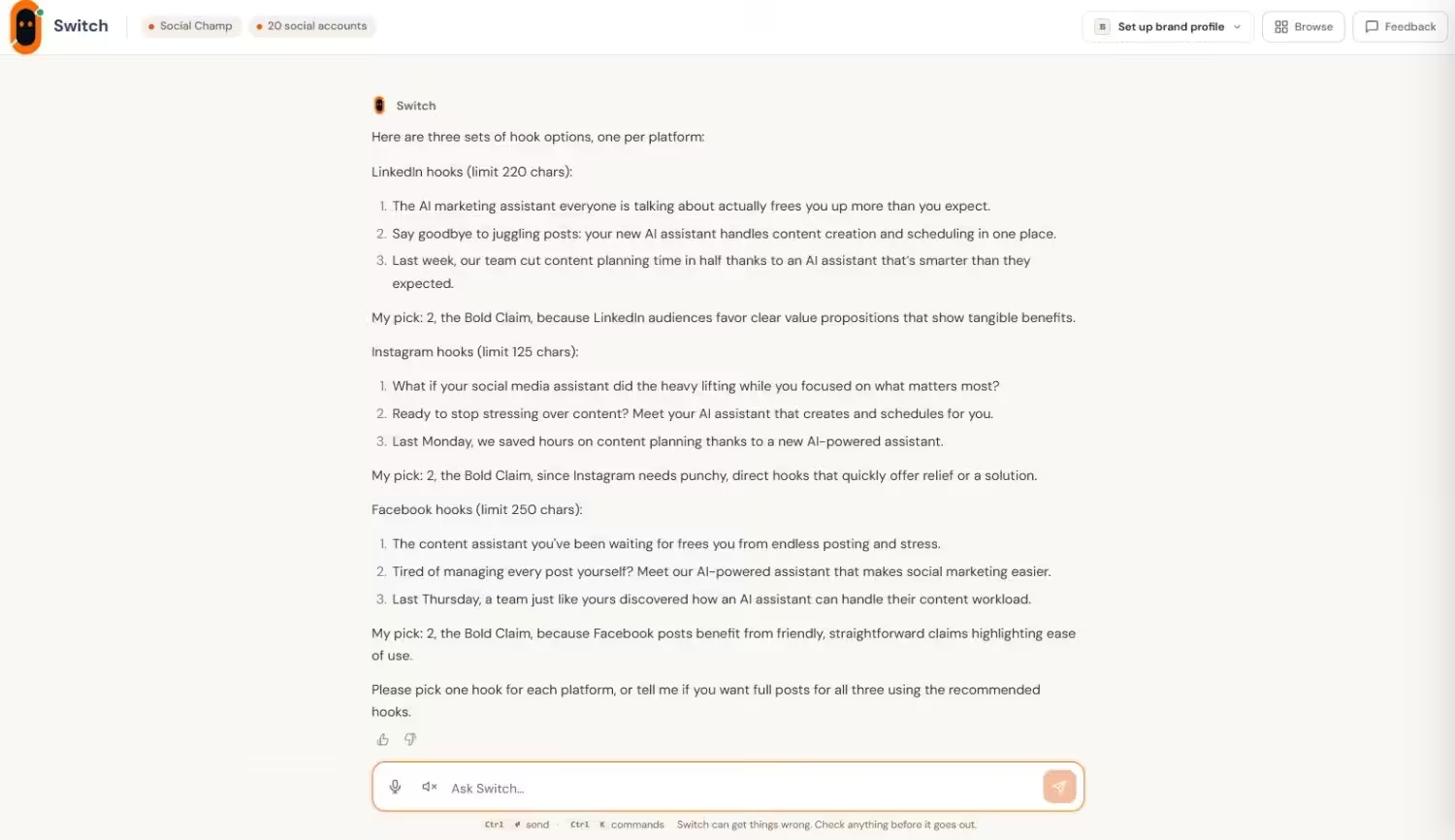
Once you’ve the right information, AI becomes much more useful for maintaining a consistent writing style.
Here are the approaches I’d use.
Give AI Examples of Your Existing Content
I’d start with real examples rather than a long list of adjectives.
If your brand already has posts that sound exactly right, use those as references. Pick examples that reflect the current voice and cover different types of content.
It also helps to include examples of what doesn’t work. For instance, you might show that your brand prefers direct language instead of exaggerated claims or avoids overly formal wording.
The more concrete the examples, the easier it is to give AI a clear direction. In Switch, these become reference posts, which is what the Brand Profile learns your voice from.
Turn Brand Guidelines Into Practical Instructions
A brand guide should answer questions a writer actually has.
Should sentences be short or detailed? Is humor welcome? Does the brand speak directly to the reader? Are contractions okay? Which words should never appear in a post?
I’d also create a simple list of things to do and things to avoid. That gives AI something much more useful than instructions such as “sound authentic” or “be engaging.”
Create Platform-Specific Rules
Your core voice should remain recognizable, but the way you use it can change by platform.
For example, you might use a more professional tone on LinkedIn while keeping Instagram captions more relaxed. The important part is making sure the difference comes from the platform and audience, rather than from a completely different brand personality.
Giving AI these platform-specific instructions can help keep that distinction clear.
Use AI to Review Content Too
AI doesn’t have to write every post from scratch.
I find it just as useful to use AI as a second set of eyes. Give it a finished draft and ask it to check whether the wording matches your brand guidelines.
It can point out language that feels too formal, too promotional, too casual, or simply unlike your usual writing.
I’d still make the final call myself. I wouldn’t hand a brand voice over completely to an AI tool.
Featured Article: Best AI Content Creation Tools
Where Switch Can Fit Into Your Brand Voice Workflow
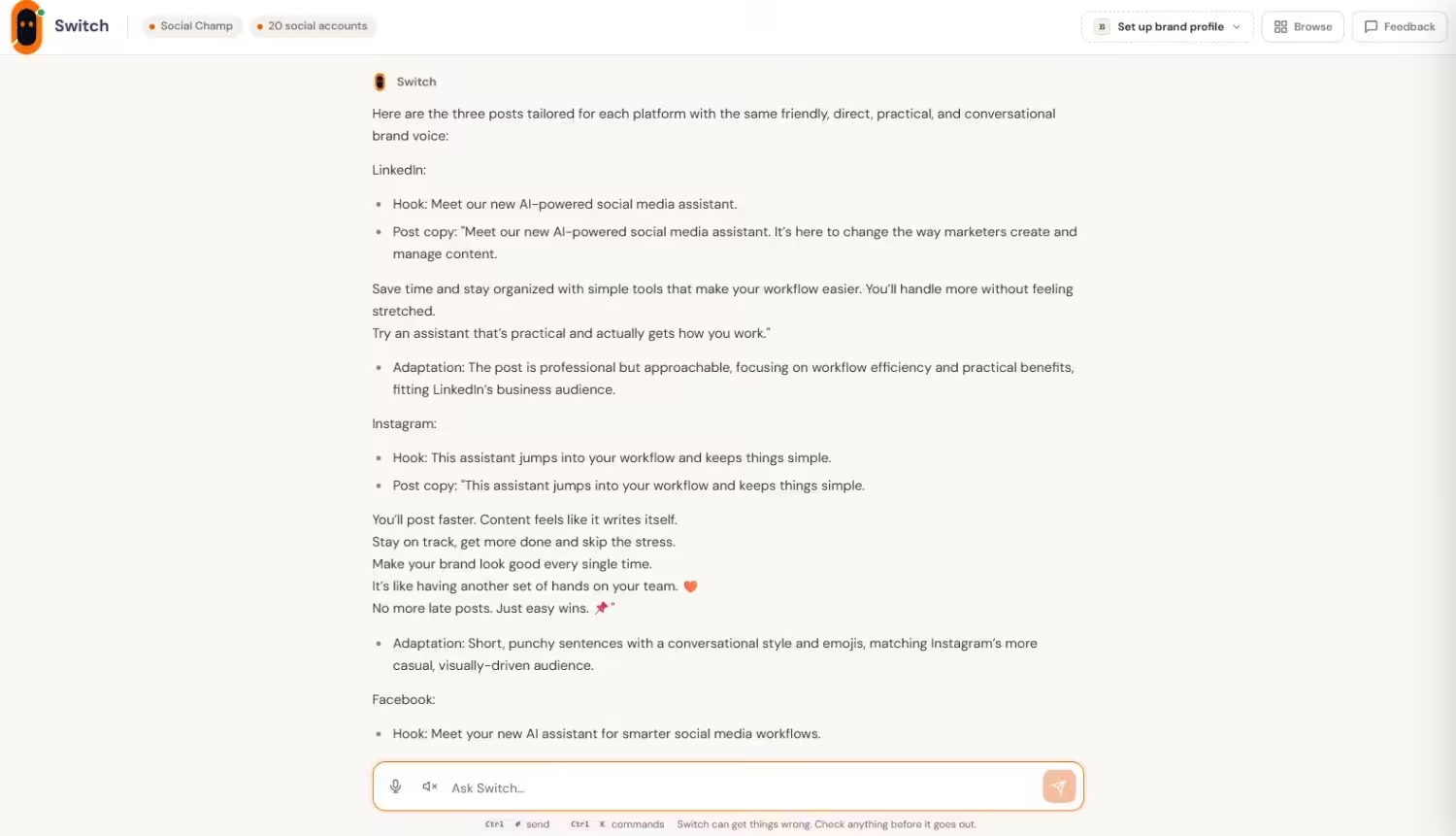
This is also where an AI assistant such as Switch can fit into the process.
Social Champ’s Switch can work with brand context, existing content, references, and content pillars when creating social media content. It works from a Brand Profile for each channel, along with brand voice analysis and top-post style matching.
That matters because I’d rather give an AI assistant something real to work from than ask it to guess what my brand sounds like.
Start With a Brand Profile
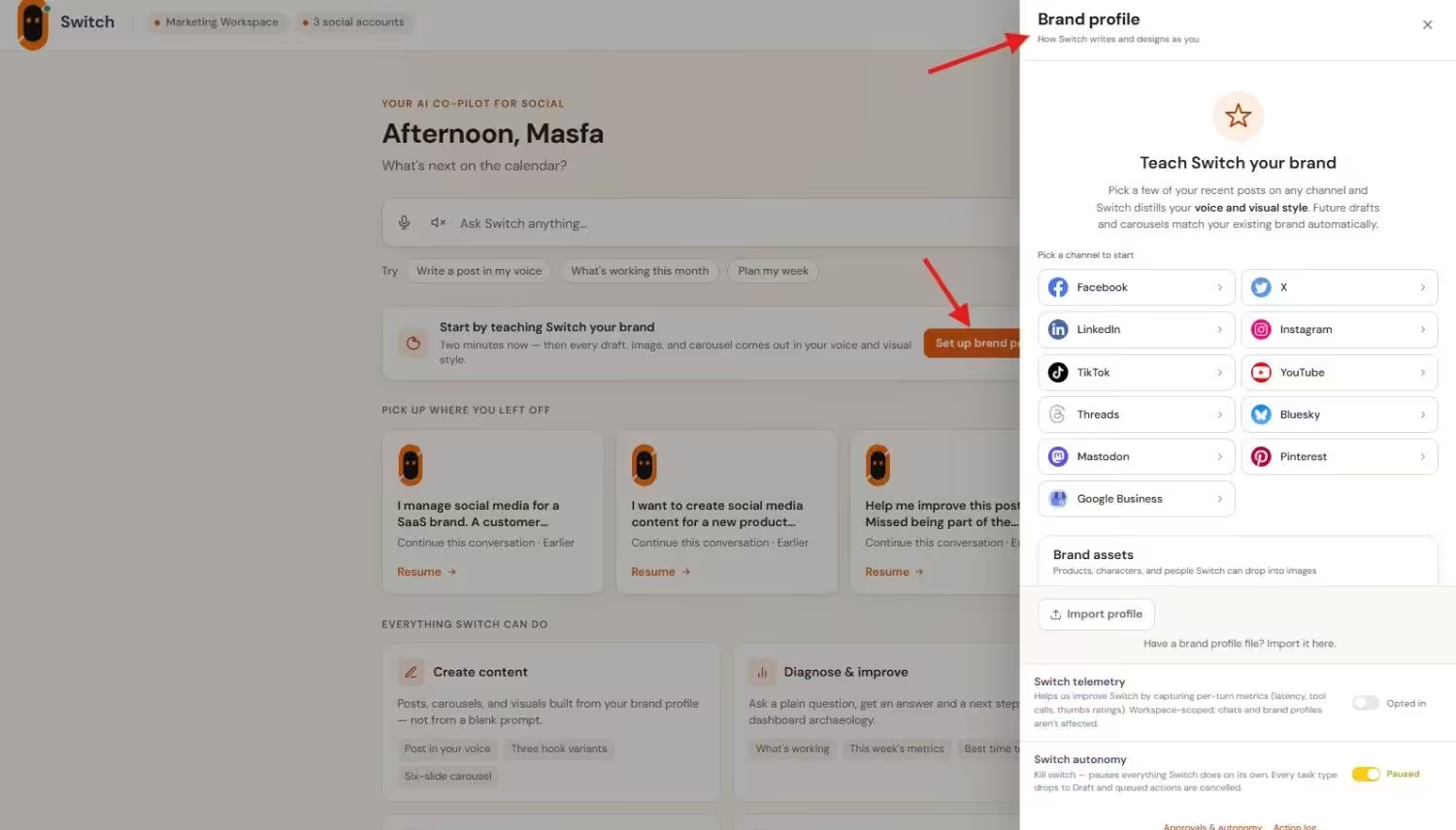
Before Switch creates anything, you set up a Brand Profile. Think of it as your brand guidelines, stored where the AI can actually use them. Each channel gets its own profile, so your LinkedIn voice doesn’t have to match your Instagram one exactly.
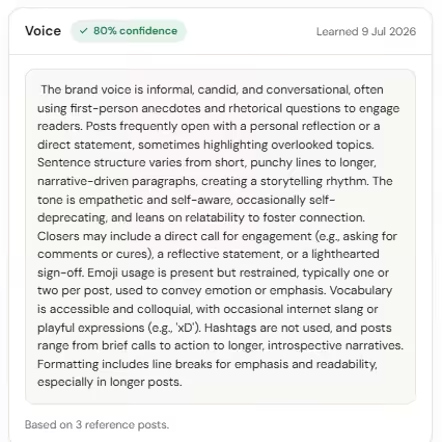
You can let Switch learn from your existing posts or edit the profile yourself. The Voice section captures your tone, how your posts usually open and close, sentence rhythm, and emoji and hashtag habits.
Visual Style covers colors, typography, and mood, while Brand Assets let you add your real products and people so generated images don’t rely on generic visuals. Together, they keep both your copy and your images on-brand.
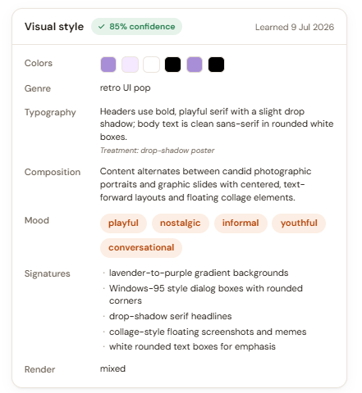
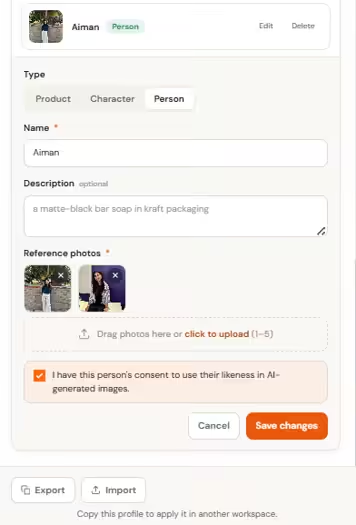
I’d let Switch do the first pass, then adjust anything that doesn’t sound quite right. Each profile also shows a confidence score and a “Learned on” date, so you can see how much Switch had to work with and when it’s time for a refresh.
Use Existing Content as a Reference
Your strongest previous posts can tell you a lot about your actual voice.
Maybe your best content tends to be direct and conversational. Maybe your audience responds well when you use short sentences and practical examples. Those patterns can be useful references when creating new content.
Switch can use top-post style matching and selected references as part of its content workflow.
When Switch creates content, its drafts are modeled on your top three performing posts, matching your brand voice, length, and formatting. So the posts your audience already responded to become the starting point, rather than a blank prompt.
That doesn’t mean every new post should copy an older one. It simply gives the content creation process some history to work with.
Keep Platform Differences Without Losing the Core Voice
I also like the idea of separating brand consistency from platform formatting.
A post can be adapted for LinkedIn, Instagram, Facebook, or another supported channel without throwing away the personality that makes the brand recognizable.
When I use Switch to create content for different platforms, I can give it the channel context and adjust the content without starting from scratch each time. That makes it easier to keep the same brand personality while changing the format and delivery for each platform.
Since each channel has its own Brand Profile, the difference between your LinkedIn and Instagram voice is something you set up once, not something that shifts from post to post.
And importantly, the output still goes through review and editing before it moves into the normal publishing flow. That human step matters.
Are Your Best Posts Sitting Idle?
A Practical Workflow for Using AI With Your Brand Voice
If I were setting this up for a social media team, I’d keep the process fairly simple.
Step 1: Define the Voice
Write down how the brand should sound. Include sentence style, vocabulary, formality, humor, and the type of relationship you want with the audience.
Then list the language you don’t want to use.
Step 2: Collect Your Best Examples
Pick several recent posts that genuinely represent the brand.
I’d avoid throwing every old post into the mix. Brands change, and an outdated post may reflect a voice you no longer want.
Step 3: Generate and Review
Give the AI your brand information along with the platform, audience, topic, and goal.
Generate the first draft, then check it against your voice guidelines.
Step 4: Make the Final Human Edit
This is the part I’d never skip.
Read the post out loud. Does it sound like your company? Would someone on your team actually say it this way?
Also check the facts, product claims, and messaging before publishing.
How to Know if Your Brand Voice Is Staying Consistent
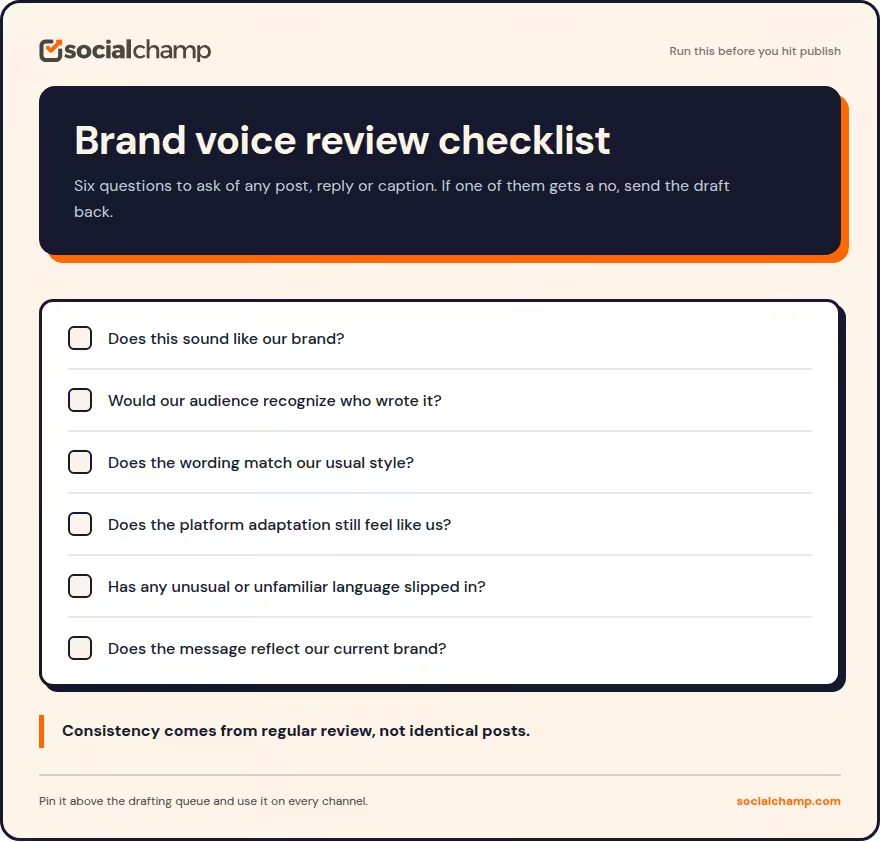
Checking one post isn’t enough. I prefer looking at content across several weeks and multiple platforms.
Before publishing, I’d ask:
- Does this sound like our brand?
- Would our audience recognize who wrote it?
- Does the wording match our usual style?
- Does the platform adaptation still feel like us?
- Has the AI introduced language we would never normally use?
- Does the message reflect what the brand is saying today?
Then, every so often, compare posts from different writers and channels.
If one platform consistently sounds much more formal or promotional than the others, that’s a sign your guidelines or AI instructions may need some work.
Final Thoughts
I don’t think maintaining brand voice with AI means finding one perfect prompt and calling it a day.
It’s more about building a process around clear guidelines, useful examples, platform context, and human review.
AI can help a team create and review content faster, but it still needs something meaningful to follow. The better your brand information is, the easier it becomes to keep new content recognizable.
AI assistants such as Switch can become part of that workflow by bringing brand context and existing content into the creation process.
Still, the final question remains a human one: “Does this actually sound like us?” If the answer is yes, you’re probably on the right track.