A few months ago, I went through what I can only describe as my “automate everything” phase.
I set up rules for posting, replying, tagging, reporting, and pretty much anything else I thought a tool could handle for me.
For about two weeks, it felt fantastic. My content calendar was full, my inbox was quieter, and I literally thought I’d finally figured out the secret to managing social media without constantly being glued to it.
Then a customer left a simple question in the comments, and my automated reply answered with something completely unrelated.
It wasn’t offensive or wildly inappropriate. It was just… wrong. The tone was off; it missed the context, and it definitely wasn’t the kind of response I’d have written myself.
And that was my wake-up call. I realized I’d been thinking about automation the wrong way.
So if you’re trying to figure out what you should hand over to a tool and what still needs a real person behind it, I get it. I’ve been there. Let’s talk about it.
Short Summary
- Automate repetitive, low-risk social media tasks, not everything.
- Scheduling, reporting, monitoring, and simple replies are great tasks to automate.
- Sensitive conversations and customer complaints still need a human touch.
- Brand voice, crisis management, and major ad decisions require human judgment.
- Use AI to speed up drafts and routine work, while keeping control over final decisions.
- Social Champ’s Switch lets you choose between drafting, approval, and automatic task handling.
Why I Stopped Trying to Automate Everything
Automating a task doesn’t mean you never have to think about it again. Sometimes, it just moves the work somewhere else.
Instead of doing the original task yourself, you end up spending your time fixing whatever the automation got wrong.
I’ve seen brands schedule an entire week’s worth of posts, only to have breaking news make one of those posts look completely out of touch. I’ve seen automated replies send cheerful marketing messages to people asking how to get a refund.
Here, the problem is asking the tools to handle something that still needs human judgment. That doesn’t mean I’m against automation. Quite the opposite. I love automation when it saves me from repetitive work.
The question I ask now is much simpler: What exactly am I automating, and what happens if it gets it wrong?
That question has saved me from quite a few headaches.
Start With the Boring Stuff
Before I turn any task over to an automation tool, I look at how repetitive it is.
If something happens over and over again, doesn’t carry much risk, and doesn’t require much creative thinking, it’s usually a good candidate.
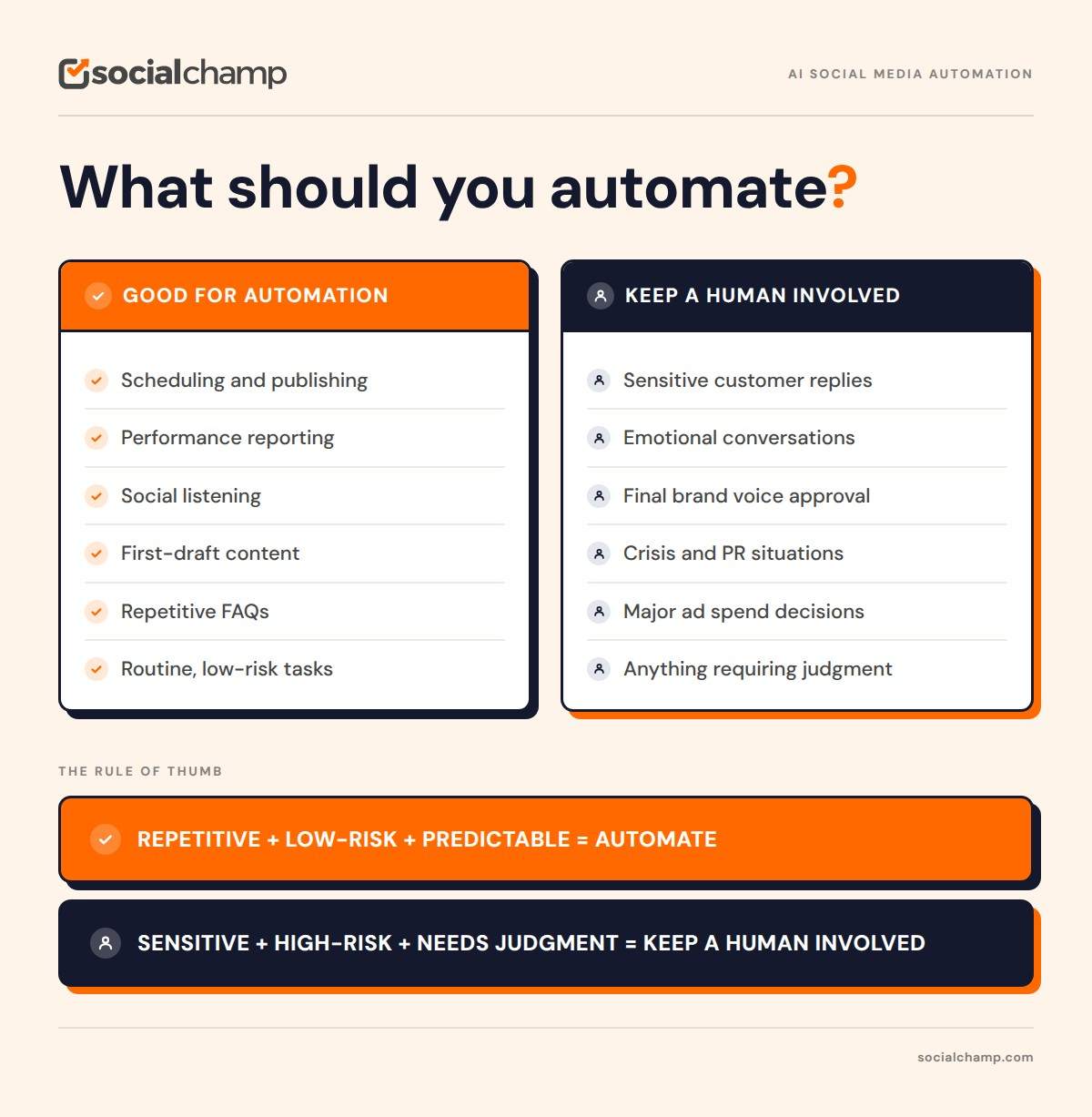
If it involves someone’s feelings, a sensitive situation, or my brand’s reputation, I slow down. For me, that creates two pretty clear categories.
The Tasks I Happily Automate
These are the things that can eat up hours without really needing my attention.
-
Scheduling Posts
This one is probably the easiest decision. If I’m posting at 9 AM, 1 PM, and 6 PM across several platforms, I don’t want to be sitting there waiting for the clock to hit the right minute.
I’d much rather prepare everything in advance and let a scheduling tool handle the publishing. There’s really no prize for manually pressing the publish button five times a day.
In Switch (Social Champ’s AI Assistant), this is as simple as asking. You can schedule a post, check your queue, or paste in five ideas and bulk schedule them across your connected channels.
-
Pulling Together Reports
I don’t know anyone who genuinely enjoys copying engagement numbers into a spreadsheet every Monday morning.
Automated reporting takes that repetitive work off my plate and gives me consistent numbers to look at. I still want to understand what the numbers mean, of course. I just don’t need to spend my morning collecting them.
Switch has quick prompts like This week’s metrics and Monthly client report, and it comes back with a suggested next step instead of just numbers.
-
Keeping an Eye on Conversations
There’s no realistic way for me to watch every mention, hashtag, comment, and conversation happening around a brand all day.
Monitoring tools are useful here because they can flag unusual spikes or sudden changes in conversations. Switch’s Listen & Monitor module tracks brand mentions, sentiment trends, and competitor posts, and you can set up alerts and keyword watches right from the chat.
That means I can spend my time looking at something that needs attention instead of constantly refreshing social platforms.
-
Getting a First Draft Started
This is one I was skeptical about at first.
When people say “automate content,” I immediately think of generic posts being pumped out and published without anyone checking them. That’s not what I mean.
I find it genuinely useful to have a tool give me a starting point. Sometimes getting past that blank page is the hardest part.
With Switch, drafts are modeled on your top three performing posts and your Brand Profile, so the starting point already sounds closer to you than a blank prompt would.
If I’ve a rough idea and a tool turns it into a first draft, I can take it from there. I can rewrite it, add my own examples, change the tone, remove anything that doesn’t sound like me, and make it something I’m actually comfortable publishing.
For me, that’s very different from letting a tool create something and publish it without anyone looking at it.
-
Answering the Really Simple Questions
Some questions come up again and again.
- “What are your opening hours?”
- “Do you ship internationally?”
- “Where can I find this?”
If the answer is straightforward and unlikely to change without anyone noticing, an automated response can save a lot of time.
I’d still check those replies from time to time. Information changes, and there’s nothing worse than confidently giving someone an outdated answer. Switch’s inbox triage also scores messages by sentiment, which helps the upset ones reach a real person faster instead of getting lost in the pile.
Stop Losing Time to Repeats
The same replies, the same reports, the same scheduling grind. Switch handles the repetitive work so you don't have to do it every week.
The Things I Still Want a Human Handling
This is where I learned most of my lessons. There are some things I don’t want to hand over completely, no matter how convenient the automation is.
-
When Someone Is Upset
If someone is angry, disappointed, confused, or dealing with a genuine problem, I don’t want a canned response meeting them on the other side. Even if the response is technically correct, it can feel cold.
When someone has taken the time to explain a problem, they usually want to feel heard. That’s something I don’t think should be left entirely to automation.
-
The Final Check on My Brand Voice
I’ve no problem using AI to help me get a draft started. But before something represents a brand publicly, I want a person to look at it.
That’s because brand voice isn’t always something you can put into a neat set of instructions.
Maybe there’s a joke the audience didn’t respond well to last month. Maybe there’s a phrase the team has stopped using. Maybe there’s an inside joke that regular followers understand, but a tool wouldn’t know about.
Those little details matter. A tool can help me write. I still want to decide what actually sounds like us.
-
Anything That Could Turn Into a Crisis
This is probably the biggest red flag for me.
If there’s a product recall, a viral complaint, a major mistake, or a situation that’s suddenly getting a lot of attention, I want people involved.
Those moments require context. They may also require input from leadership, customer support, PR, or legal. That’s not the time to let an automated system decide what the brand should say.
When things are already going wrong, the last thing I want is an automated response making them worse.
-
Decisions Involving Real Ad Money
Automation can absolutely help with ad bidding and campaign efficiency.
But when we’re talking about where a meaningful amount of money is going, I still want someone checking what’s happening.
A campaign can look great on a dashboard and still be attracting the wrong people. The numbers might say everything is working. A human might look at the results and say, “Wait, why are these people clicking?” That’s an important difference.
This is why I like that Switch asks for an extra confirmation before any ad spend goes through, and has a one-tap emergency brake to pause a campaign immediately.
The Three Questions I Use Now
Whenever I’m unsure whether I should automate something, I run it through three questions.
- Does this happen repeatedly? If I’m doing essentially the same thing over and over, automation starts looking pretty attractive.
- What happens if it gets something slightly wrong? A scheduling mistake is annoying. A bad response during a customer complaint can damage trust.
- Does this need human judgment? If emotions, context, reputation, or brand voice are involved, I want a person somewhere in the process.
That’s usually enough to make the decision. If the task is repetitive, low-risk, and predictable, I’ll automate it. If getting it wrong could upset someone or hurt the brand, I’ll keep a human involved.
Featured Article: 7 Best Social Media APIs for Multi-Platform Posting
Where Switch Comes Into the Picture
This is actually one of the reasons I wanted to write this post.
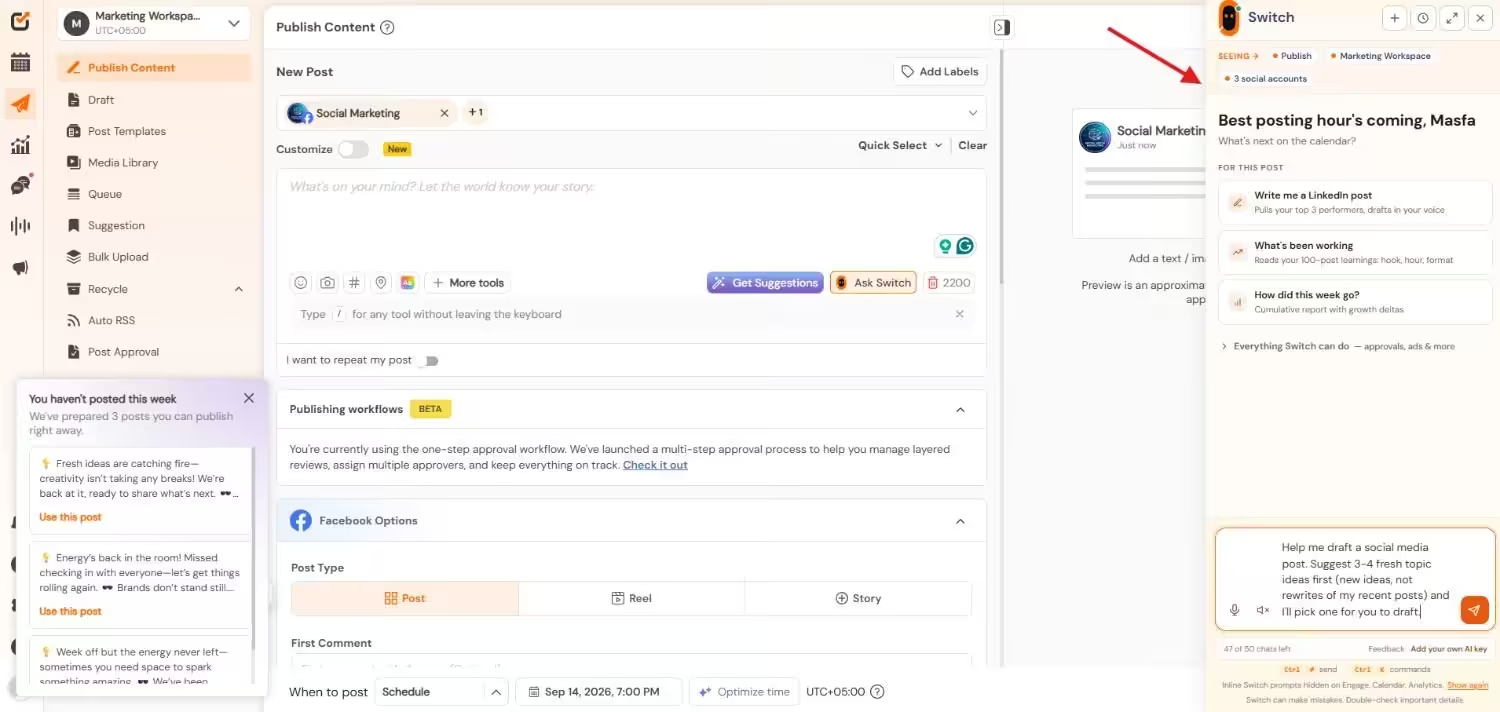
Social Champ has introduced its AI Assistant, Switch, and what caught my attention was the way it approaches automation. It doesn’t have to be an all-or-nothing decision. You can decide how much control you want to give it.
I Can Start Small
One thing I like about this approach is that I don’t have to hand everything over at once. I can use Switch to help create a draft and then review it myself.
I can also have tasks prepared for approval, which means someone still gets the final say before anything is published.
And for repetitive tasks that don’t need much oversight, I can give the system more freedom within the limits I’ve set.
That feels much more practical to me than simply switching everything to “automatic” and hoping for the best.
I Still Have Control
This is important because automation only works for me when I know I can step in.
Switch has a kill switch built in. Pausing it drops every task Switch would handle on its own back to Draft and cancels anything already queued. There’s also an action log, so I can see exactly what Switch has done or attempted.
I can decide where automation makes sense and where I want to stay involved. That’s the balance I was missing during my “automate everything” phase.
Who I Think Would Get the Most Out of It
If you’re managing social media for a brand, something like Switch could help you move from an idea to a draft or scheduled post without jumping between a bunch of different screens.
If you’re working at an agency and managing several client accounts, having approval steps and action history in one place can make it easier to keep track of what’s happening and make sure the right person checks things before they go live.
And if you’re a founder handling your own social media, I can see the appeal there too. You don’t necessarily need to become an expert in every little part of social media management just to get your content out consistently.
I’m not saying this because I think everyone needs Switch. I’m saying it because the idea fits with what I’ve learned from my own automation mistakes.
The best tools, at least for me, aren’t the ones that try to remove me from the process completely. They’re the ones that let me decide where I want to be involved.
Featured Article: How to Post on Social Media From Claude
What I Learned From My Automation Experiment
Looking back, I don’t think automation made my workload smaller because I automated everything. It got better once I became more selective.
I don’t need to manually schedule every post. I don’t need to spend my Monday morning collecting numbers. I don’t need to answer the same basic question for the hundredth time.
Those things can be handled.
But when someone is upset, when something unexpected happens, or when a post needs to sound exactly like the brand, I want to be there. That’s the part of social media that actually needs me.
And if you’re exploring tools that give you different levels of control instead of forcing you into an all-or-nothing setup, take a look at what Social Champ’s Switch is doing with its draft, approve, and auto stages.
You might find a better way to structure your workflow. Or at the very least, you might get a few hours of your week back. I’ll take either one.