Honestly, everyone has done this. You edit the reel at 12 AM, the pacing is perfect, the audio is on point, and you just hit the publish button. Then when you open the app in the morning, there are only 3 views. I know it hurts.
I spent a lot of time figuring that out: even if it’s great content, if you post late at night when your audience is sleeping, then the algorithm will ghost you.
That’s why smart scheduling is the real turning point. It reads your audience’s data using AI and posts at precisely the time your audience is scrolling.
So if you don’t know how to start with intelligent scheduling, don’t worry.
In this blog, I’m going to show you how it works, why it’s better than manual posting, how to set it up quickly, and schedule social media posts. Let’s fix your timing so your content gets the love it deserves.
Short Summary
- Smart scheduling uses AI to study your audience and drop posts when people scroll.
- It beats manual scheduling because the AI reads your data and picks the time for you.
- Social Champ combines AI captions, AI images, and AI-suggested best times in one place.
- You batch your content, hit schedule, and the tool handles the rest while you create.
- Your competitors post smarter. If you wait, you hand them your audience.
What Is Smart Scheduling and How Does It Work?
When I tested different social media content schedulers for the first time, I thought smart scheduling was a fancy timer only. Turns out, it’s not.
Basically, smart scheduling is an AI feature that reads your audience’s behavior and tells you when you should publish the content. It tracks when people scroll and engage on the platform and then suggests the best posting time.
How the AI Reads Your Data
It’s very simple. First, the tool tracks your historical data, such as which posts performed at what time, and then it matches your audience’s activity patterns. If your Instagram audience is active at 7 PM and your LinkedIn audience at 9 AM, AI treats both differently.
It also tracks real-time engagement such as:
- Shares
- Comments
- Likes
- Impressions
- Fan count
Then it scores every hour of the day and ranks them. The best window gets a green light. The weaker ones get a pass.
What a Smart Schedule Truly Does
When you set a smart schedule, the tool does the job for you. It doesn’t choose random slots. Instead, it picks the time when your audience is really online and engaging.
And the cherry on top is that AI gets smarter after every post because most smart scheduling software uses an algorithm that learns from your wins and losses. That means your next post has a better shot than your last one.
I Tested It So You Don’t Have To
I tested it across multiple accounts. The posts that went up at the times the AI picked got way more traction than my random 2 AM drops. Way more. I’m not saying it’s magic. I’m saying the data doesn’t lie.
If you want to try it yourself, grab a free social media scheduler and test it on your own account. You will see the difference fast.
Stop Guessing Your Times!
Smart Scheduling vs. Traditional Scheduling: Which Is Better?
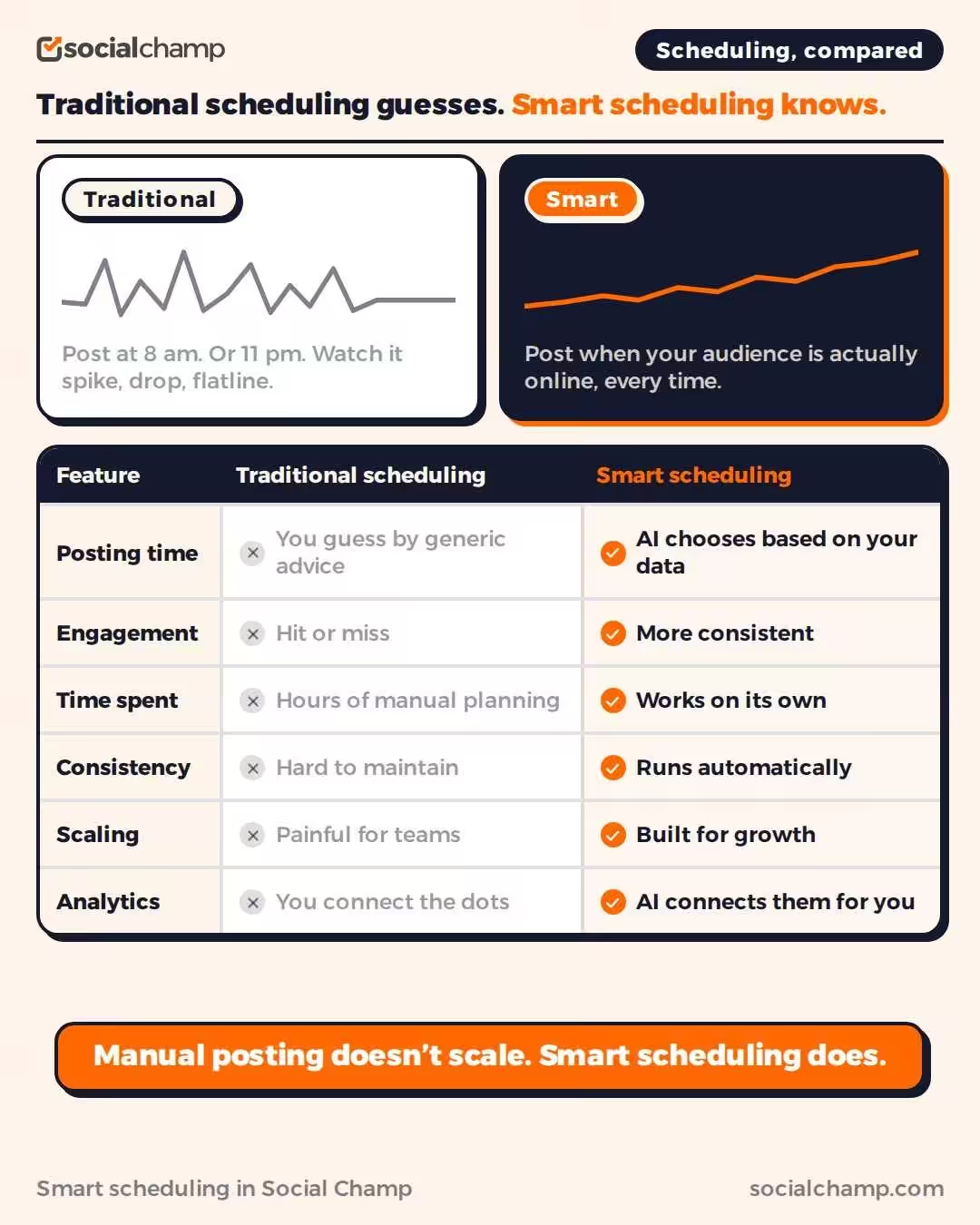
Earlier, I used to post at random times before I found intelligent scheduling. Sometimes that meant 8 AM. Sometimes that meant 11 PM. My engagement looked like a heart monitor. Up. Down. Flatline. I had no idea why some posts popped off, and others tanked.
The issue with traditional scheduling is that it’s a trap. You pick a time. You hope it works. You cross your fingers. It is basically a vibe check for your content strategy.
What Traditional Scheduling Really Looks Like
With the old way, you guess your posting times from some blog you read in 2023. You slot your posts into a social media calendar and pray the algorithm agrees. It rarely does.
You waste hours as you move posts around. Every 10 minutes you look at your phone. Time zones are stressful for you. And you’re missing your audience for hours.
How Intelligent Scheduling Changes the Game
After some time, I switched to intelligent scheduling and felt the difference instantly. My posts started going live when my audience genuinely scrolled, not when I felt creative or when I finished my edit.
Intelligent scheduling automatically analyzes your metrics to find out when your content has the best opportunity to perform. It accounts for platform differences too. Your TikTok and LinkedIn audience doesn’t come online at the same time. AI understands this pattern so you don’t have to.
Real Talk Comparison
| Feature | Traditional Scheduling | Smart Scheduling |
|---|---|---|
| Posting Time | You guess based on generic advice | AI chooses based on your data |
| Engagement | Hit or miss | More consistent |
| Time Spent | Hours of manual planning | Works on its own |
| Consistency | Hard to maintain | Runs automatically |
| Scaling | Painful for teams | Built for growth |
| Analytics | You connect the dots | AI connects them for you |
Why Your Business Needs the Upgrade
As a brand or an agency, you need social media scheduling tools for business that work for you. Manual posting doesn’t scale. Also, you can’t babysit 10 accounts and can’t guess time zones for each account.
On the other hand, smart scheduling saves a lot of your time, gives your content a fighting chance, and positions your brand in front of those eyes that truly care.
And yeah, competitors are already using this. A 2026 Salesforce report found that 87% of marketers now use generative AI in at least one daily workflow. Basically, if you stick with manual posting, then you give them your audience on a platter.
How Smart Scheduling Works
Earlier, I used to think that the main game of posting is creativity. Turns out, timing is essential as well. And timing comes from data.
When you use a content scheduler (Social Champ), AI analyzes your previous posts and tracks which ones worked and which ones failed, as well as when your audience is active on the platform. It’s not the generic advice of any random blog. It’s your own data, which doesn’t lie.
Reach Without the Hustle
With smart scheduling, all you have to do is upload the post, choose the date, and AI will check your history to let you know when they are more likely to be viewed by the right people.
Not only that, it knows the platforms’ differences well. Your Instagram crowd might scroll at lunch. Your LinkedIn crowd might check in at 8 AM. The tool knows this because it studied your metrics.
So, now you don’t have to guess the best time to post on social media anymore. The AI hands you the answer.
Engagement That Literally Lands
I noticed that when I let the AI choose my posting slots, likes and comments went up. And not by a little; the difference was a lot.
The algorithm favors the posts that pick up early engagement. Research on how platform algorithms actually rank content shows that posts getting likes, comments, and shares in the first 30 to 60 minutes get pushed to way more followers.
When a post goes live at the right time, people see it. They interact. The algorithm picks it up. Then it pushes you to even more people. Basically, it’s a snowball effect. And it starts with one correct time slot.
Your Team Will Thank You
If you work with a team, smart scheduling saves everyone. You just have to batch the content at the start of the week, load it to the tool, and let the AI choose the posting time. Nobody needs to set an alarm to post at night or on the weekend.
It Learns As You Grow
And you know what’s the best part? It gets smarter over time. Every post teaches the algorithm something new. Your audience habits shift. The AI shifts with them. You’re not stuck with a schedule from six months ago. You always post at the moment that matters most.
Featured Article: 10 Best AI Video Generators of 2026 (Compared & Tested)
Steps to Smart Schedule a Post in Social Champ
I remember the first time I tried to schedule my social media posts in bulk. I just clicked around for 20 minutes, got lost in menus, and I almost threw my laptop across the room.
But guess what? Social Champ fixes that entire mess. Let me tell you how you can smart-schedule your post without losing your sanity.
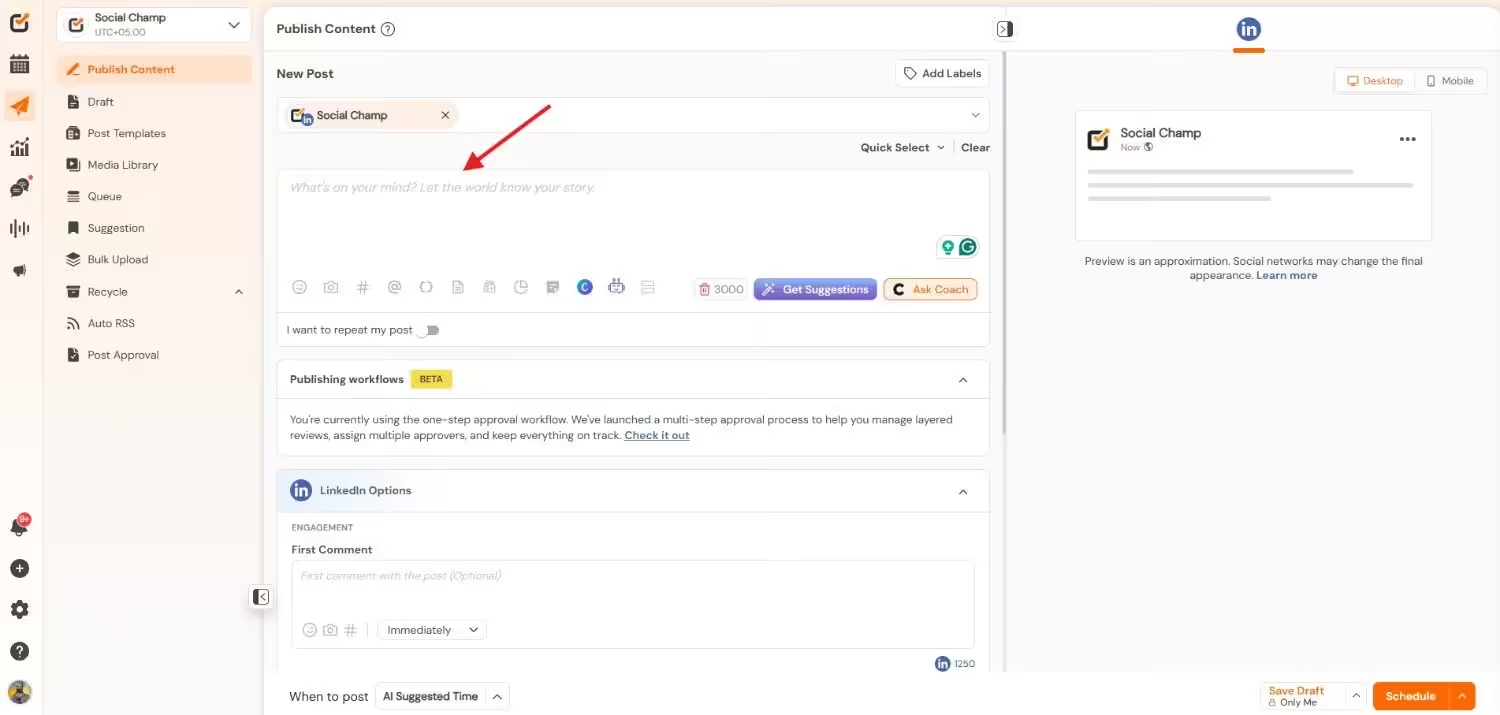
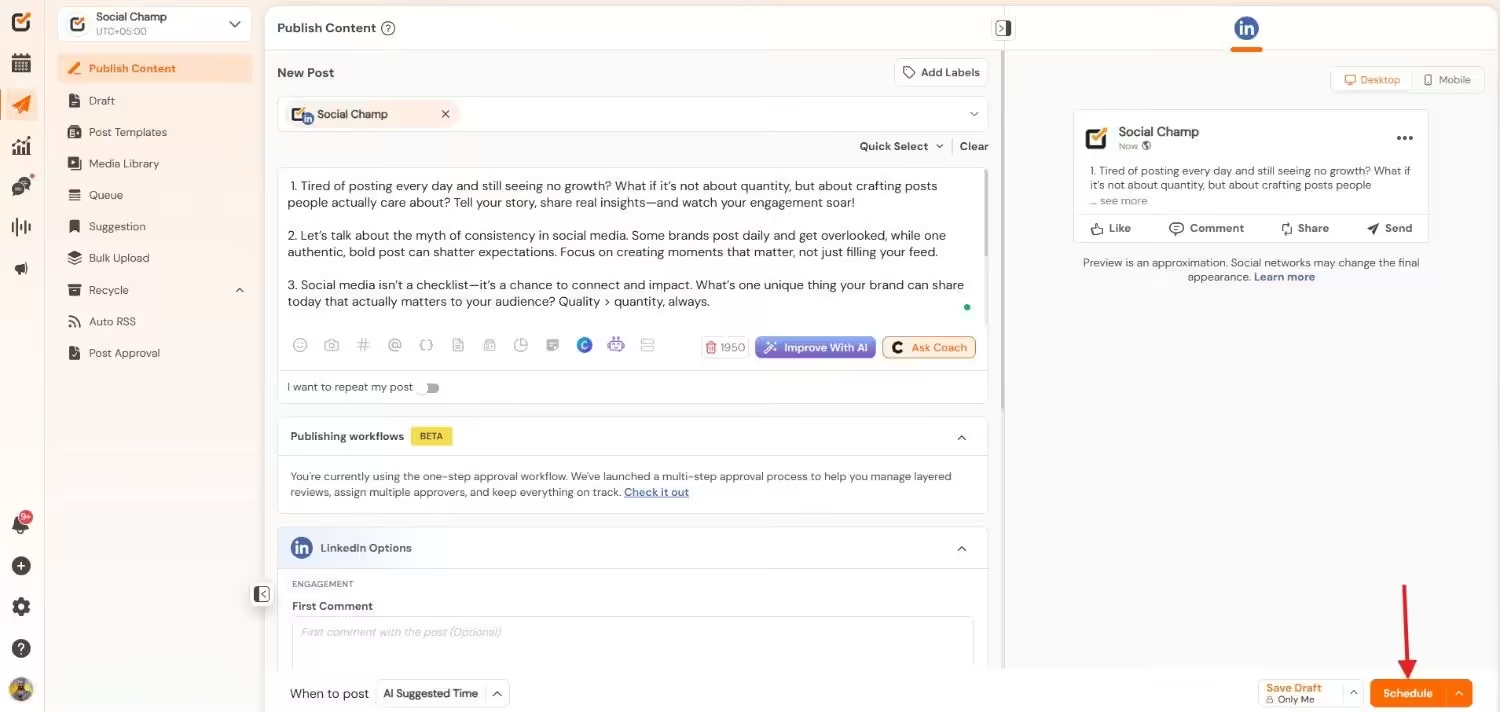
Step 1: Open the Composer
Open Social Champ and log in to your account. You’ll see the “New Post” option. Click here to write your post.
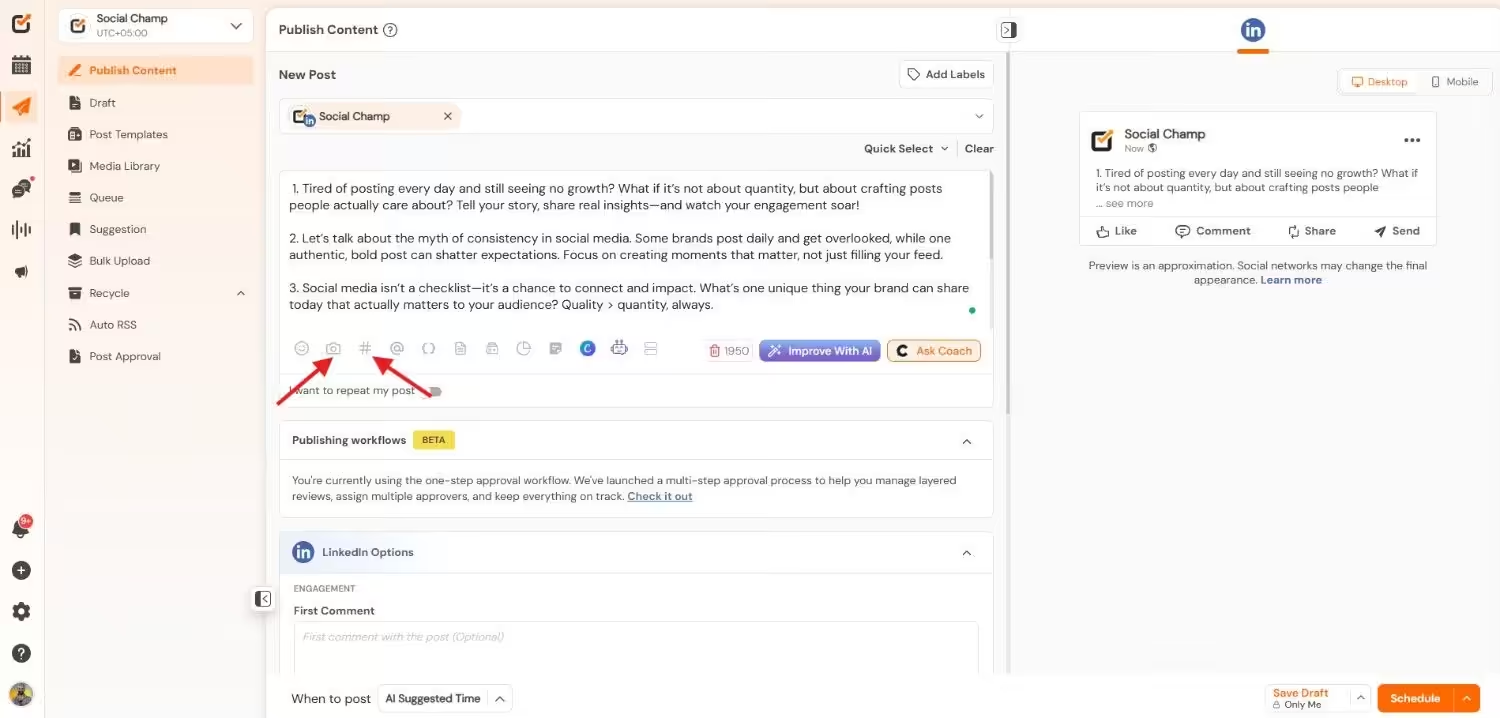
Step 2: Write Your Content
Now write your caption, upload the image, and add hashtags. Basically, just get your content ready here.
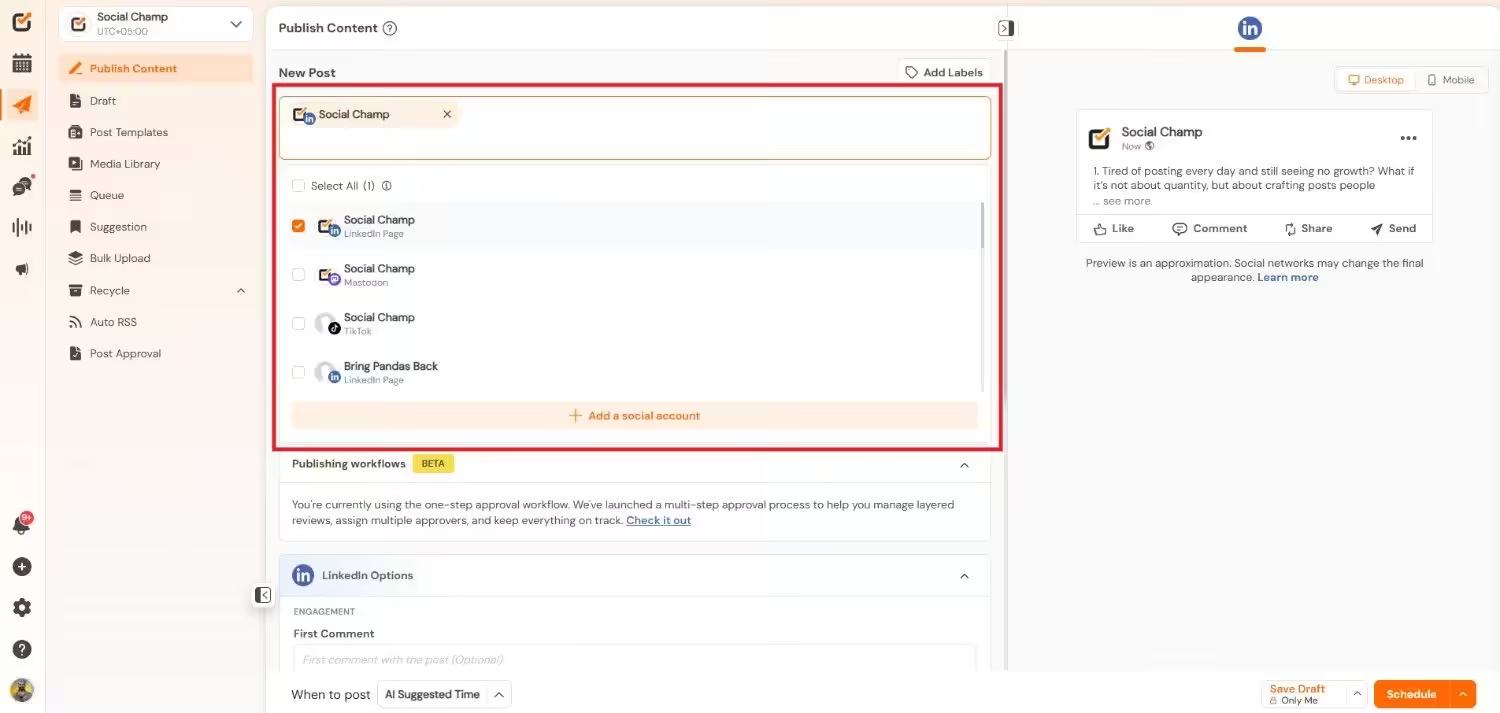
Step 3: Select Accounts
Click the dropdown at the top of the composer. Click the profile where you want to publish the post or connect the new one.
Step 4: Select AI Suggested Best Time
Now, when your content is ready, click the dropdown near “When to post.” Select “AI Suggested Time.” The AI will track your account data and suggest the best posting windows. You can also choose your own slot.
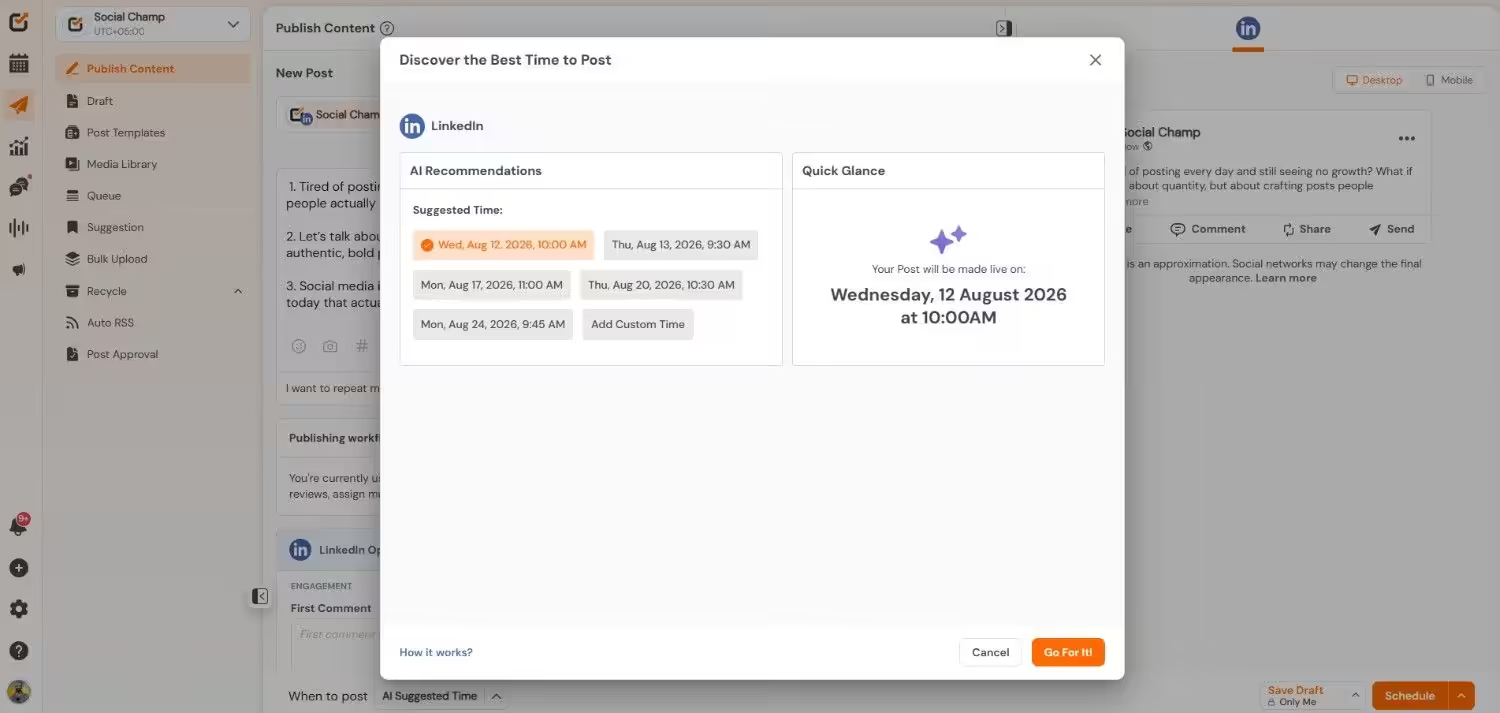
Step 5: Schedule Your Post
Choose the AI-suggested time and click “Schedule.” Now, your post will be published on the date and time you have set.
Now turn off your laptop and grab a snack!
It Takes Under Two Minutes
I ran this workflow across 5 different accounts. Each post took under two minutes without any stress, math, or guesswork.
Even if you work in education and manage a school page, this setup saves you hours every week. You batch your posts on Monday. The AI handles the rest. Your content hits when students and parents genuinely check their feeds.
Still Post at Random?
Conclusion
I’ve been the person who posts at 2 AM and wonders why nothing hits. I used to stare at analytics that look like a flatline. And I’ve tested enough tools to know which ones actually deliver.
Smart scheduling is the difference between a post that hits the void and one that speaks directly to your audience. The AI reads your data. It picks your window and gives your content the shot it deserves.
Your competitors already figured this out. They post at the right time while you guess. They grow while you stay stuck. That gap will only get wider if you wait.
Social Champ makes the whole process easy. The AI writes your captions. It builds your images. It tells you exactly when to post. You just show up and create.
So, stop letting bad timing kill your best work. Start posting smarter today. Your audience already scrolls. Make sure they see you.
Featured Article: My 9 Productivity Tools That Somehow Escaped the Digital Graveyard