
Join Our Discord Community

How to Delete TikTok Account: 3 Simple Methods That Work

Want to learn how to delete TikTok account? Discover 3 simple, step-by-step methods via app, desktop, or support form to erase your profile fast.

Published on: Aug 10, 2026
Written by: Afirah Shaikh
| Reviewed by: Zainab Adil 
Share:
How to Delete TikTok Account

Tired of doomscrolling on TikTok? Probably why you’re here to learn how to delete TikTok account!

If you manage a business, you might just be closing a personal account to focus entirely on your brand’s strategy, where using a TikTok scheduler can help keep your content organized without the distraction.

Or you’re ready to wipe an account completely; in both cases, you’re at the right place!

In this blog, I’ll be covering the 3 simple methods of deleting TikTok account that will take this distraction completely out of your life.

So let’s start with the first one!

Short Summary

  • Deleting your TikTok account is a quick way to curb doomscrolling, reset your digital footprint, or clear out personal profiles so you can focus strictly on managing brand content.
  • On desktop, you can delete your account by navigating to your profile, opening Settings, clicking Account Control, hitting Delete, and following the prompts to download your data and confirm.
  • On the mobile app (iOS or Android), head to your profile menu, tap Settings and privacy, select Account, tap Delete account permanently, and follow the on-screen steps to enter a verification code and complete deletion.
  • If you are locked out of your account, you can submit a manual deletion request through TikTok’s official Feedback Webform by selecting Account Access/Security, choosing Request to delete an account, providing your details, and attaching proof of ownership.
  • Deactivating your account is a temporary alternative that hides your profile, videos, and likes from everyone while saving your data until you log back in, whereas deleting permanently wipes your data after a 30-day grace period.
  • Account deactivation is currently done through the app under Settings and privacy > Account > Deactivate or delete account > Deactivate account.
  • Deleting your account comes with a 30-day grace period, giving you time to log back in and cancel the deletion before your videos, drafts, and profile data are gone for good.

How to Delete TikTok Account Using the Desktop

If you spend most of your day at a computer or just prefer using a larger screen, deleting your TikTok account from a web browser is super straightforward. You don’t even need to pick up your phone.

Here’s how to do it in just a few clicks:

  • Log into your account: Go to tiktok.com on your desktop browser and sign in if you haven’t already.
  • Head to Settings: Go to your profile and click on the settings icon.
  • Find Account Control: You will see the Account Control option at the top. Click on it.
  • Hit Delete: Click the Delete option, and TikTok will ask you the reason.
  • Confirm deletion: Click Continue and download your TikTok data if you want before confirming deletion. Then click Continue until it’s done.
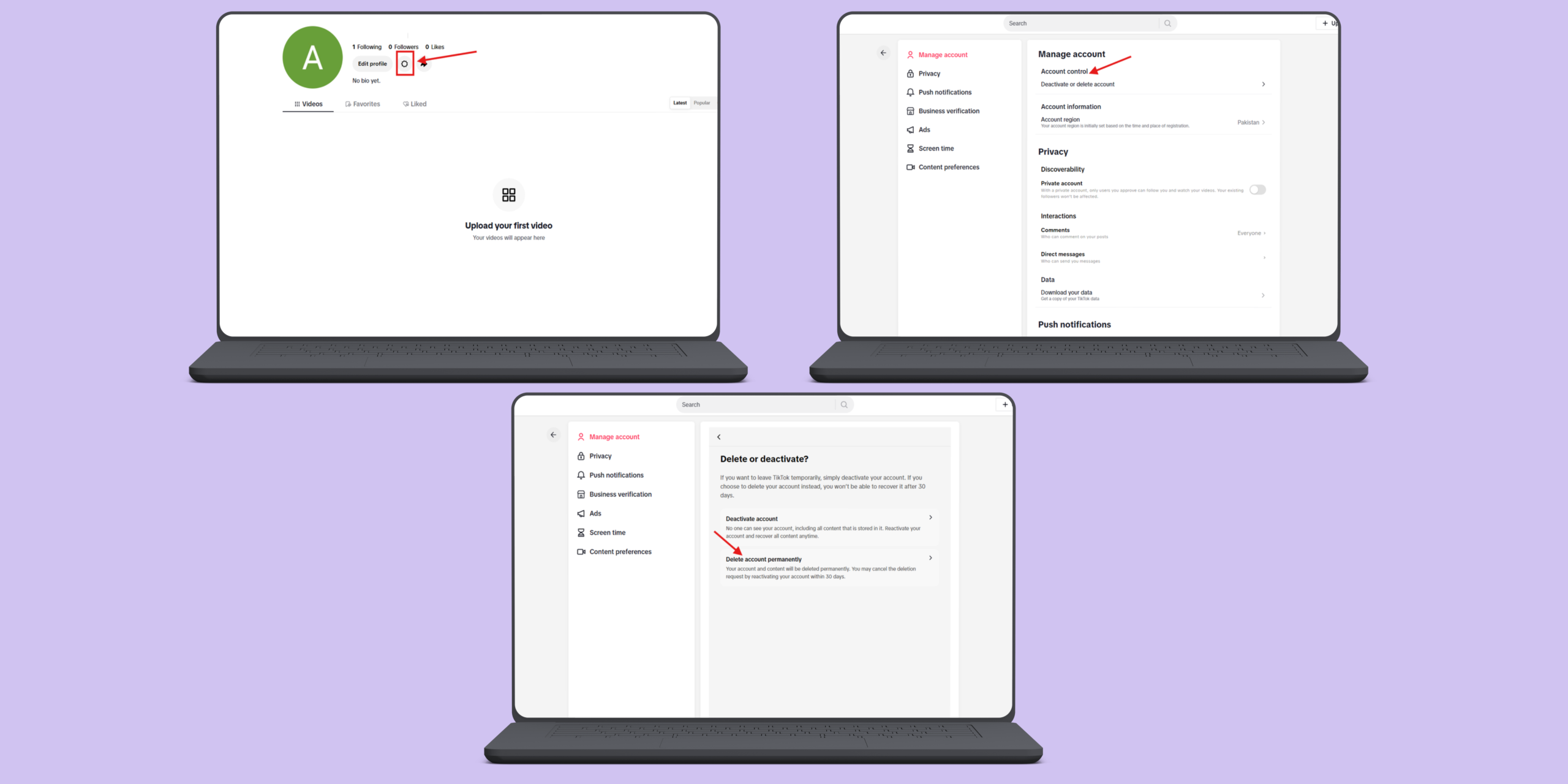
    How to Delete TikTok Account on Desktop
    How to Delete TikTok Account on Desktop

Take a Break From TikTok Without Deleting!

Lock in your posting schedule ahead of time with Social Champ, step away from the phone, and watch your brand grow on autopilot.

How to Delete TikTok Account Using the App

If you prefer using your phone, where most of us spend our time scrolling anyway, deleting your account through the mobile app only takes a minute or two. The steps are identical whether you’re using an iPhone or an Android device.

Here is the step-by-step walk-through:

  • Open TikTok and go to your profile: Launch the app and tap the Profile icon in the bottom-right corner.
  • Open the menu: Tap the three horizontal lines in the top-right corner to bring up the menu.
  • Go to Settings: Select Settings and Privacy at the bottom of the screen.
  • Select Account: Tap on Account at the very top of the list.
  • Choose permanent deletion: TikTok will give you two options, Deactivate or Delete account permanently. Select Delete account permanently.
  • Answer or skip the survey: TikTok will ask why you’re leaving. You can pick a reason if you want, or just tap Skip in the top-right corner.
  • Download your data (optional): Next, TikTok gives you the option to request a download of your data (like your posts and draft videos). If you want it, request it before deleting; if not, check the box confirming you’ve reviewed the terms and tap Continue.
  • Enter your verification code: To keep someone else from deleting your account, TikTok will send a 6-digit verification code to your phone number or email. Type it in and tap Delete account.
  • Final confirmation: Hit Delete one last time on the pop-up modal to wrap it up.
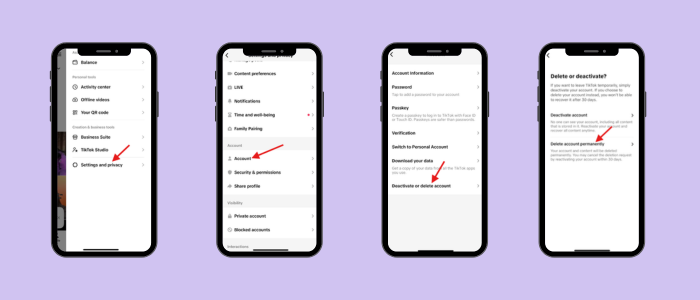
    How to Delete TikTok Account on App
    How to Delete TikTok Account on App

Featured Article: TikTok Shadowban: What It Is & How to Get Rid of It?

Delete TikTok Account By TikTok Support Form Method

What if you lost access to your logged-in device, forgot your password, or had your account locked? In that case, how to delete TikTok account without logging in? Well, don’t worry—you aren’t stuck forever. You can ask TikTok’s support team to manually delete your account by submitting a request through their official Feedback Webform.

Because this method involves a human support agent reviewing your ticket, it takes a little more time and requires you to prove that you actually own the account.

Here is how to request account deletion using the support form:

  • Open the TikTok Feedback Form: Go to your web browser and navigate to TikTok’s official Feedback page.
  • Select the topic: Under the Topic dropdown menu, select Account Access/Security.
  • Choose a subtopic: In the secondary dropdown that appears, select Request to delete an account.
  • Fill in your contact details: Enter the email address and phone number associated with the TikTok account you want to delete. (Make sure these match your account records so support can verify you.
  • Attach proof of ownership (Optional but helpful): If you have screenshots showing ownership of the account (like proof of logged-in sessions or previous support emails), attach them using the file uploader.
  • Submit the form: Check the required verification boxes, solve the quick CAPTCHA, and hit Submit.

Since this goes through TikTok’s support queue, it can take anywhere from a few days to a couple of weeks to process. Support will reply to the email address you provided to confirm your identity before wiping the account for safety reasons.
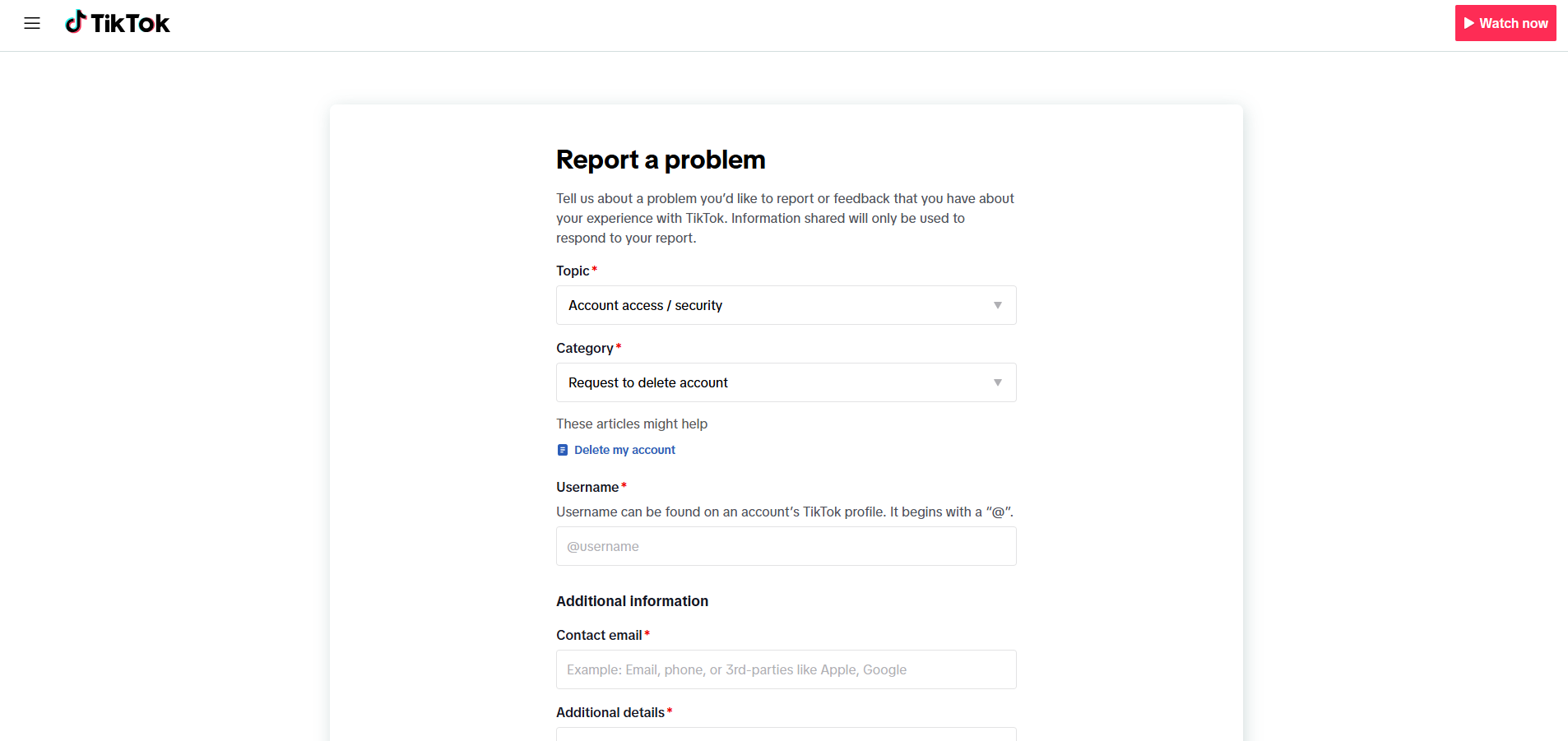
How to Delete TikTok Account via TikTok Support

How to Deactivate TikTok Account

Not sure if you’re ready to say goodbye to your account forever? That’s where deactivation comes in. It’s the perfect option if you just need a digital detox or a quick break from the feed without wiping away all your videos, drafts, and followers.

Think of deactivating as hitting the pause button. Your profile, videos, likes, and comments become completely invisible to everyone else on TikTok. However, all your data stays safely stored on TikTok’s servers. Whenever you’re ready to return (it can be next week or next year), you simply log back in, and your account is restored exactly as you left it.

Deleting, on the other hand, is permanent. TikTok hides your account for 30 days in case you change your mind, but once those 30 days are up, everything is deleted for good, and you cannot recover your TikTok anymore.

Here’s the answer to can you deactivate TikTok account from the app:

  • Open TikTok and go to your profile: Tap the Profile icon in the bottom-right corner.
  • Open the menu: Tap the three lines in the top-right corner.
  • Go to Settings: Tap Settings and privacy.
  • Select Account: Tap Account at the top of the menu.
  • Tap Deactivate or delete account: Choose Deactivate or delete account near the bottom.
  • Choose Deactivate: Select Deactivate account.
  • Confirm your choice: TikTok will show a quick summary of what happens when you deactivate. Tap the red Deactivate button at the bottom.
  • Verify your identity: Enter your password or the 6-digit code sent to your email/phone.
  • Final confirmation: Tap Deactivate account one last time to put your profile on hold.
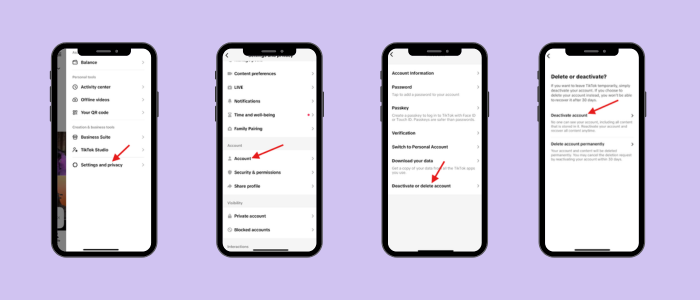
    How to Deactivate TikTok Account
    How to Deactivate TikTok Account

Your Competitors Are Already Automating!

Stop trading hours for views and streamline your entire social strategy with Social Champ right now.

Conclusion

Whether you’re stepping away from the app to curb your screen time, streamlining your digital footprint, or just taking a temporary breather, knowing how to delete TikTok account options gives you complete control over your social media presence.

Remember, if you choose the deletion route, you have a 30-day grace period to change your mind before your videos, drafts, and data are permanently erased. And if you ever decide to come back, or focus strictly on managing scheduled content for your brand, you can always hit the ground running with a fresh slate.


Frequently Asked Questions

1. Do My Videos Get Deleted if I Delete My TikTok Account?

Yes, once the 30-day grace period ends and your account is permanently deleted, all your published videos, drafts, and account data are permanently erased.

2. How Long Does It Take for a TikTok Account to Be Permanently Deleted?

It takes 30 days. Your account is deactivated immediately upon request, and full permanent deletion occurs automatically after 30 days of inactivity.

3. How Can I Delete My TikTok Account if I Forgot My Password?

You can reset your password on the login screen using your email/phone number, or use the TikTok Support Feedback form to request manual deletion.

4. Does Deleting the TikTok App Delete Your Account?

No, deleting the app only removes it from your phone. Your profile, videos, and account remain active and visible to others online until you manually delete it through settings.

5. What Is the Difference Between Deactivating and Deleting a TikTok Account?

Deactivating temporarily hides your profile and videos until you log back in, while deleting permanently wipes all your content and data after a 30-day grace period.

Afirah Shaikh is a content marketer at Social Champ who turns strategy into storytelling. With three years of experience in content marketing and an MBA to her name, she has worked with brands across the digital marketing, e-commerce, and SaaS industries worldwide to create content that performs. She is known for her ability to balance creativity with purpose to drive results.

Leave the first comment

<script>
document.addEventListener('DOMContentLoaded', function() {
    function transformTablesForMobile() {
        if (window.innerWidth > 767) return; // Only for mobile
        
        const tables = document.querySelectorAll('#brxe-kpxjkv table');
        
        tables.forEach(table => {
            if (table.classList.contains('transformed')) return;
            
            let headers = [];
            const thead = table.querySelector('thead');
            const tbody = table.querySelector('tbody');
            
            // Get headers - check for both th and td in thead
            if (thead) {
                const headerRow = thead.querySelector('tr');
                if (headerRow) {
                    // First try th, then td
                    let headerCells = headerRow.querySelectorAll('th');
                    if (headerCells.length === 0) {
                        headerCells = headerRow.querySelectorAll('td');
                    }
                    headers = Array.from(headerCells).map(cell => cell.textContent.trim());
                }
            } else if (tbody) {
                // If no thead, take first row
                const firstRow = tbody.querySelector('tr');
                if (firstRow) {
                    let headerCells = firstRow.querySelectorAll('th');
                    if (headerCells.length === 0) {
                        headerCells = firstRow.querySelectorAll('td');
                    }
                    headers = Array.from(headerCells).map(cell => cell.textContent.trim());
                }
            }
            
            // Return if no headers found
            if (headers.length === 0) return;
            
            // Get all data rows
            const rows = Array.from(tbody.querySelectorAll('tr'));
            const dataRows = rows; // All tbody rows are data rows when thead exists
            
            // Create new structure
            const newContainer = document.createElement('div');
            newContainer.className = 'mobile-table-container';
            
            // Create a section for each column
            headers.forEach((header, colIndex) => {
                const columnSection = document.createElement('div');
                columnSection.className = 'mobile-column-section';
                
                const columnHeader = document.createElement('div');
                columnHeader.className = 'mobile-column-header';
                columnHeader.innerHTML = header; // Use innerHTML to preserve formatting
                columnSection.appendChild(columnHeader);
                
                const columnList = document.createElement('div');
                columnList.className = 'mobile-column-list';
                
                dataRows.forEach(row => {
                    const cells = row.querySelectorAll('td');
                    if (cells[colIndex]) {
                        const item = document.createElement('div');
                        item.className = 'mobile-column-item';
                        item.innerHTML = cells[colIndex].innerHTML;
                        columnList.appendChild(item);
                    }
                });
                
                columnSection.appendChild(columnList);
                newContainer.appendChild(columnSection);
            });
            
            table.style.display = 'none';
            table.classList.add('transformed');
            table.parentNode.insertBefore(newContainer, table.nextSibling);
        });
    }
    
    transformTablesForMobile();
    
    // Handle window resize
    let resizeTimer;
    window.addEventListener('resize', function() {
        clearTimeout(resizeTimer);
        resizeTimer = setTimeout(function() {
            const containers = document.querySelectorAll('.mobile-table-container');
            const tables = document.querySelectorAll('#brxe-kpxjkv table.transformed');
            
            if (window.innerWidth > 767) {
                containers.forEach(c => c.style.display = 'none');
                tables.forEach(t => t.style.display = 'table');
            } else {
                containers.forEach(c => c.style.display = 'block');
                tables.forEach(t => t.style.display = 'none');
            }
        }, 250);
    });
});
</script>
/* Sticky header for tables WITH thead */
#brxe-kpxjkv table thead {
    background-color: #f0ebf8;
    position: sticky;
    top: 0;
    z-index: 2;
}

#brxe-kpxjkv table thead th {
    background-color: #f0ebf8;
    position: sticky;
    top: 0;
}

/* Sticky header for tables WITHOUT thead (first row only) */
#brxe-kpxjkv table:not(:has(thead)) tbody tr:first-child {
    background-color: #f0ebf8;
    position: sticky;
    top: 0;
    z-index: 2;
}

#brxe-kpxjkv table:not(:has(thead)) tbody tr:first-child td,
#brxe-kpxjkv table:not(:has(thead)) tbody tr:first-child th {
    background-color: #f0ebf8;
    position: sticky;
    top: 0;
}


/* Mobile Column Layout */
@media (max-width: 767px) {
  #brxe-kpxjkv table{
    max-height:2000px;
  }
    .mobile-table-container {
        display: block;
        margin: 20px 0;
      border-radius: 12px;
      overflow: hidden;
    }
    
    .mobile-column-section {
        border: 1px solid #E0E0E0;
        overflow: hidden;
        background: white;
    }
    
    .mobile-column-header {
        background-color: #E3DFF5;
        padding: 15px;
        font-weight: bold;
        font-size: 16px;
        color: #333;
    }
    
    .mobile-column-list {
        padding: 0;
    }
    
    .mobile-column-item {
        padding: 15px;
        border-bottom: 1px solid #F0F0F0;
        background: white;
        font-size: 16px;
        line-height: 1.6;
    }
    
    .mobile-column-item:last-child {
        border-bottom: none;
    }
    
    .mobile-column-item:nth-child(odd) {
        background-color: #F7F6FC;
    }
    
    .mobile-column-item:nth-child(even) {
        background-color: #FAFAFA;
    }
    
    .mobile-column-item strong {
        color: #333;
        font-weight: 600;
    }
}

A Simplified Social Media Management Tool

Social Champ is your AI-powered social media management tool.

Schedule, analyze, listen, and track competitors – all in one platform.

Try now, Start free
No credit card required!
Related Blogs
We Analyzed 2.6M Posts to Find the Best Time to Post on LinkedIn in 2026
If you’ve ever felt like your brilliant LinkedIn post didn’t get the engagement it deserved, you're not alone.  It’s frustrating.…
Best Time to Post on Facebook in 2026: 8.47M Posts Analyzed
If you’ve starred on the screen after creating a post, wondering about the best time to post on Facebook, you’re…
Top 12 Free & Low Cost Social Media Management Tools in 2026
Jul 28, 2026
This is the only guide you need to learn about your options for free and low-cost social media management tools…
Wait, before you go...👋

Don't let your Social Growth stop here.

Get 14 days of Social Champ Pro - Completely free!
Schedule unlimited posts, analyze performance, and manage all your social media from one place.

Unlimited
Scheduling

In-Depth
Analytics

Manage Multiple
Accounts

Start My 14-Day Free Trial

No credit card required

Cancel anytime

Easy setup

Loved by 10,000+ marketers and businesses

Secure & Reliable

#1 Rated Social Media Management Tool