I’ve lost count of how many times I’ve opened my social media dashboard just to do one quick thing and ended up bouncing between half a dozen tasks.
A post needs a caption, yesterday’s numbers need checking, someone is waiting for approval, and there’s a comment sitting in the inbox that still needs a reply. By the time I’m done, the “quick task” has eaten half an hour.
AI agents are starting to change that pattern. Instead of waiting for instructions one tiny step at a time, they can work across parts of a workflow and help get routine jobs moving. That makes them interesting for social media, where the work is rarely just one task.
Short Summary
- AI agents can handle multiple social media tasks instead of simply answering prompts.
- They can assist with content creation, scheduling, analytics, inbox management, listening, and paid campaigns.
- Human approval still matters for sensitive or high-risk actions.
- Tools like Social Champ’s Switch show how AI agents are being built into real social media workflows.
- The best way to start is with one repetitive task, clear boundaries, and gradual automation.
In this article, I’ll look at where AI agents fit into the social media workflow, what they can realistically handle, where human judgment still matters, and how tools such as Social Champ’s Switch are putting this approach into practice.
How Much Time Are You Losing?
What Are AI Agents?
I’ll admit, “AI agent” can sound like one of those tech terms that gets thrown around until everyone pretends they know what it means. So let’s keep it simple.
An AI agent is designed to do more than respond to a prompt. Instead of giving me an answer and stopping there, it can work through a task using the context, tools, and permissions available to it.
That difference becomes pretty important when I look at social media.
A social media workflow rarely ends with only writing a caption. There are usually several things that come after it. I need to decide where the post goes, check the content, find a suitable time, get approval if someone else needs to sign off, and eventually see how it performed.
That’s where AI agents start to make more sense.
Agents vs. Chatbots: The Key Difference
A chatbot is generally built around a conversation. I ask something, it responds, and I decide what to do next.
For example, I might ask a chatbot:
- “Give me five Instagram caption ideas.”
- “Why did this post perform better than the others?”
- “Write a LinkedIn post about our new feature.”
I get my answer, then I take it from there.
An AI agent can be part of the workflow itself. Depending on what it has access to, I can give it a broader goal, and it can work through the supported steps instead of making me manually connect every piece.
That doesn’t mean I can hand over my entire social media operation and walk away. The agent still works within its available tools, permissions, rules, and limits.
The difference is really about what happens after I give the instruction.
Why It’s Important for Social Media Teams
This matters because social media has a funny way of turning small tasks into a full afternoon.
I might spend five minutes writing a post, then another ten finding the right place to schedule it. Add analytics, approvals, inbox messages, competitor checks, and reporting, and suddenly I’m spending more time managing the process than thinking about the content itself.
AI agents can help with some of that operational work.
For example, an agent can potentially:
- Take a content request and prepare a draft.
- Work with available brand or channel context.
- Help schedule supported content.
- Pull together performance information.
- Find relevant drafts or media.
- Help manage supported approval workflows.
- Assist with monitoring tasks.
- Prepare or carry out certain actions when the required controls allow it.
The important word here is help.
I don’t think the most useful way to look at AI agents is as replacements for social media managers. The better question is: Which parts of my workflow don’t actually need me sitting there doing them manually?
That’s where the time savings start to become interesting.
Featured Article: The 7 Best Instagram Scheduling Tools I Recommend
Where AI Agents Are Changing the Workflow
AI agents become more useful when they can handle more than one isolated task. In social media, that means helping with the steps that usually sit between planning, publishing, and reporting.
Content Ideation and Creation
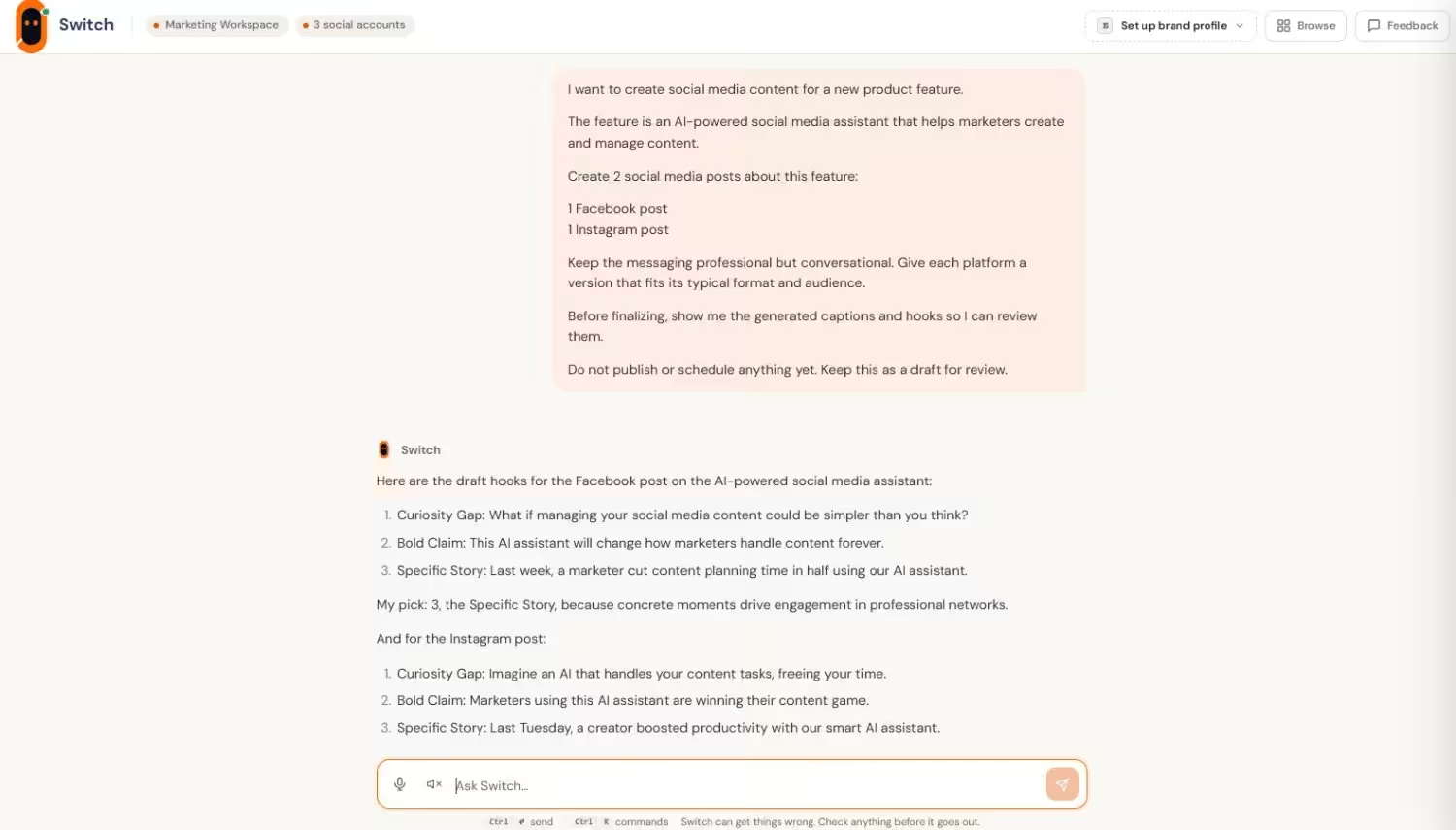
Instead of asking for just a caption, I can give an agent a topic, goal, or content idea and have it help with several parts of the process.
It can potentially:
- Create captions, hooks, and content variations.
- Adapt posts for different channels.
- Work with available brand voice and content context.
- Create supported images or carousels.
- Prepare a preview for review.
The agent handles the preparation, while I still decide whether the content fits the brand.
Scheduling and Publishing
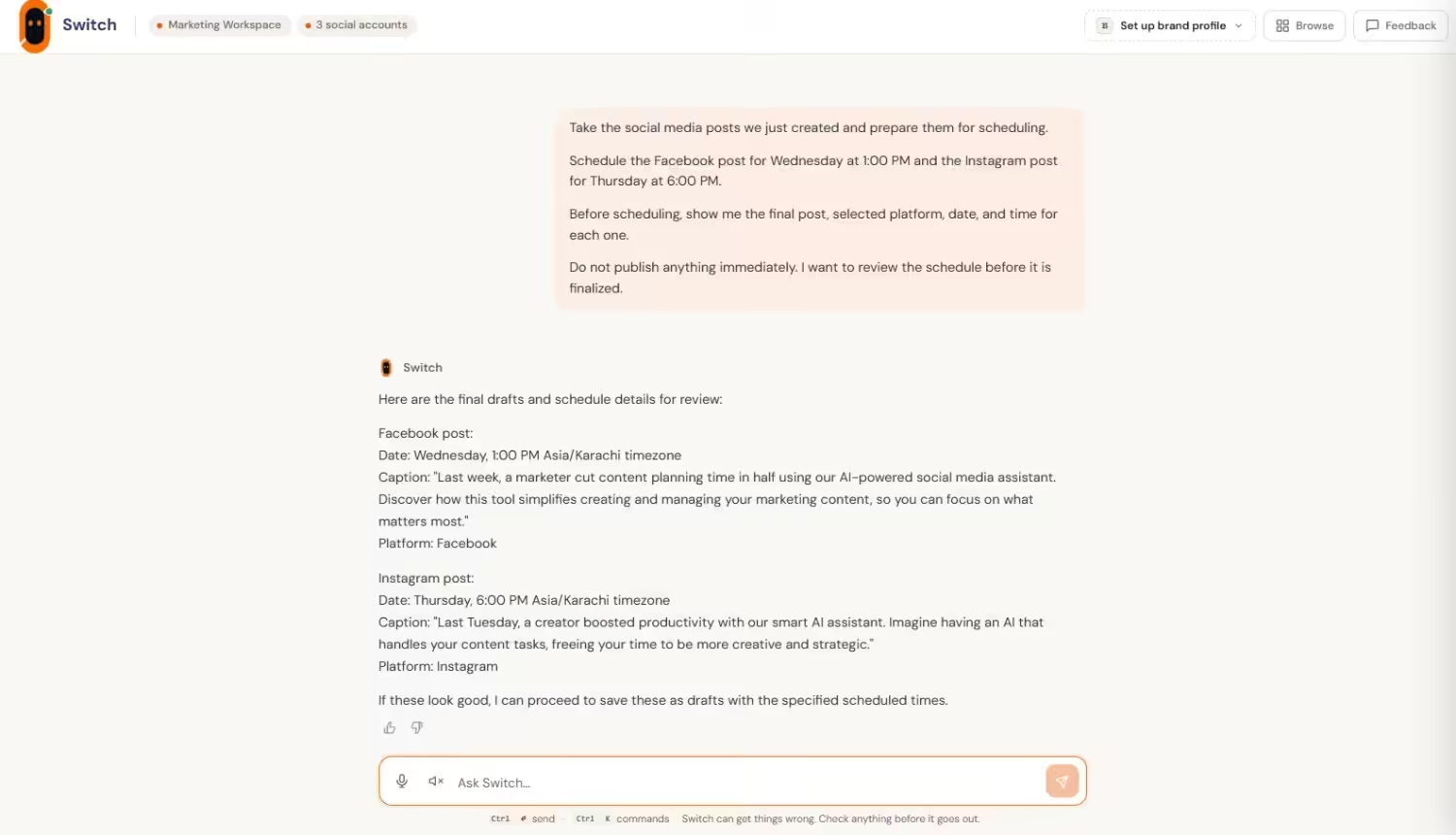
Scheduling sounds simple until I’m managing multiple channels and a packed content calendar. AI agents can help prepare posts, check supported channel details, identify calendar gaps, and move content into scheduling workflows.
The important part is that scheduling doesn’t always mean automatic publishing. Permissions, platform rules, and approval settings can determine whether an agent drafts, queues, or publishes an action.
Analytics and Reporting
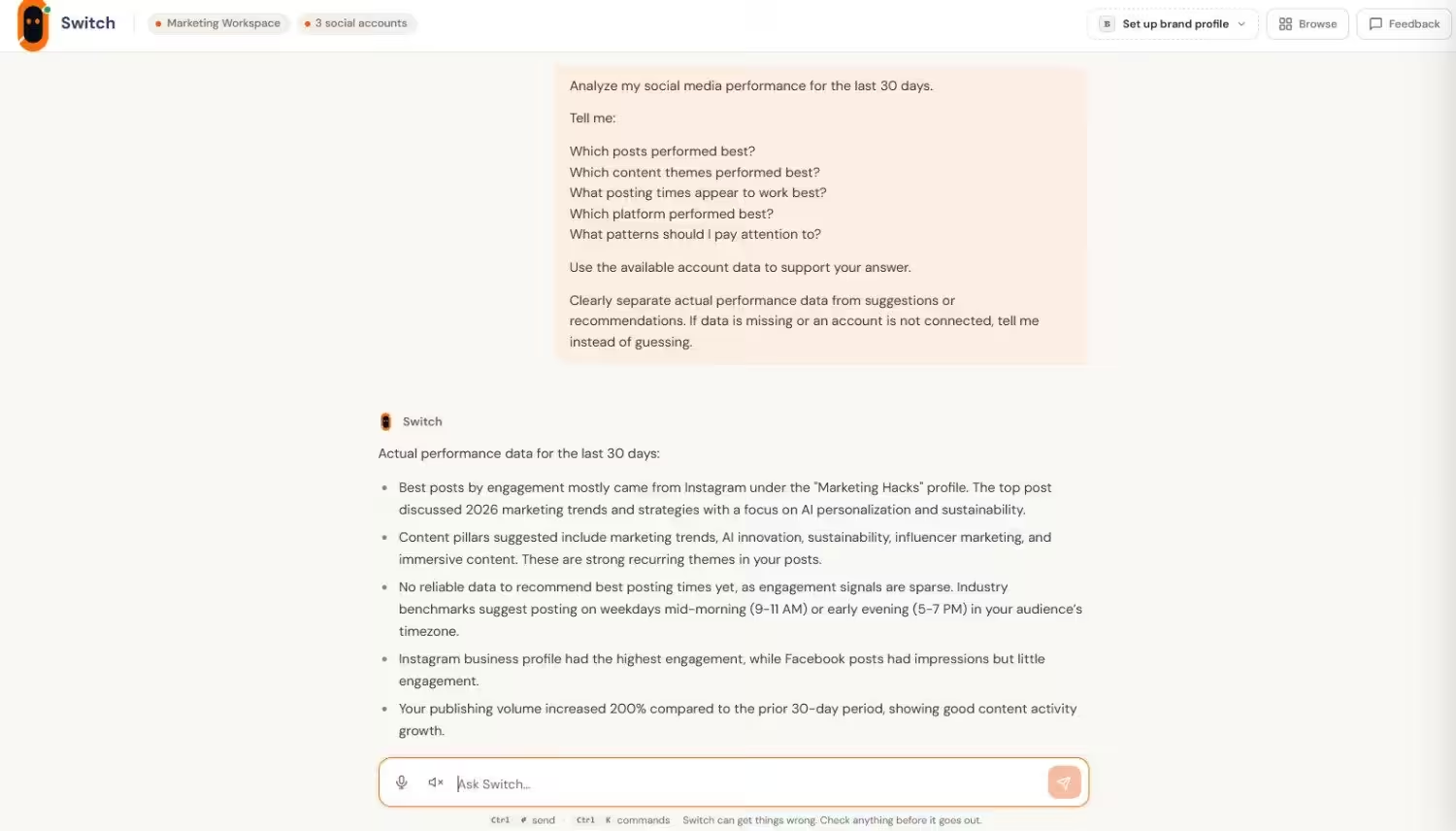
I don’t have to dig through several dashboards. I can simply ask an agent questions about performance, top posts, posting times, or content patterns.
It can pull together available data and explain what the numbers show. I’d still check the underlying data, especially when accounts are disconnected or information is missing.
Community Management and Inbox Replies
AI agents can also help with incoming messages by identifying common questions, sentiment, or potential risks and suggesting appropriate replies.
For routine, approved questions, some systems can support more automation. Sensitive conversations can remain subject to human approval, which is important when a wrong response can quickly become a public problem.
Social Listening and Competitor Tracking
Agents can work with supported listening data to surface brand mentions, keywords, sentiment, competitor posts, and alerts. This can reduce the need to manually check every update.
Paid Campaigns
AI agents can assist with supported ad platforms by creating campaigns, checking performance, and making certain changes. Because these actions can affect spending, permissions, limits, and confirmation steps matter more here.
Across all these areas, the pattern is similar: the agent takes on more of the workflow, while the human decides how much control to give it.
AI Agents Are Changing Who Does the Busywork
The real change with AI agents is that they can take a request and work through several steps without needing me to spell out every move.
That can shift my role from doing every little task to reviewing the work, making decisions, and stepping in when something needs a human touch.
Keeping a Person in the Loop
This is where approval matters.
For simple, low-risk tasks, an agent may be able to handle more of the process on its own. For other actions, it can stop and wait for confirmation.
A typical workflow might look like:
Request → Draft → Review → Approve → Publish
The exact steps depend on the tool, but the idea is straightforward. Automation doesn’t have to mean giving up control.
Speed Isn’t the Only Thing That Matters
It’s easy to get excited about an agent that can finish a task quickly. But speed doesn’t mean much if it posts the wrong content, sends an inappropriate reply, or makes a change I didn’t approve.
I’d rather know:
- What the agent is doing.
- What information it’s using.
- Which actions need my approval.
- What happens when something goes wrong.
- How I can stop or correct it.
For social media, that control matters just as much as getting things done faster. The point is to take repetitive work off my plate without taking important decisions out of my hands.
How Social Champ Is Using AI Agents
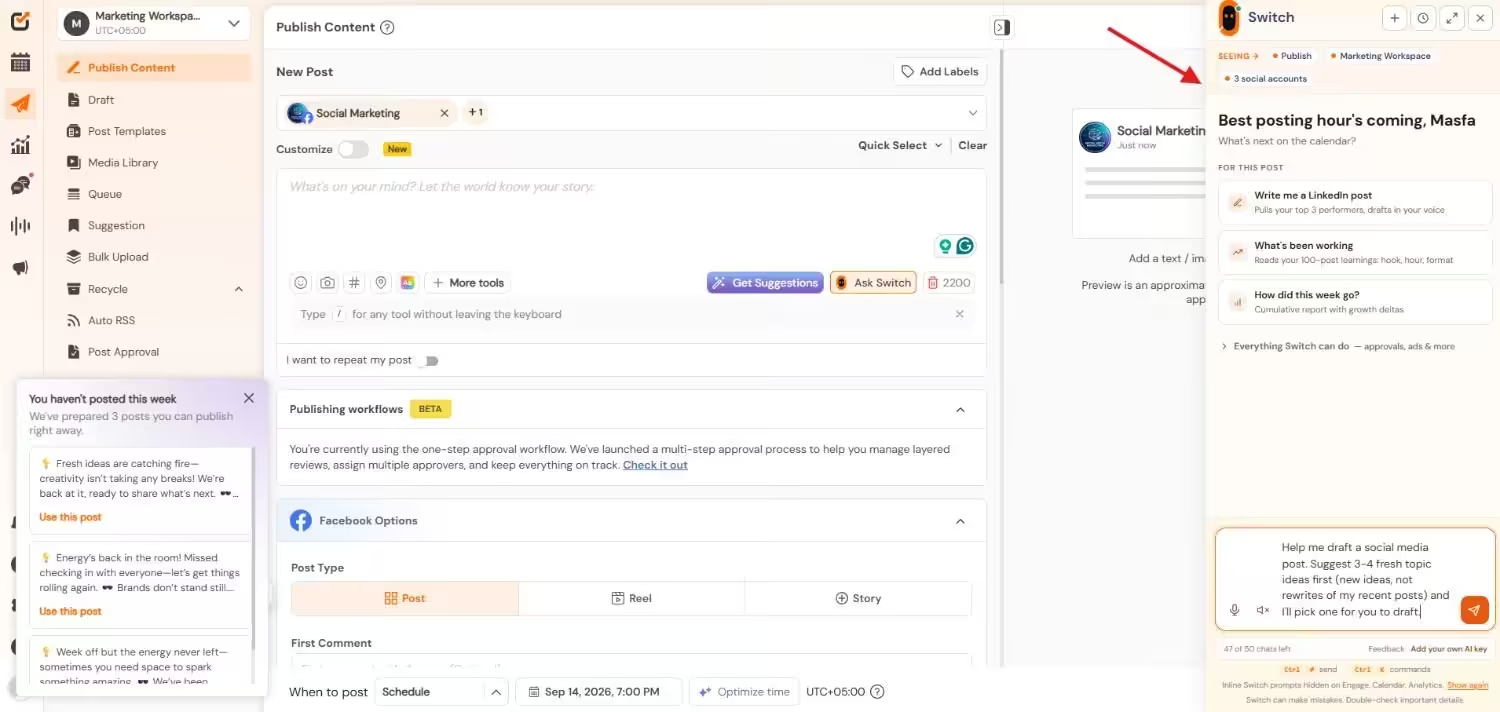
AI agents are still a relatively new part of social media software, but some platforms are already building them into everyday workflows. Switch by Social Champ is one example.
Basically, Switch is designed to work across supported social media tasks from one conversational interface.
What Switch Can Do Today
Depending on the connected accounts, permissions, and available features, Switch can help with tasks such as:
- Creating captions, hooks, images, and carousels.
- Preparing and scheduling social posts.
- Checking analytics and identifying top-performing content.
- Finding drafts, media, and labeled content.
- Managing supported approval workflows.
- Monitoring mentions, sentiment, keywords, and competitors.
- Working with supported Google and Meta ad campaigns.
The important part is that these capabilities don’t all work in exactly the same way. Some actions can be completed directly, while others still require the usual product workflow or human input.
How Switch Handles Control and Trust
Switch also follows different levels of autonomy depending on the task. An action can remain a draft, require approval, or, where supported, run more automatically.
That distinction matters when an agent is working with a real social account.
For example, creating a caption is relatively low risk. Publishing a post, replying to a customer, or changing an ad budget carries more consequences. The level of control needs to match the action.
For me, that’s what makes an AI agent practical.
Still Doing The Same Tasks Daily?
What to Watch Out For Before You Hand Over the Keys
AI agents can take a lot of repetitive work off my plate, but I wouldn’t hand one full control of a social media account without checking a few things first.
Accuracy and Honesty
The first question is simple: Can I trust what the agent tells me?
An agent can misunderstand a request, work with incomplete information, or report that something happened when it didn’t. That’s especially important when it comes to publishing, analytics, or customer replies.
I want the tool to clearly tell me whether an action was completed, needs approval, or failed.
Platform Rules and Permissions
An agent doesn’t operate outside the rules of the platforms it connects to.
Account permissions, API limitations, platform policies, and access settings can all affect what it can actually do. A feature that works for one account may not work for another if the required connection or permission isn’t available.
Know What the Agent Can’t Do
This one is easy to overlook.
AI agents are often presented around what they can do, but their limitations matter just as much. Some tasks may still require the normal interface, manual uploads, additional setup, or human approval.
Before relying on an agent for an important workflow, I’d check its actual capabilities rather than assuming it can handle every step.
The goal is to know exactly where the automation stops before you build your workflow around it.
Featured Article: Best MCP Servers: My 9-Tool Stack for Social Media Creators
How to Start Using AI Agents Without Losing Your Mind
You don’t have to hand an AI agent your entire social media workflow on day one. In fact, starting small is probably the better approach.
Pick One Repetitive Task
Think about the part of your workflow you do over and over again.
Maybe it’s turning ideas into captions, checking weekly performance, finding content gaps, or preparing posts for several channels.
Start there.
Give the agent a clear task, see how it handles the work, and pay attention to where you still need to step in. That gives you a much better idea of whether it actually saves time.
Set Boundaries Before You Scale
Once you’re comfortable with one task, decide what the agent can and can’t do.
For example:
- Which accounts can it access?
- Which actions need approval?
- What information can it use?
- Which tasks should always stay manual?
- What happens if an action fails?
I wouldn’t measure success by how much control I can give an agent. I’d measure it by how much unnecessary work I can remove without creating more work to fix mistakes later.
That’s a much more useful starting point for bringing AI agents into a real social media workflow.
Conclusion
After looking at all these use cases, I think the biggest change AI agents bring to social media is that they can take some of the busywork off your hands.
They can help with everything from turning an idea into a post to checking performance, monitoring conversations, or moving content through a workflow.
But that doesn’t mean you should let an agent make every decision for you. Your judgment still matters, especially when a post goes public, a customer needs a sensitive response, or money is involved.
And honestly, you don’t need to automate everything at once.
Start with one task that eats up more time than it should. See how the agent handles it. Keep the parts that work, set boundaries where they matter, and build from there. Because the real win is getting some of your time back.